
To collect an e-signature during the checkout process, you'll need to integrate a custom form that allows customers to digitally sign an agreement. This feature is useful for terms acceptance, donation authorization, or any other legal acknowledgment required before payment.
Below are the procedure steps to successfully configure and render this feature using StoreConnect and Salesforce.
Before you begin
- Check that you are using StoreConnect version 19 or later.
Set up a checkout form with an e-signature
Add a checkout form
- In Salesforce, go to App Launcher and search Forms.
- Select the Form Type as Checkout Form.
- Give the form a Name and select Save.
See the Checkout forms topic for more information.
Add the e-signature form question
- In the Related tab of the new form, select New in the Form Questions section.
- Set the Data Type as Text. (This is required because the signature is saved as a Base64 PNG string.)
- Set the Required field as True.
- Set the Hidden field as True.
- Copy this markdown code and paste it in the Question (Markdown) field. {% render 'shared/e_signature' %}
- Select Save.
This adds the signature field to the form in the checkout flow.
Add the e-signature snippet to your theme
You also need to update your theme, so that the signature block appears correctly on the checkout page.
- Open the theme that you want to add the signature block to.
- In the Theme Template section, select New.
- Enter snippets/shared/e_signature as the Key.
- Copy and paste the code below into the Content area of the template record, then select Save. Make sure to include the full code snippet.
  E-Signature


        Signature is required.


        Signed!


        Clear


        Save


    // Shared selector for submit buttons
    const SC_SUBMIT_BUTTON_SELECTORS = [
      'button[data-payment-info-submit]',
      'button[data-disable-with]',
      'button[type="submit"]',
      'input[type="submit"]',
      'button.SC-Button-primary'
    ].join(', ');

    // Initialise one signature block
    function initSignatureBlock(signatureEl) {
      if (!signatureEl || signatureEl.dataset.initialized === 'true') return;
      signatureEl.dataset.initialized = 'true';

      const signatureCanvas = signatureEl.querySelector('[data-signature-canvas]');
      if (!signatureCanvas) return;

      const signaturePad = new SignaturePad(signatureCanvas, {
        backgroundColor: 'rgb(255,255,255)',
        penColor: 'rgb(0,0,0)'
      });

      const signaturePreview = signatureEl.querySelector('[data-signature-preview]');
      const signatureClear   = signatureEl.querySelector('[data-signature-clear]');
      const signatureSave    = signatureEl.querySelector('[data-signature-save]');
      const signatureSubmit  = signatureEl.querySelector('[data-signature-submit]');
      const alertRequired    = signatureEl.querySelector('[data-signature-alert-required]');
      const alertSigned      = signatureEl.querySelector('[data-signature-alert-signed]');

      // Hide the backing answer input for THIS question
      const container = signatureEl.closest('label, section');
      const signatureAnswerInput = container
        ? container.querySelector('input[name^="answers["][name$="][answer]"]')
        : null;
      if (signatureAnswerInput) signatureAnswerInput.classList.add('sc-hide');

      function showAlert(el) {
        if (!el) return;
        el.classList.remove('sc-hide');
        setTimeout(() => el.classList.add('sc-hide'), 5000);
      }

      function hideAlerts() {
        if (alertRequired) alertRequired.classList.add('sc-hide');
        if (alertSigned)   alertSigned.classList.add('sc-hide');
      }

      // Clear button
      signatureClear?.addEventListener('mousedown', () => {
        signaturePad.clear();
        if (signaturePreview) {
          signaturePreview.classList.add('sc-hide');
          signaturePreview.removeAttribute('src');
        }
        signatureCanvas.classList.remove('sc-hide');
        signatureSave?.classList.remove('sc-hide');
        signatureSubmit?.classList.add('sc-hide');
        hideAlerts();
        if (signatureAnswerInput) signatureAnswerInput.value = '';
      });

      // Save button
      signatureSave?.addEventListener('click', () => {
        hideAlerts();

        if (signaturePad.isEmpty()) {
          showAlert(alertRequired);
          return;
        }

        const dataURL = signaturePad.toDataURL('image/png');

        if (signaturePreview) {
          signaturePreview.src = dataURL;
          signaturePreview.classList.remove('sc-hide');
        }
        signatureCanvas.classList.add('sc-hide');

        signatureSave.classList.add('sc-hide');
        signatureSubmit?.classList.remove('sc-hide');

        if (signatureAnswerInput) {
          signatureAnswerInput.value = dataURL;
        }

        showAlert(alertSigned);
      });

      // Require a signature on submit for THIS form
      const form = signatureEl.closest('form');
      if (form) {
        form.addEventListener('submit', (e) => {
          if (signaturePad.isEmpty() && !(signatureAnswerInput && signatureAnswerInput.value)) {
            e.preventDefault();
            showAlert(alertRequired);
          }
        });

        // Move this signature block above this form's submit button
        const submitBtn = form.querySelector(SC_SUBMIT_BUTTON_SELECTORS);
        if (submitBtn && !signatureEl.dataset.moved) {
          submitBtn.parentNode.insertBefore(signatureEl, submitBtn);
          signatureEl.dataset.moved = 'true';
        }
      }
    }

    // Initialise all signature blocks currently in the DOM
    function initAllSignatures() {
      document.querySelectorAll('.SC-Signature').forEach(initSignatureBlock);
    }

    if (document.readyState === 'loading') {
      document.addEventListener('DOMContentLoaded', initAllSignatures);
    } else {
      initAllSignatures();
    }

    // Watch for payment provider DOM changes (tabs switching, etc.)
    const observer = new MutationObserver(() => {
      setTimeout(initAllSignatures, 50);
    });
    observer.observe(document.body, { childList: true, subtree: true });

    window.addEventListener('beforeunload', () => observer.disconnect());

    // Auto-click "Save" when any submit-like button is clicked
    document.addEventListener('click', (e) => {
      if (!e.target.closest(SC_SUBMIT_BUTTON_SELECTORS)) return;

      document.querySelectorAll('.SC-Signature [data-signature-save]').forEach((btn) => {
        if (!(btn instanceof HTMLButtonElement)) return;
        btn.click();
      });
    });

    if (window.location.pathname.includes('/account/orders')) {
      function hideSignaturePanel() {
        document.querySelectorAll('[data-e-signature]').forEach((field) => {
          const panel = field.closest('.Panel');
          if (panel) panel.classList.add('sc-hide');
        });
      }

      if (document.readyState === 'loading') {
        document.addEventListener('DOMContentLoaded', hideSignaturePanel);
      } else {
        hideSignaturePanel();
      }

      const observer = new MutationObserver(() => {
        setTimeout(hideSignaturePanel, 100);
      });
      observer.observe(document.body, { childList: true, subtree: true });
    }
Preview the change in your store
We recommend checking the template element in your own store's checkout, to verify that it looks correct and works. Here's an example of what the signature block might look.
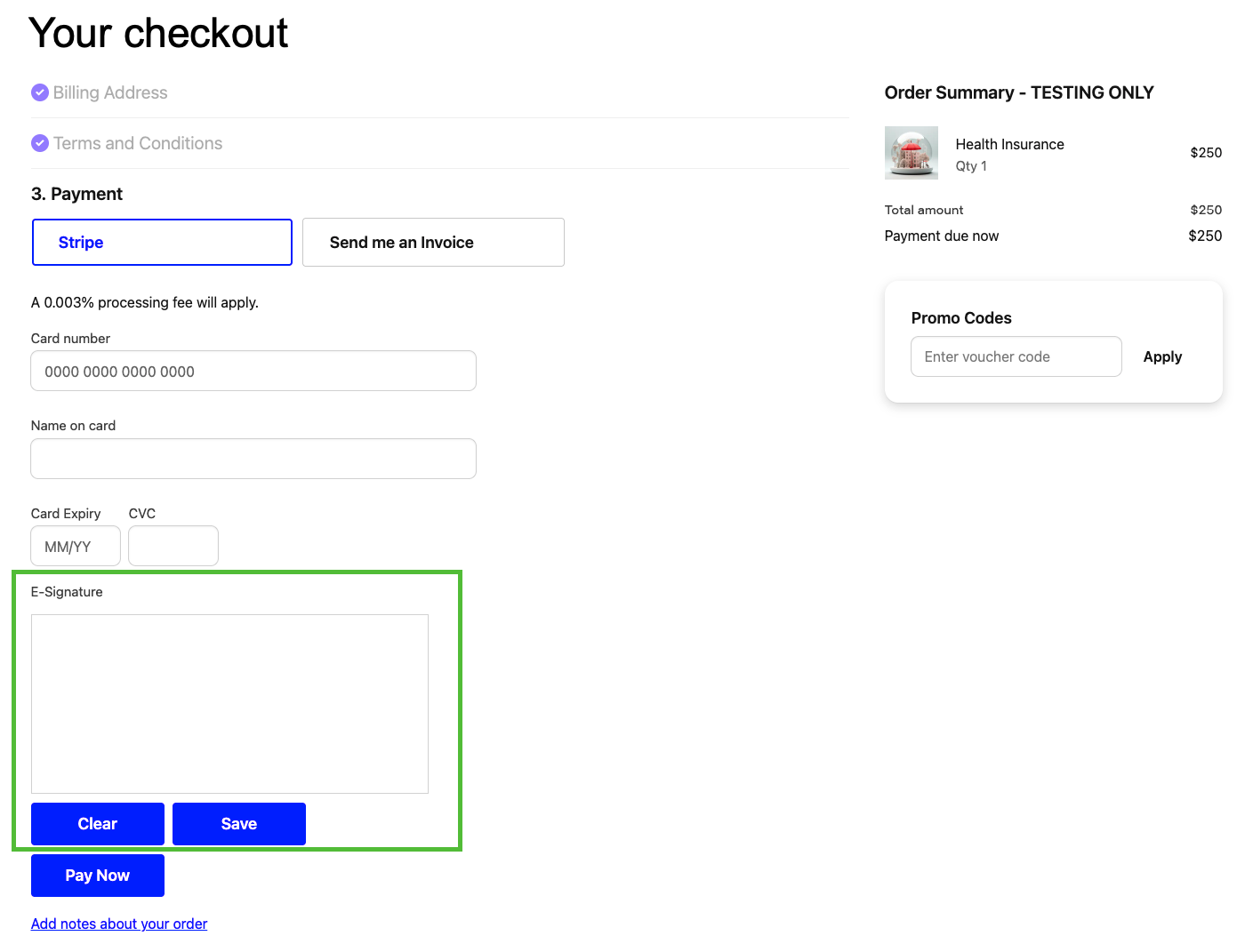
Manage e-signatures
The user experience
The user draws their signature in the E-Signature block area.
- To re-draw the signature, the user can click Clear.
- The form cannot be submitted unless a signature is saved.
- To save the signature, the user clicks Save. The signature image is stored as a Base64 PNG in Salesforce.
- If the user tries to submit their order without a signature, an error will show.
- If the user enter their signature and tries to submit the form, a background script automatically attempts to save the signature first.
Image storage and visibility
When saved, the signature is stored in a hidden field in Salesforce and Base64 encoded.
- The underlying form’s hidden answer input is automatically filled.
- The signature UI is moved above the checkout submit button.
If you want to be able to view a customer's signature as an image in Salesforce, you need to create a Salesforce Flow to:
Display the PNG image
Store the signature elsewhere.
If you decide to set this up, the signature is saved as standard Custom Form Answer text data.