
We recommend always upgrading the StoreConnect Package and StoreConnect Website to the same version, at the same time. Post-upgrade tasks
The most important things to do is read the release notes and familiarize yourself with what has changed. Then:
- View your store site carefully and look for any design issues that might be linked to Liquid or other theme component changes.
- For new functionality involving new records, ensure you are using the preferred page layout for the object.
- Ensure interdependent integrations are up to date, such as Lightning packages.
- Review error logs for automations and scheduled jobs, including API workflows.
Upgrade picklist values
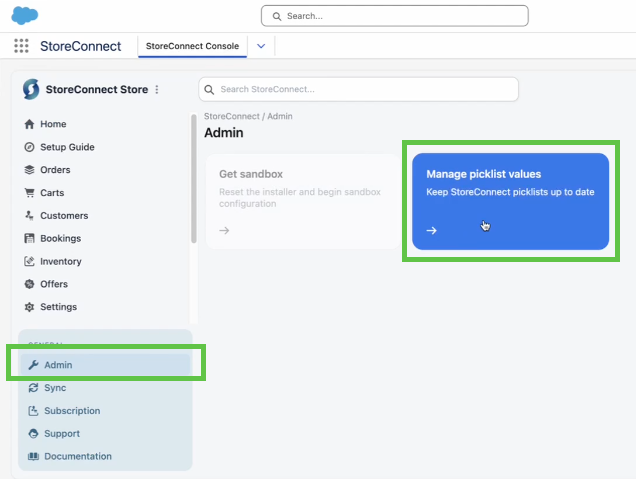
When you upgrade packages, you might also need to update picklist values. There's a tool in the StoreConnect Console for you to this.
Go to the StoreConnect Console > Administration > Pick list values. Follow the onscreen prompts.
Upgrading to version 20
Upgrade straight to v20.0.9
If you have overwritten the products/product/json-ld.liquid snippet as part of your design config, it is now named rich_data_json.liquid so you will need to upgrade the override path to products/product/rich_data_json.liquid.
But if you reference products/product/json-ld in a snippet elsewhere, this will render to products/product/rich_data_json.liquid automatically. Theme change: Order_Item is now Cart_Item.