
Actions translate an end user’s request into real agent action that updates your Salesforce CRM. For example, we can configure an action called available_products that authorizes the agent to get the latest information about available products from Salesforce, and display them to the user.
There are multiple ways to add agent actions: From the Agentforce package, using Flow, or via Apex code.
Add agent actions using APEX
In the procedure below, we will add an action using Apex.
Add an APEX class
Create a new Apex class called AFPurchasableProducts.
Use your own code or copy and paste the sample code below.
Sample code
public class AFPurchasableProducts {

    public AFPurchasableProducts() {}

    // ==========
    // Input Variables
    // ==========
    public class Input {
        @InvocableVariable(
            label='Store Id'
            description='s_c__Store__c record Id to evaluate products for'
            required=true
        )
        public Id storeId;

        @InvocableVariable(
            label='Action Type'
            description='Action to perform: add (add to cart) or buy (go to checkout). Default is buy.'
        )
        public String type;

        @InvocableVariable(
            label='Preserve Cart'
            description='If true, preserves the existing cart contents when adding/buying.'
        )
        public Boolean preserve;

        @InvocableVariable(
            label='Return Behavior'
            description='Redirect behavior after action: true (referrer), false (stay on site), or a callback URL.'
        )
        public String ret;

        @InvocableVariable(
            label='Promotion Code'
            description='Promotion code (case-sensitive) applied to the action.'
        )
        public String code;
    }

    // ==========
    // Rich Link Item
    // ==========
    public class ProductRichLink {
        public String linkURL;
        public String linkTitle;
        public String linkImageURL;
        public String linkImageMimeType;
        public String linkDescriptionText;
    }

    // ==========
    // Rich Link Response Wrapper
    // ==========
    public class ProductRichLinkResponse {

        @InvocableVariable(
            label='Purchasable Product Details'
            required=true
        )
        public List productDetails;

        public ProductRichLinkResponse() {
            this.productDetails = new List();
        }
    }

    // ==========
    // Invocable Method
    // ==========
    @InvocableMethod(
        label='Quick: Get Purchasable Products as Rich Links'
        description='Given a store Id, returns, for each input, rich link details (URL, title, image URL, MIME type, description) for purchasable products.'
    )
    public static List execute(List inputs) {
        List responses = new List();

        if (inputs == null || inputs.isEmpty()) {
            return responses;
        }

        Set storeIds = new Set();
        for (Input i : inputs) {
            if (i != null && i.storeId != null) {
                storeIds.add(i.storeId);
            }
        }

        Map storesById = new Map(
            [
                SELECT Id,
                       s_c__Link__c,
                       s_c__Logo_Id__r.s_c__Url__c
                FROM s_c__Store__c
                WHERE Id IN :storeIds
            ]
        );

        // ---- Load all active Products ----
        List activeProducts = [
            SELECT Id,
                   Name,
                   ProductCode,
                   IsActive,
                   s_c__Features_Markdown__c,
                   s_c__Subscription_Term__c,
                   s_c__Subscription_Term_Count__c,
                   s_c__Subscription_Term_Unit__c,
                   s_c__Subscription_Type__c
            FROM Product2
            WHERE IsActive = true
        ];

        Set activeProductIds = new Set();
        for (Product2 p : activeProducts) {
            activeProductIds.add(p.Id);
        }
        Map productById = new Map(activeProducts);

        // ---- Product Media: first s_c__Product_Media__c per product (by position) ----
        Map mediaUrlByProductId = new Map();

        if (!activeProductIds.isEmpty()) {
            for (s_c__Product_Media__c pm : [
                SELECT s_c__Product_Id__c,
                       s_c__Media_Id__r.s_c__Url__c,
                       s_c__Position__c
                FROM s_c__Product_Media__c
                WHERE s_c__Product_Id__c IN :activeProductIds
                ORDER BY s_c__Product_Id__c, s_c__Position__c ASC
            ]) {
                Id pid = pm.s_c__Product_Id__c;
                // First row per product (lowest position) wins
                if (!mediaUrlByProductId.containsKey(pid)) {
                    mediaUrlByProductId.put(pid, pm.s_c__Media_Id__r.s_c__Url__c);
                }
            }
        }

        for (Input i : inputs) {
            ProductRichLinkResponse response = new ProductRichLinkResponse();
            responses.add(response);

            if (i == null || i.storeId == null) {
                continue;
            }

            s_c__Store__c store = storesById.get(i.storeId);
            if (store == null) {
                continue;
            }

            String baseLink = store.s_c__Link__c;
            String storeFallbackImageUrl = (store.s_c__Logo_Id__r != null)
                ? store.s_c__Logo_Id__r.s_c__Url__c
                : null;

            List reqs =
                new List();

            s_c.AFGetPurchasableProductIdsInvocable.Request req =
                new s_c.AFGetPurchasableProductIdsInvocable.Request();

            req.productIds = new List(activeProductIds);
            req.storeId = i.storeId;
            reqs.add(req);

            List purchResults;

            try {
                purchResults = s_c.AFGetPurchasableProductIdsInvocable.getPurchasableProductIds(reqs);
            } catch (Exception e) {
                continue;
            }

            if (purchResults == null || purchResults.isEmpty()) {
                continue;
            }

            s_c.AFGetPurchasableProductIdsInvocable.Result first = purchResults[0];
            if (first.error != null) {
                continue;
            }

            Set purchIds = new Set();
            if (first.productIds != null) {
                purchIds.addAll(first.productIds);
            }

            for (Id pid : purchIds) {
                Product2 p = productById.get(pid);
                if (p == null) {
                    continue;
                }

                ProductRichLink link = new ProductRichLink();

                link.linkURL = buildDirectToCartUrl(
                    baseLink,
                    p.ProductCode,
                    i.type,
                    i.preserve,
                    i.ret,
                    i.code
                );

                link.linkTitle = p.Name;

                String imageUrl = mediaUrlByProductId.get(p.Id);
                if (String.isBlank(imageUrl)) {
                    imageUrl = storeFallbackImageUrl;
                }
                link.linkImageURL = imageUrl;

                if (!String.isBlank(imageUrl)) {
                    link.linkImageMimeType = 'image/png';
                }

                if (!String.isBlank(p.s_c__Features_Markdown__c)) {
                    link.linkDescriptionText = p.s_c__Features_Markdown__c;
                } else {
                    link.linkDescriptionText = p.Name;
                }

                response.productDetails.add(link);
            }

        }

        return responses;
    }

    // ==========
    // Helper: build cart URL
    // ==========
    @TestVisible
    private static String buildDirectToCartUrl(
        String baseLink,
        String productCode,
        String typeParam,
        Boolean preserveParam,
        String returnParam,
        String codeParam
    ) {
        if (String.isBlank(baseLink) || String.isBlank(productCode)) {
            return null;
        }

        String normalizedBase = baseLink.endsWith('/')
            ? baseLink.removeEnd('/')
            : baseLink;

        String path = normalizedBase + '/cart/' +
            EncodingUtil.urlEncode(productCode, 'UTF-8');

        List params = new List();

        String finalType = String.isBlank(typeParam) ? 'buy' : typeParam.toLowerCase();
        if (finalType != 'buy' && finalType != 'add') {
            finalType = 'buy';
        }
        params.add('type=' + EncodingUtil.urlEncode(finalType, 'UTF-8'));

        if (preserveParam != null) {
            params.add('preserve=' + String.valueOf(preserveParam));
        }

        if (!String.isBlank(returnParam)) {
            // Allowed: "true", "false", or callback URL
            params.add('return=' + EncodingUtil.urlEncode(returnParam, 'UTF-8'));
        }

        if (!String.isBlank(codeParam)) {
            params.add('code=' + EncodingUtil.urlEncode(codeParam, 'UTF-8'));
        }

        return path + (params.isEmpty() ? '' : '?' + String.join(params, '&'));
    }
}
Add an action to a topic
Open a topic, for example, the Sales Representative topic from the previous procedure.
Go to the This Topic’s Actions tab.
Select New and then +Create New Action.
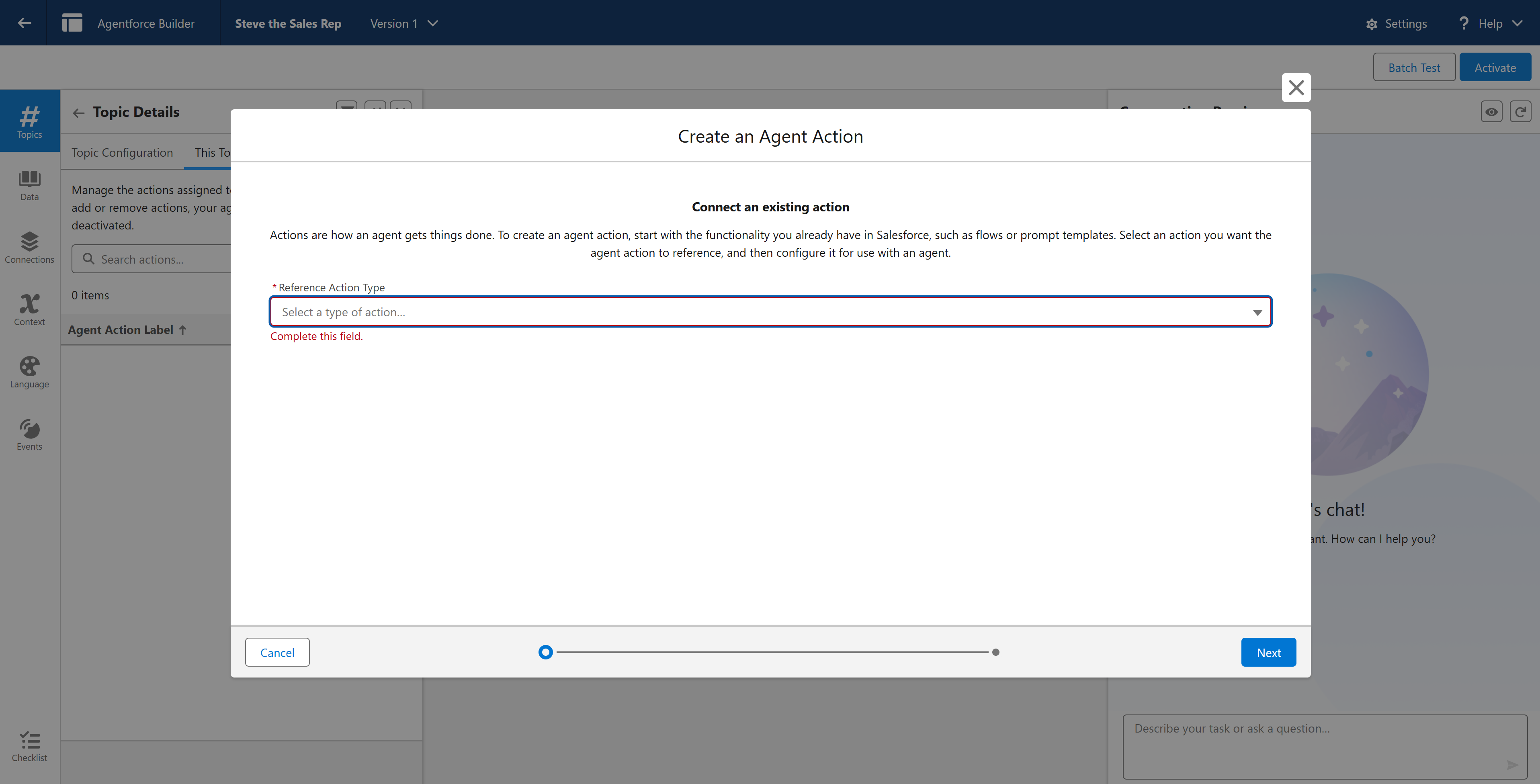
Select the Action Reference Type as Apex.
Set the Reference Action Category to Invocable Method and then select your reference action. If you used our example, this would be Quick: Get Purchasable Products for Store.
Change the Agent API name from the auto generated value to available_products.
Select Next.
Configure the action
On the Configure your action for Agent screen, instruct the agent on how to use the action. Provide instructions and validations on each input and output.
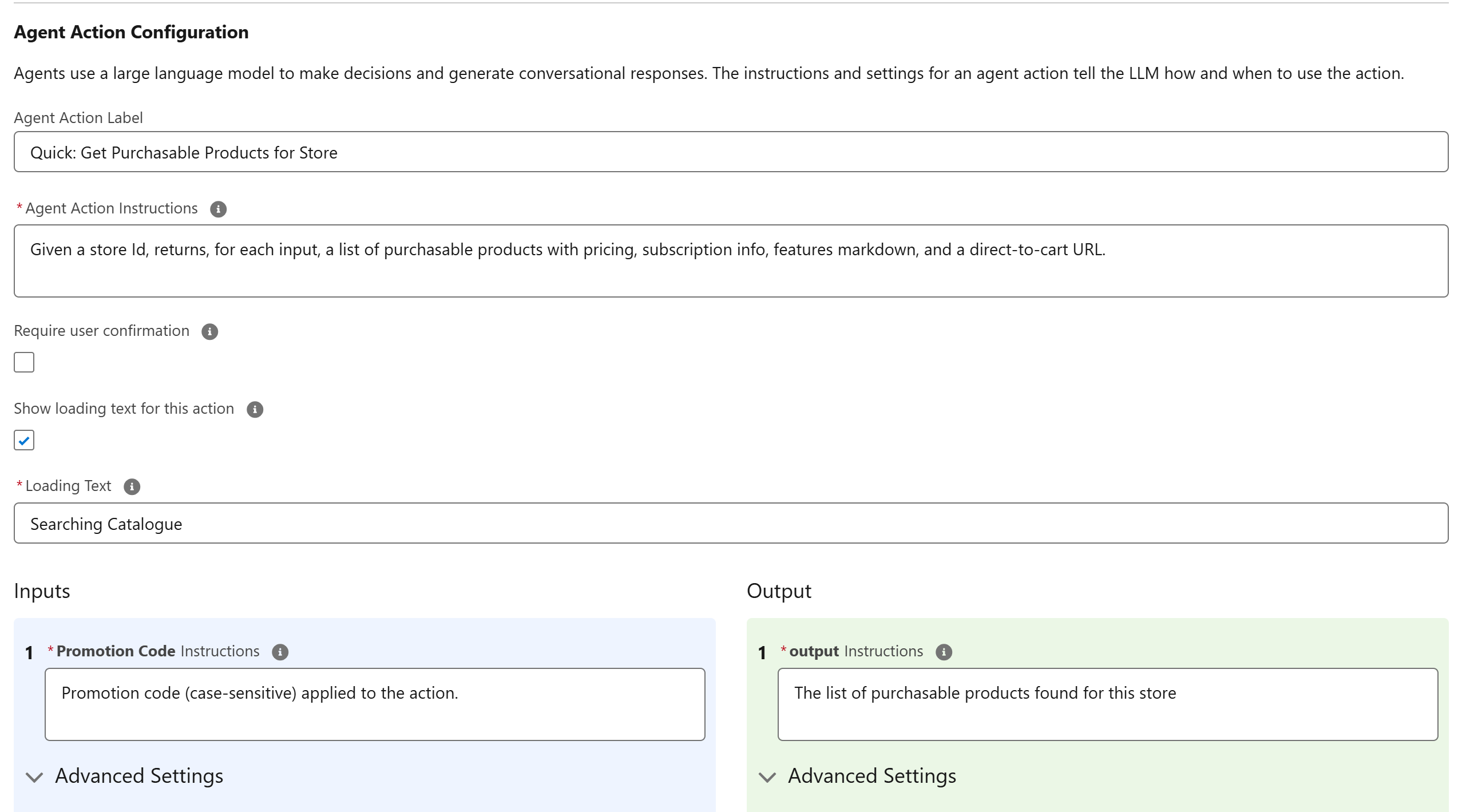
For inputs:
To require customer input, select the Require input option.
Check the Collect data from the user option.
In the Loading Text field, add a placeholder message for when the agent is thinking, for example Searching Catalogue…
For outputs:
Where you want the agent to ignore an output, select the Filter from agent action option.
If you want to expose the result to the user, select the Show in Conversation option.
Enter instructions, such as The list of purchasable products found for this store.
Select Next.
Add a storeid as a custom variable
In the action record, go to the StoreId input variable.
Select Assign a Variable.
Set the storeId custom variable and save it.
Refresh your page to go back to the Agentforce Builder home.