
When new products or traits aren’t showing up as expected on your storefront, rebuilding your product index may help.
Prerequisites
You must know your Salesforce Org ID as this must be provided when requesting an index rebuild.
Request an index rebuild
- Navigate to our Support Portal.
- Log in via 'Log in with Salesforce'
- Click 'Contact Us'.
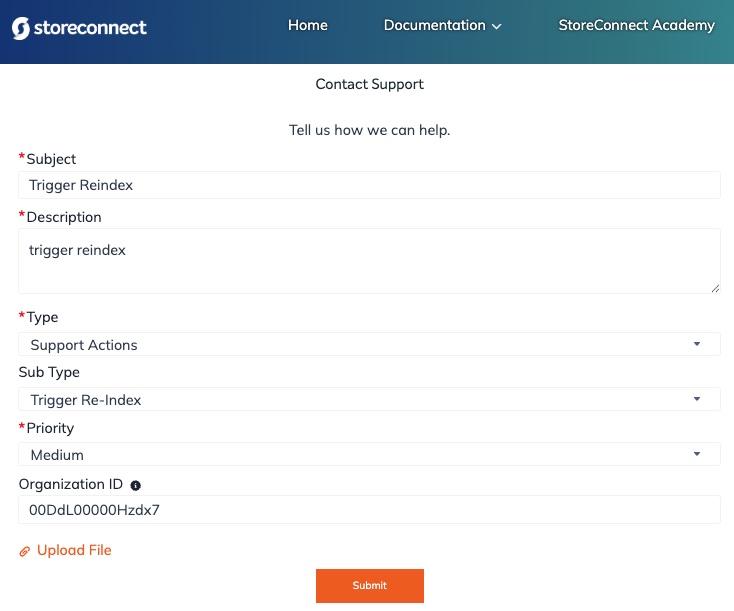
- Enter a short subject and description.
- Choose Support Actions from the Type dropdown.
- Choose Trigger Re-Index from the Sub Type dropdown.
- Provide your Org ID.
- Click 'Submit'.

You will receive an email for the case creation followed by a comment that will indicate if the trigger was successful. The index build will commence almost immediately but may take a few minutes to complete. It could take several hours if you have a large amount of products or price books.
Attempting to trigger a rebuild of the product index again before the first one finishes will result in an email stating the action failed. The first request will continue to complete.
If the trigger is not helping resolve your issue, the cause of your products or traits not appearing may lay elsewhere.