
There are three ways someone can be invited to sign up to an account with your store:
- Requesting they set a password after checkout
- Send an invite via email to a contact in Salesforce
- Using the store’s registration form
Only one of these three invite methods can be used per contact.
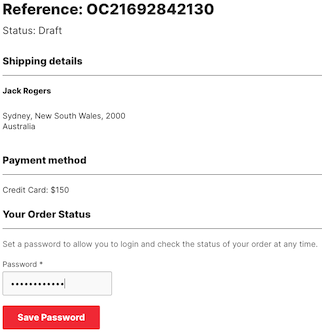
Sign up to an account on checkout
When a customer completes a purchase on your store, you can offer an option for them to set a password and open an 'account'. This allows them to check on their orders, manage details, etc.
Send an email invitation when a new account is added
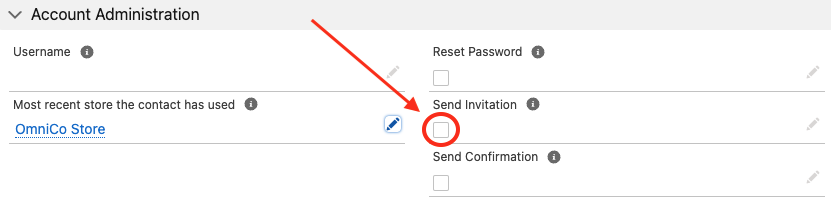
Add the StoreConnect Send Invitation field to the contact record in Salesforce. When selected, accounts without a Username are automatically sent an invitation email. This may take a couple of minutes to send and will show in the activities section once sent.
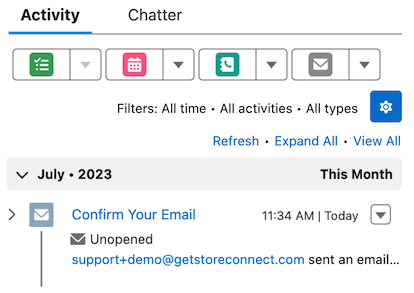
Tip: If you ever need to access the invite link that was sent, you can open the email in the contact’s Activities section. The link will be in there.
Use a registration URL
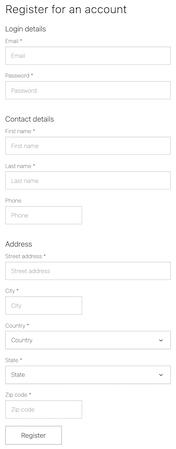
All stores have a registration page which can be found using the following URL: https://yourstoredomain.com/accounts/register
This page is where customers can create an account. After submitting the form, they will receive an email asking them to verify their email address. They will not be able to log in without having first verified their email address.
Passwords
Use the checkbox options on the contact record to send a password reset manually. Alternatively, customers can initiate a reset from the sign in page. Resetting a password will set a password, if one was never previously set.
Session timeout
A session timeout is the length of time a user remains signed in to an account when there is no activity. By default, sessions expire after 30 minutes of no activity or 60 minutes after log in.
You can modify these defaults by creating Store Variables and setting your own values:
- session.inactivity_timeout_minutes
- session.absolute_timeout_minutes
Tip: Longer sessions can diminish security for a customer account. Depending on your business, consider if shorter sessions might be appropriate.
Troubleshooting
If you have any issues inviting a customer:
- Check that a username does not already exist for the contact. If it does exist, use the Reset Password feature instead.
- Check that there are no duplicate contacts with the same email address.
- Check that the email address has not bounced, clear any soft / hard bounces if needed - See: Salesforce - Managing Bounce Data