
In StoreConnect, label templates are created in ZPL (Zebra Programming Language), which is a specialized markup language used to design labels. ZPL is widely used in retail, manufacturing, healthcare, logistics, and other industries, where label printing (e.g. barcodes, shipping labels, product tags) is essential.
For this procedure, you will need to be able to write in ZPL and use Liquid to create dynamic label templates. You will also need the right Salesforce Admin access to add and update templates.
Add or update a label template
- Open your store in StoreConnect.
- Go to the Additional Relationships tab
- In the Store Printable Templates section, select New or open an existing template.
- Give the template a Name. Choose something you will recognize easily later.
- In the Printer Type field, select Label.
- Specify the height and width of the template (this should correspond to the printer requirements).
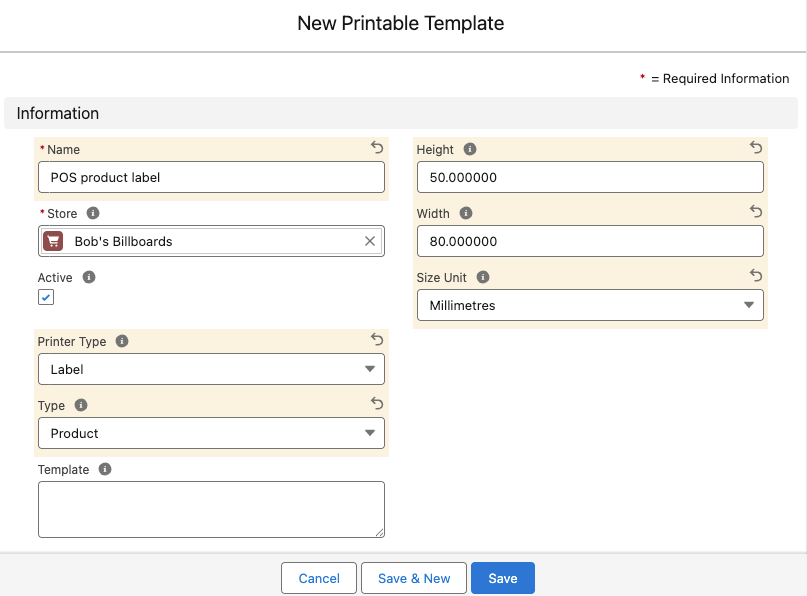
- Enter the ZPL markdown in the Template field. A sample is provided below, along with an explanation of the example.
- When you are finished, select Save.
- Print and test the template, then make changes to the code until you are happy.
Sample template
^XA
^PW400
^LL216
^FX Product code
^CFA,20
^FB380,1,,,
^FO20,20^FD{{ product.product_code }}^FS

^FX Product name
^CF0,30
^FX 9999 below prevents text from wrapping
^FB9999,1,10,,
^FO20,50^FD{{ product.name }}^FS

^FX EAN13 Bar code - 12 digits
^FO60,90
^BY3,,50
^BU^FD{{ product.barcode }}^FS

^FX Date
^CF0,20
^FB100,1,,L,
^FO20,195^FD22/09/23^FS

^FX Price
^CF0,30
^FB380,1,,R,
^FO0,190^FD{{ product.pricing.price | money }}^FS

^XZ
Explanation of sample template
^XA                   // Start of label format
^PW400                // Label width in dots (400 dots wide)
^LL216                // Label length (216 dots)

^FX Product code      // Comment: Product code
^CFA,20               // Font A, height 20
^FB380,1,,,           // Field block with width 380, 1 line
^FO20,20^FD{{ product.product_code }}^FS  // Field origin (x=20, y=20), Field data

^FX Product name
^CF0,30               // Font 0, size 30
^FB9999,1,10,,        // Prevents wrapping (9999 is wide)
^FO20,50^FD{{ product.name }}^FS

^FX EAN13 Bar code - 12 digits
^FO60,90              // Position barcode at (60,90)
^BY3,,50              // Barcode field default: module width 3, height 50
^BU^FD{{ product.barcode }}^FS  // ^BU is UPC-A barcode

^FX Date
^CF0,20               // Font 0, size 20
^FB100,1,,L,          // Align left
^FO20,195^FD22/09/23^FS  // Fixed date

^FX Price
^CF0,30               // Font 0, size 30
^FB380,1,,R,          // Align right
^FO0,190^FD{{ product.pricing.price | money }}^FS

^XZ                   // End of label format