
StoreConnect includes a Sync Error Tool that notifies users when a record (ie. order, contact, or any other object) fails to sync from the website to Salesforce due to an issue. Common causes include Duplicate Rules, Required Fields, Validation Rules, and Flow Errors. This tool ensures you can quickly identify and resolve sync failures, preventing disruptions to order processing and customer notifications.
Accessing the sync error tool
You can access the sync error tool directly from the App Launcher menu.
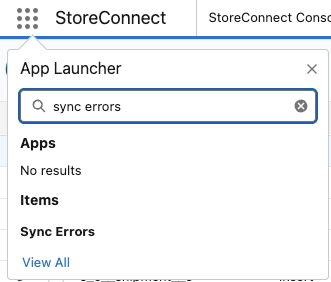
- The utility is also visible within the StoreConnect Config app and can be added to any Console app.
- A Sync Error notification appears at the bottom of the StoreConnect apps, and will show errors when detected.
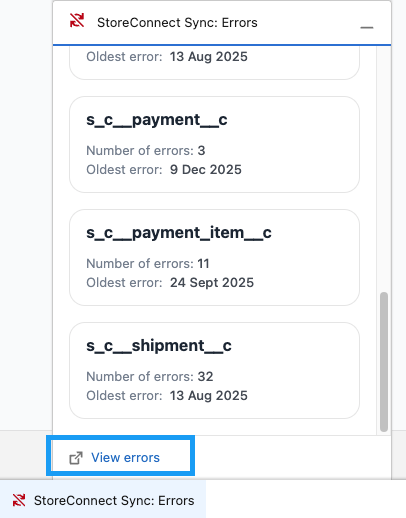
Understanding the sync error fields
The Sync Error Tool provides a structured list of unresolved sync errors, helping users diagnose and fix issues efficiently.
Sync error fields details
- Object – The type of record being synced.
- Event Type – Action taken (Create, Update, Delete).
- Processed At – The last time the record was processed by StoreConnect Sync.
- Salesforce ID – The Salesforce record ID (if the record exists).
- StoreConnect ID – The unique ID assigned by StoreConnect.
- Message – The specific error message provided by Salesforce.
Resolving sync errors
When a sync error occurs, it is logged in the Sync Errors List. Often, fixing the first listed error resolves subsequent related errors.
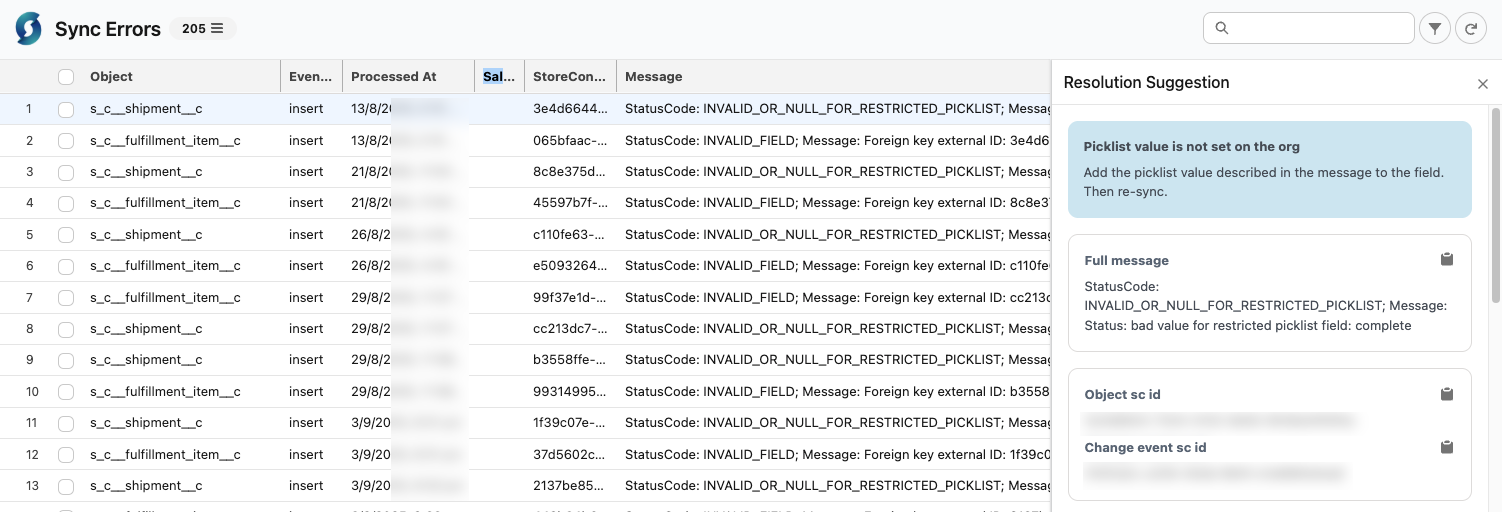
Clicking the information icon next to an error provides further details and resolution suggestions.
Example resolution process
- Identify the root cause of the sync error.
- Implement the recommended fix (e.g., removing a required field constraint or resolving a duplicate conflict).
- Retry the sync by:
- Clicking on the Object(s) checkbox with the affected sync error.
- Click on the Re-sync button shown on the far right.
Sync status codes
Sync errors in StoreConnect are categorized using Salesforce-native status codes.
These codes help identify why a record failed to sync and provide guidance for resolution.
Below are common error codes and their fixes.
| Status Code | Description | Resolution |
|---|---|---|
| CANNOT_EXECUTE_FLOW_TRIGGER | A Flow is blocking the action. | Check the sync error message to identify the Flow blocking the action. Fix or disable the Flow, then re-sync. For detailed steps, see resolve-flow-trigger-sync-errors. |
| CANNOT_INSERT_UPDATE_ACTIVATE_ENTITY | An Apex error has occurred. | Check the sync error message for details. If related to a duplicate lead, disable duplicate rules, re-sync, then merge records. See also resolve-flow-trigger-sync-errors. |
| CANNOT_REPARENT_RECORD | The owner of the object is inactive. | Change the owner of the record to an active user, then re-sync. |
| DUPLICATE_VALUE | A unique column has a duplicate value. | Change the duplicate value in the existing record, then re-sync. Adjust as needed after sync completes. See also resolve-duplicate-account-sync-errors. |
| DUPLICATES_DETECTED | A duplicate rule is blocking the sync. | Temporarily disable duplicate rules, re-sync, then merge records. Ensure all referenced sync errors are resolved first. For detailed steps, see resolve-duplicate-account-sync-errors. |
| EMAIL_ADDRESS_BOUNCED | The target contact's email address is marked as "Bounced." | Handle the reason for the Hard Bounce status, this could mean the contacts email is no longer valid, then remove the "Bounced" status from the Contact record and retry sync. For detailed steps, see resolve-email-bounce-sync-errors. |
| EMAIL_TEMPLATE_MERGEFIELD_ERROR | Merge field issue in an email template. | You can update the affected mergefield with a new field on the object to grab the data not syncing or clone the affected template and set the store to use the new template instead. See also resolve-email-template-sync-errors. |
| ENTITY_IS_LOCKED | Unable to modify a locked record. | If related to an activated order, contact support. Otherwise, deactivate the object and re-sync. |
| FAILED_ACTIVATION | Record failed to be activated. | Resolve the specific error preventing activation, then re-sync. |
| FIELD_CUSTOM_VALIDATION_EXCEPTION | A custom validation is blocking the action. | Check the sync error message to identify which validation is blocking the action. Fix the validation or data, then re-sync. Disabling the validation temporarily is also an option. Note: the validation may not be in Setup > Validation Rules — it could be in a managed package or Apex trigger. For detailed steps, see resolve-custom-validation-sync-errors. |
| FIELD_INTEGRITY_EXCEPTION | Creating or updating records with invalid field values. | If missing a State/Country code, ensure the values exist in the org’s picklist settings, then re-sync. For detailed steps, see resolve-state-country-picklist-sync-errors. |
| INVALID_CHANGE_EVENT | A previous change for the same record has failed. | Resolve the issue with the previous failed change, then re-sync this record. |
| INVALID_CROSS_REFERENCE_KEY | An update to a record is invalid for the object type. | The record associated with the update may be deleted or invalid. Check relevant Flows, then re-sync. |
| INVALID_EMAIL_ADDRESS | Unable to save a record due to an invalid email address. | Temporarily disable any Flow or trigger sending emails, re-sync, then correct the data. |
| INVALID_FIELD | A parent record has failed to sync. | This record has a lookup/master-detail relationship with a parent record that failed to sync. Fix the parent record’s issue first, then re-sync. |
| INVALID_OR_NULL_FOR_RESTRICTED_PICKLIST | A picklist value is not set in the org. | Add the missing picklist value from the error message to the field’s options, then re-sync. |
| REQUIRED_FIELD_MISSING | A required field is missing, preventing sync. | StoreConnect may not populate this field. Remove the required status or set a default value, then re-sync. |
| UNKNOWN_EXCEPTION | Record can't be saved due to a validation, process, or job failure. | Check the error message for details. Fix or disable the failing validation, process, or Apex job, then re-sync. |
| UNABLE_TO_LOCK_ROW | Unable to get exclusive access to this record. | The record is locked by another action. Retry sync. If it fails again, find and unlock the record before re-syncing. |