

Add grid view switcher to product page
On this page
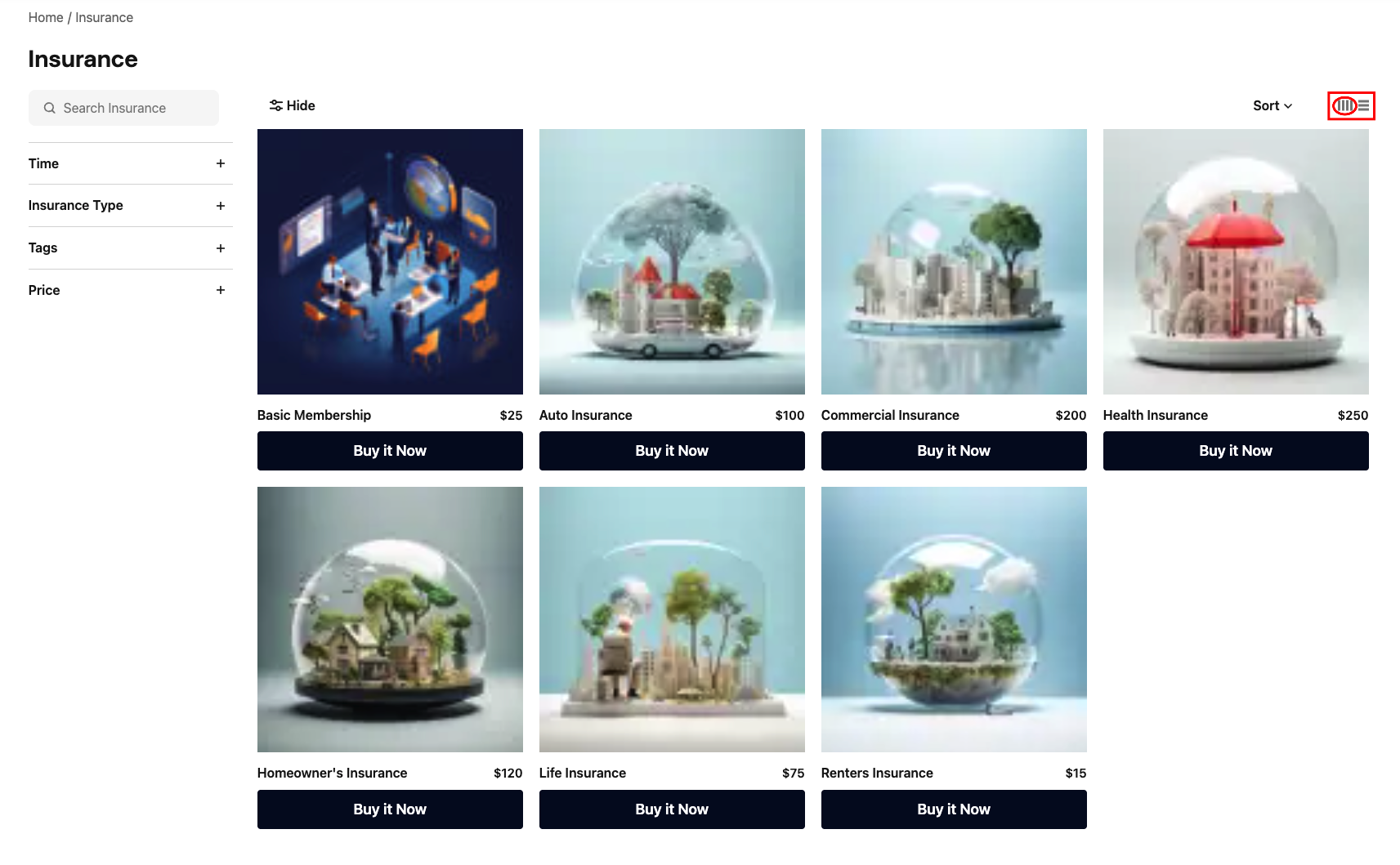
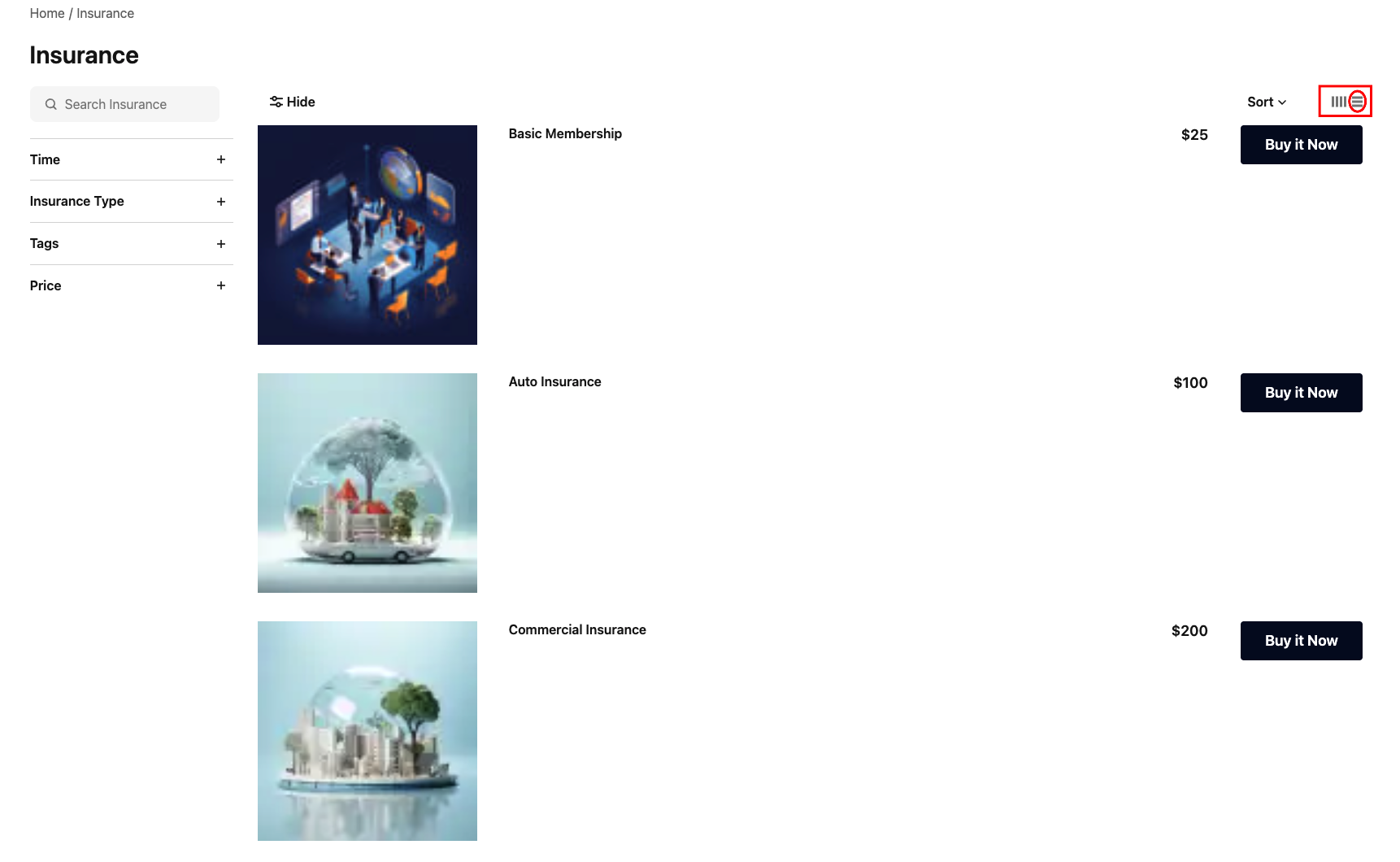
The grid switcher enhances the user experience of product pages on your website, enabling users to view products as a list or a grid for improved readability and accessibility. By default, products are displayed in a four-column grid (standard view).
When implemented, the user’s chosen view is sustained for the current browser session. You’ll need to add the switcher using JavaScript to handle interactions. You may also need to make CSS layout adjustments, and Liquid modifications to support both standard and custom templates. Additionally, custom icons and switcher options ensure a seamless and intuitive experience.
The switcher appears in the top right of a product list and looks like this: 
What you need
- A code editor
- A theme record in your organization
Step 1: Override the product category template
- Create a new record for the product category template, if it doesn’t already exist in your theme. Or override the existing template.
- Add the following code and save the template.
Key: pages/product_category
```liquid
{{ current_product_category.name }}
```
Step 2: Override the product card template
- Create a new record for the product card template, if it doesn’t already exist in your theme. Or override the existing template.
- Add the following code and save the template.
The code enables the switch from standard alignment and re-orders the content on a horizontal view.
key: snippets/products/card
```liquid
{%- default product: blank -%} {%- default allow_comparisons: false -%}
{%- comment %} Image {% endcomment %}
  {%- if product.image != blank %}

  {%- else %}
    {% render "shared/placeholder_image" %}
  {%- endif %}


{%- comment %} Earn Points {% endcomment %}
{%- if current_store.display_points? and product.pricing.hide_price? == false %}
  {%- unless product.restricted? and product.restricted_text != blank %}
    {%- if product.pricing.can_earn_points? and product.pricing.total_earn_points > 0 %}

        {{ "pricing.points.earn.earn_label" | t }}
        {%- if product.pricing.variable_pricing? %}
          {{ "pricing.points.earn.variable_points_label" | t }}
        {%- endif %}
        {%- if product.pricing.points_bonus? %}

            {{ product.pricing.total_earn_points | points }}

        {%- endif %}

          {{ product.pricing.earn_points | points }}


    {%- endif %}
  {%- endunless %}
{%- endif %}
{%- comment %} Tags {% endcomment %} {%- if product.tags.size > 0 %}
  {%- assign tags = product.tags %}
  {% for tag in tags %}

      {{ tag.value }}

  {% endfor %}
{%- endif %}
{%- comment %} Headline {% endcomment %}
{{ product.name | truncate: 70 }}

{%- comment %} Detail {% endcomment %}


  {%- comment %} Price {% endcomment %}

    {%- if product.restricted? and product.restricted_text != blank %}

        {{ product.restricted_text }}

    {%- else %}
      {%- if product.pricing.hide_price? %}

          {{ product.pricing.hide_price_text }}

      {%- elsif product.pricing.has_price? %}

        {%- comment %} Currency Price {% endcomment %}
        {%- if current_store.display_currency? and product.pricing.can_purchase_with_currency? %}
          {%- if product.pricing.on_sale? %}

              {%- if product.pricing.sale_price == 0 %}
                {{ "pricing.free" | t }}
              {%- else %}
                {%- capture price %}{{ product.pricing.sale_price | money }}{%- endcapture %}
                {% if product.pricing.variable_pricing? %}
                  {{ "pricing.variable" | t: price: price }}
                {%- else -%}
                  {{ price }}
                {%- endif %}
              {%- endif %}


              {{ product.pricing.original_price | money }}

          {%- else %}

              {%- if product.pricing.price == 0 %}
                {{ "pricing.free" | t }}
              {%- else %}
                {%- capture price %}{{ product.pricing.price | money }}{%- endcapture %}
                {% if product.pricing.variable_pricing? %}
                  {{ "pricing.variable" | t: price: price }}
                {%- else -%}
                  {{ price }}
                {%- endif %}
              {%- endif %}

          {%- endif %}
        {%- endif -%}

        {%- comment %} Points Price {% endcomment %}
        {%- if current_store.display_points? and product.pricing.can_purchase_with_points? %}

          {%- comment %} Or {% endcomment %}
          {%- if current_store.display_currency? and product.pricing.can_purchase_with_currency? %}
            {{ "pricing.currency_or_points_connector" | t }}
          {%- elsif product.pricing.variable_pricing? %}
            {%- comment %} From {% endcomment %}
            {{ "pricing.points.purchase.variable" | t }}
          {%- endif %}

          {%- if product.pricing.points_sale? %}

              {{ product.pricing.sale_purchase_points| points }}

          {%- endif %}

            {{ product.pricing.purchase_points | points }}

        {%- endif %}
      {%- endif %}

      {%- comment %} Subscriptions {% endcomment %}
      {%- if product.subscription? %}
        {%- capture timespan %}
          {%- liquid
            assign term = product.pricing.subscription_term | number, compact: true
            assign unit = product.pricing.subscription_term_unit

            if term != blank and unit != blank
              render "shared/subscriptions/term_unit", unit: unit, number: term
            endif
          %}
        {%- endcapture %}

          {{ "pricing.subscription_timespan" | t: timespan: timespan }}

      {%- endif %}
    {%- endif %}


  {%- comment %} Restrictions {% endcomment %}
  {%- if product.restricted? %}

      {% render "products/restricted", product: product, compact: true %}

  {%- endif %}

  {%- comment %} Fulfilment {% endcomment %}
  {%- unless product.restricted? and product.current_approved_quantity <= 0 %}

      {%- if product.can_purchase? %}
        {%- if product.can_pickup? %}
          {%- if product.can_ship? %}
            {{ "products.pickup.available" | t }}
          {%- else %}
            {{ "products.pickup.only" | t }}
          {%- endif %}
        {%- endif %}
      {%- elsif product.can_add_to_cart? %}
        {%# No text required. Let humans figure it out during quote process. %}

      {%- else %}
        {%- if product.bookable? %}
          {{ "products.availability.sold_out" | t }}
        {%- elsif product.track_inventory? %}
          {{ product.out_of_stock_text }}
        {%- else %}
          {{ product.unavailable_text }}
        {%- endif %}
      {%- endif %}

  {%- endunless %}


{%- comment %} Actions {% endcomment %}

  {% if product.can_add_to_cart? %}
    {%- comment %} Buy now {% endcomment %}
    {%- unless theme_variables["products.card.hide_purchase_button"] == true %}
      {%- render "products/card/buttons", product: product %}
    {%- endunless %}
  {%- endif %}
  {%- comment %} Compare {% endcomment %}
  {%- if allow_comparisons and theme_variables["products.comparisons"] == true %}


          {{ "products.compare.add_to_compare" | t }}


  {%- endif %} ```
Step 3: Create a custom template for the grid switcher button section
- Create a new record for the grid switcher button template, or override the existing template.
- Add the following code and save the template.
key: snippets/shared/grid_switcher
```liquid
{% default style_class: blank %}
{%- capture bars -%} {%- render “shared/icons/bars”, width: “3px”, height: “20px”, style_class: ‘sc-pointer-events-none’ %} {%- endcapture -%}
```
key: snippets/shared/icons/bars
```liquid
{% default style_class: blank %} {% default width: blank %} {% default height: blank %} ```
Step 4: Upload the image assets
For each asset, you will need to upload them separately.
- Using your code editor, create a file for each asset using the .js and .css extensions, respectively.
- Upload them in the theme assets section.
key: grid-switcher.css
```css
.sc-view_item { gap: 7px; }
.sc-view_item svg { fill: #858585; }
.sc-view_item button { gap: 2px; }
.sc-view_horizontal { rotate: 90deg; }
.SC-ProductCard_body { display: flex; flex-direction: column; flex-grow: 1; }
.sc-grid { display: grid; }
.sc-one-column { grid-template-columns: repeat(2, 1fr); }
@media screen and (min-width: 992px) { .sc-one-column { grid-template-columns: 1fr; } } .sc-two-columns { grid-template-columns: repeat(2, 1fr); } .sc-three-columns { grid-template-columns: repeat(2, 1fr); } @media screen and (min-width: 768px) { .sc-three-columns { grid-template-columns: repeat(3, 1fr); } } .sc-four-columns { grid-template-columns: repeat(2, 1fr); } @media screen and (min-width: 768px) { .sc-four-columns { grid-template-columns: repeat(4, 1fr); } } .sc-two-to-three-column { grid-template-columns: repeat(2, 1fr); gap: var(–sc-spacing-base); } @media screen and (min-width: 768px) { .sc-two-to-three-column { grid-template-columns: repeat(3, 1fr); } }
@media screen and (min-width: 992px) { .is-horizontal .SC-ProductCard { flex-direction: row; gap: var(–sc-spacing-xlarge); } }
@media screen and (min-width: 992px) { .is-horizontal .SC-ProductCard_actions .SC-Button-expanded { width: 33.33%; } }
@media screen and (min-width: 992px) { .is-horizontal .SC-ProductCard_details { display: flex; flex-direction: column; } }
@media screen and (min-width: 992px) { .is-horizontal .SC-ProductCard_headline { font-size: var(–sc-font-xlarge); flex-grow: unset; } }
@media screen and (min-width: 992px) { .is-horizontal .SC-ProductCard_image_wrapper { max-width: 270px; width: 100%; } }
@media screen and (min-width: 992px) { .is-horizontal .SC-ProductCard_price { padding-bottom: var(–sc-spacing-small); } }
@media screen and (min-width: 992px) { .is-horizontal .SC-ProductCard_price_item { font-size: var(–sc-font-medium); } }
@media screen and (min-width: 992px) { .is-horizontal .SC-ProductCard_subheadline { flex-grow: 0; } }
@media screen and (min-width: 992px) { .is-horizontal .SC-ProductCard_variants { flex-grow: unset; padding-bottom: var(–sc-spacing-medium); } } ```
key: grid-switcher.js
```javascript
const gridSwitcher = () => { let switcherBtns = document.querySelectorAll(‘[data-js=grid_switcher] button’); const productGrid = document.querySelector(‘#SC-ProductsGrid’);
// Function to apply grid type from session storage const applyStoredGridType = () => { let storedGridType = sessionStorage.getItem(‘selectedGridType’); if (storedGridType) { insertTypeGrid(storedGridType); } };
const insertTypeGrid = (gridType) => { productGrid.classList.remove(‘SC-CardGrid’, ‘is-offset-by-sidebar’, ‘is-horizontal’, ‘sc-one-column’, ‘sc-four-columns’); productGrid.classList.add(‘sc-grid’, ‘sc-gap’);
switch (gridType) {
  case 'grid_one_column':
    productGrid.classList.add('sc-one-column', 'is-horizontal');
    break;
  case 'grid_four_columns':
    productGrid.classList.add('sc-four-columns');
    break;
  default:
    break;
}   };
switcherBtns.forEach((button) => { button.addEventListener(‘click’, (event) => { let gridType = button.getAttribute(‘data-js’); insertTypeGrid(gridType); sessionStorage.setItem(‘selectedGridType’, gridType); }); });
applyStoredGridType(); };
document.addEventListener(‘DOMContentLoaded’, gridSwitcher); ```
Results
Standard view
List view
Switcher style and customization
You can customize the styles of the grid switcher by updating the CSS.
To apply changes, upload a new version of the provided CSS file. Make sure to rename the file before uploading it again to the assets, as the key must remain the same.
Was this article helpful?
Thanks for your feedback! It helps us improve our docs.