

Add agent actions
On this page
Actions translate an end user’s request into real agent action that updates your Salesforce CRM. For example, we can configure an action called available_products that authorizes the agent to get the latest information about available products from Salesforce, and display them to the user.
There are multiple ways to add agent actions: From the Agentforce package, using Flow, or via Apex code.
Add agent actions using APEX
In the procedure below, we will add an action using Apex.
Add an APEX class
-
Create a new Apex class called AFPurchasableProducts.
-
Use your own code or copy and paste the sample code below.
Sample code
``` public class AFPurchasableProducts {
public AFPurchasableProducts() {}

// ==========
// Input Variables
// ==========
public class Input {
    @InvocableVariable(
        label='Store Id'
        description='s_c__Store__c record Id to evaluate products for'
        required=true
    )
    public Id storeId;

    @InvocableVariable(
        label='Action Type'
        description='Action to perform: add (add to cart) or buy (go to checkout). Default is buy.'
    )
    public String type;

    @InvocableVariable(
        label='Preserve Cart'
        description='If true, preserves the existing cart contents when adding/buying.'
    )
    public Boolean preserve;

    @InvocableVariable(
        label='Return Behavior'
        description='Redirect behavior after action: true (referrer), false (stay on site), or a callback URL.'
    )
    public String ret;

    @InvocableVariable(
        label='Promotion Code'
        description='Promotion code (case-sensitive) applied to the action.'
    )
    public String code;
}

// ==========
// Rich Link Item
// ==========
public class ProductRichLink {
    public String linkURL;
    public String linkTitle;
    public String linkImageURL;
    public String linkImageMimeType;
    public String linkDescriptionText;
}

// ==========
// Rich Link Response Wrapper
// ==========
public class ProductRichLinkResponse {

    @InvocableVariable(
        label='Purchasable Product Details'
        required=true
    )
    public List productDetails;

    public ProductRichLinkResponse() {
        this.productDetails = new List();
    }
}

// ==========
// Invocable Method
// ==========
@InvocableMethod(
    label='Quick: Get Purchasable Products as Rich Links'
    description='Given a store Id, returns, for each input, rich link details (URL, title, image URL, MIME type, description) for purchasable products.'
)
public static List execute(List inputs) {
    List responses = new List();

    if (inputs == null || inputs.isEmpty()) {
        return responses;
    }

    Set storeIds = new Set();
    for (Input i : inputs) {
        if (i != null && i.storeId != null) {
            storeIds.add(i.storeId);
        }
    }

    Map storesById = new Map(
        [
            SELECT Id,
                   s_c__Link__c,
                   s_c__Logo_Id__r.s_c__Url__c
            FROM s_c__Store__c
            WHERE Id IN :storeIds
        ]
    );

    // ---- Load all active Products ----
    List activeProducts = [
        SELECT Id,
               Name,
               ProductCode,
               IsActive,
               s_c__Features_Markdown__c,
               s_c__Subscription_Term__c,
               s_c__Subscription_Term_Count__c,
               s_c__Subscription_Term_Unit__c,
               s_c__Subscription_Type__c
        FROM Product2
        WHERE IsActive = true
    ];

    Set activeProductIds = new Set();
    for (Product2 p : activeProducts) {
        activeProductIds.add(p.Id);
    }
    Map productById = new Map(activeProducts);

    // ---- Product Media: first s_c__Product_Media__c per product (by position) ----
    Map mediaUrlByProductId = new Map();

    if (!activeProductIds.isEmpty()) {
        for (s_c__Product_Media__c pm : [
            SELECT s_c__Product_Id__c,
                   s_c__Media_Id__r.s_c__Url__c,
                   s_c__Position__c
            FROM s_c__Product_Media__c
            WHERE s_c__Product_Id__c IN :activeProductIds
            ORDER BY s_c__Product_Id__c, s_c__Position__c ASC
        ]) {
            Id pid = pm.s_c__Product_Id__c;
            // First row per product (lowest position) wins
            if (!mediaUrlByProductId.containsKey(pid)) {
                mediaUrlByProductId.put(pid, pm.s_c__Media_Id__r.s_c__Url__c);
            }
        }
    }

    for (Input i : inputs) {
        ProductRichLinkResponse response = new ProductRichLinkResponse();
        responses.add(response);

        if (i == null || i.storeId == null) {
            continue;
        }

        s_c__Store__c store = storesById.get(i.storeId);
        if (store == null) {
            continue;
        }

        String baseLink = store.s_c__Link__c;
        String storeFallbackImageUrl = (store.s_c__Logo_Id__r != null)
            ? store.s_c__Logo_Id__r.s_c__Url__c
            : null;

        List reqs =
            new List();

        s_c.AFGetPurchasableProductIdsInvocable.Request req =
            new s_c.AFGetPurchasableProductIdsInvocable.Request();

        req.productIds = new List(activeProductIds);
        req.storeId = i.storeId;
        reqs.add(req);

        List purchResults;

        try {
            purchResults = s_c.AFGetPurchasableProductIdsInvocable.getPurchasableProductIds(reqs);
        } catch (Exception e) {
            continue;
        }

        if (purchResults == null || purchResults.isEmpty()) {
            continue;
        }

        s_c.AFGetPurchasableProductIdsInvocable.Result first = purchResults[0];
        if (first.error != null) {
            continue;
        }

        Set purchIds = new Set();
        if (first.productIds != null) {
            purchIds.addAll(first.productIds);
        }

        for (Id pid : purchIds) {
            Product2 p = productById.get(pid);
            if (p == null) {
                continue;
            }

            ProductRichLink link = new ProductRichLink();

            link.linkURL = buildDirectToCartUrl(
                baseLink,
                p.ProductCode,
                i.type,
                i.preserve,
                i.ret,
                i.code
            );

            link.linkTitle = p.Name;

            String imageUrl = mediaUrlByProductId.get(p.Id);
            if (String.isBlank(imageUrl)) {
                imageUrl = storeFallbackImageUrl;
            }
            link.linkImageURL = imageUrl;

            if (!String.isBlank(imageUrl)) {
                link.linkImageMimeType = 'image/png';
            }

            if (!String.isBlank(p.s_c__Features_Markdown__c)) {
                link.linkDescriptionText = p.s_c__Features_Markdown__c;
            } else {
                link.linkDescriptionText = p.Name;
            }

            response.productDetails.add(link);
        }

    }

    return responses;
}

// ==========
// Helper: build cart URL
// ==========
@TestVisible
private static String buildDirectToCartUrl(
    String baseLink,
    String productCode,
    String typeParam,
    Boolean preserveParam,
    String returnParam,
    String codeParam
) {
    if (String.isBlank(baseLink) || String.isBlank(productCode)) {
        return null;
    }

    String normalizedBase = baseLink.endsWith('/')
        ? baseLink.removeEnd('/')
        : baseLink;

    String path = normalizedBase + '/cart/' +
        EncodingUtil.urlEncode(productCode, 'UTF-8');

    List params = new List();

    String finalType = String.isBlank(typeParam) ? 'buy' : typeParam.toLowerCase();
    if (finalType != 'buy' && finalType != 'add') {
        finalType = 'buy';
    }
    params.add('type=' + EncodingUtil.urlEncode(finalType, 'UTF-8'));

    if (preserveParam != null) {
        params.add('preserve=' + String.valueOf(preserveParam));
    }

    if (!String.isBlank(returnParam)) {
        // Allowed: "true", "false", or callback URL
        params.add('return=' + EncodingUtil.urlEncode(returnParam, 'UTF-8'));
    }

    if (!String.isBlank(codeParam)) {
        params.add('code=' + EncodingUtil.urlEncode(codeParam, 'UTF-8'));
    }

    return path + (params.isEmpty() ? '' : '?' + String.join(params, '&'));
} } ```
Add an action to a topic
-
Open a topic, for example, the Sales Representative topic from the previous procedure.
-
Go to the This Topic’s Actions tab.
-
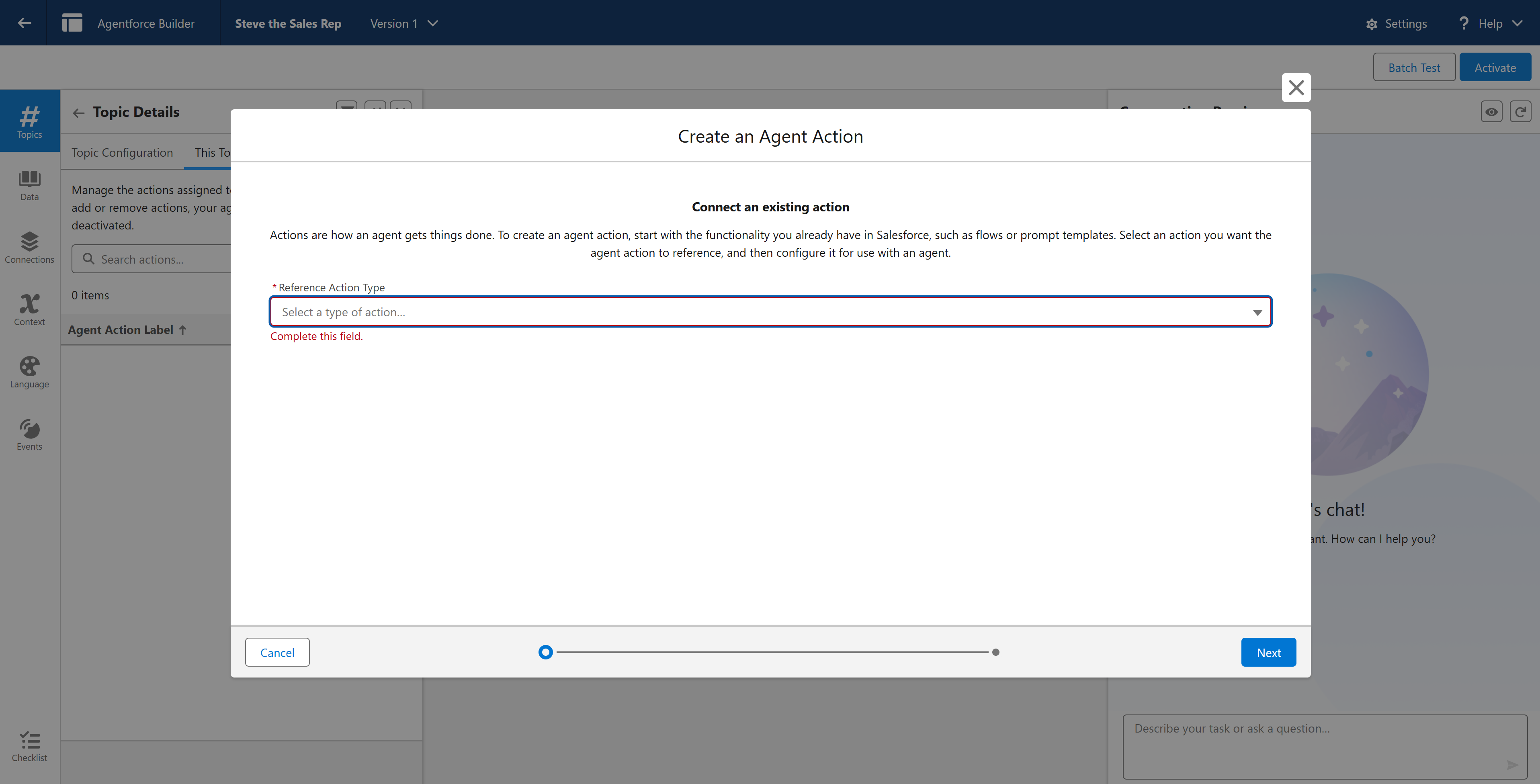
Select New and then +Create New Action.
-
Select the Action Reference Type as Apex.
-
Set the Reference Action Category to Invocable Method and then select your reference action. If you used our example, this would be Quick: Get Purchasable Products for Store.
-
Change the Agent API name from the auto generated value to available_products.
-
Select Next.
Configure the action
-
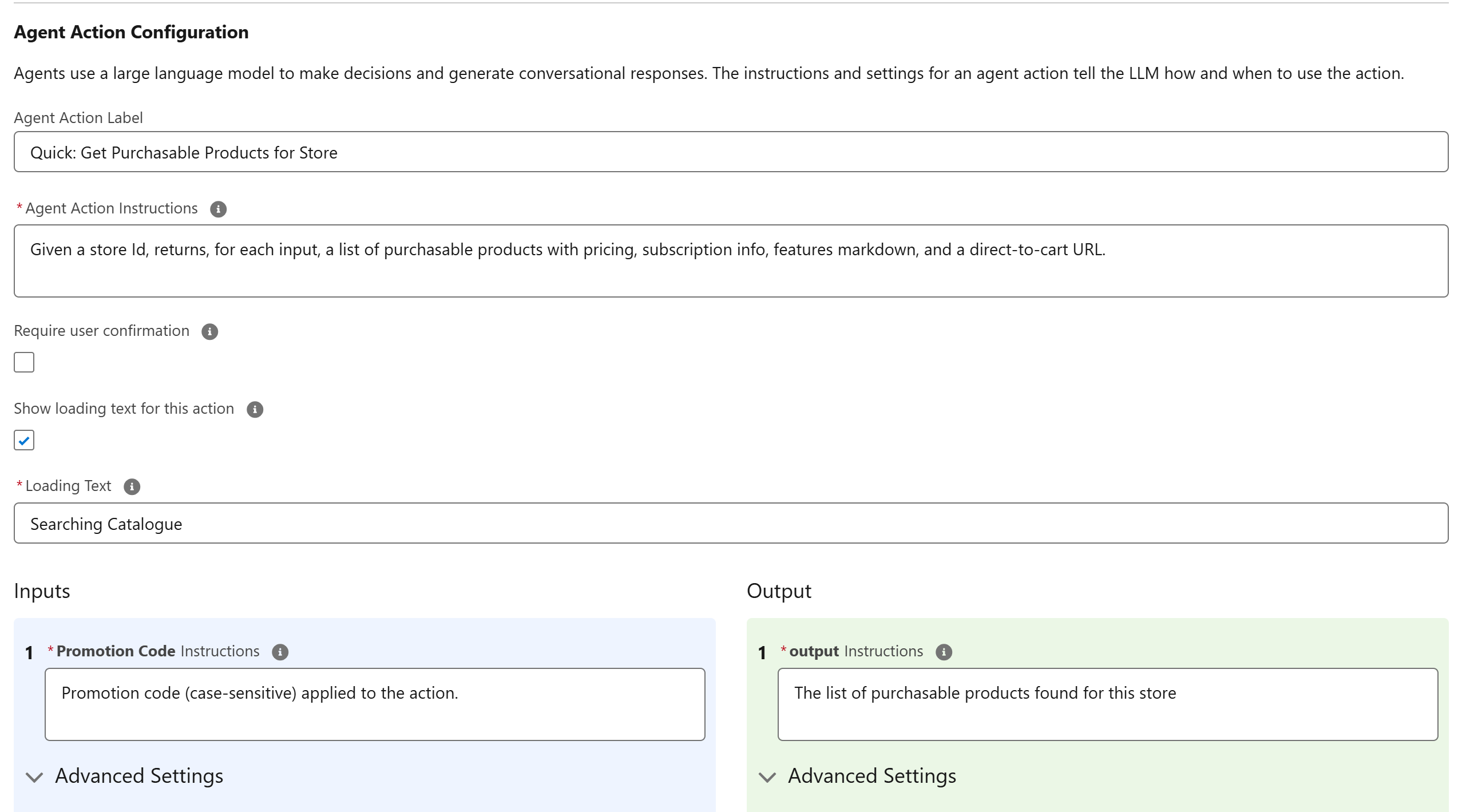
On the Configure your action for Agent screen, instruct the agent on how to use the action. Provide instructions and validations on each input and output.
-
For inputs:
-
To require customer input, select the Require input option.
-
Check the Collect data from the user option.
-
In the Loading Text field, add a placeholder message for when the agent is thinking, for example Searching Catalogue…
-
-
For outputs:
-
Where you want the agent to ignore an output, select the Filter from agent action option.
-
If you want to expose the result to the user, select the Show in Conversation option.
-
Enter instructions, such as The list of purchasable products found for this store.
-
Select Next.
-
Add a storeid as a custom variable
-
In the action record, go to the StoreId input variable.
-
Select Assign a Variable.
-
Set the storeId custom variable and save it.
-
Refresh your page to go back to the Agentforce Builder home.