

Create or update a POS receipt template
On this page
:::note This article describes receipt templates using the legacy Store Printable Templates object (accessed via the Additional Relationships tab). For the current POS Print Template system, which also supports label and document (PDF) templates and print actions, see POS print templates. :::
In StoreConnect, receipt templates are created using a combination of Liquid templating code and print markup tags.
For this procedure, you will need to be familiar with Liquid and print markup. You will also need the right Salesforce Admin access to add and update templates.
Add or update a receipt template
- Open the StoreConnect Console.
- Go to POS Configuration and select POS Printer Templates.
-
Select New or open an existing template.
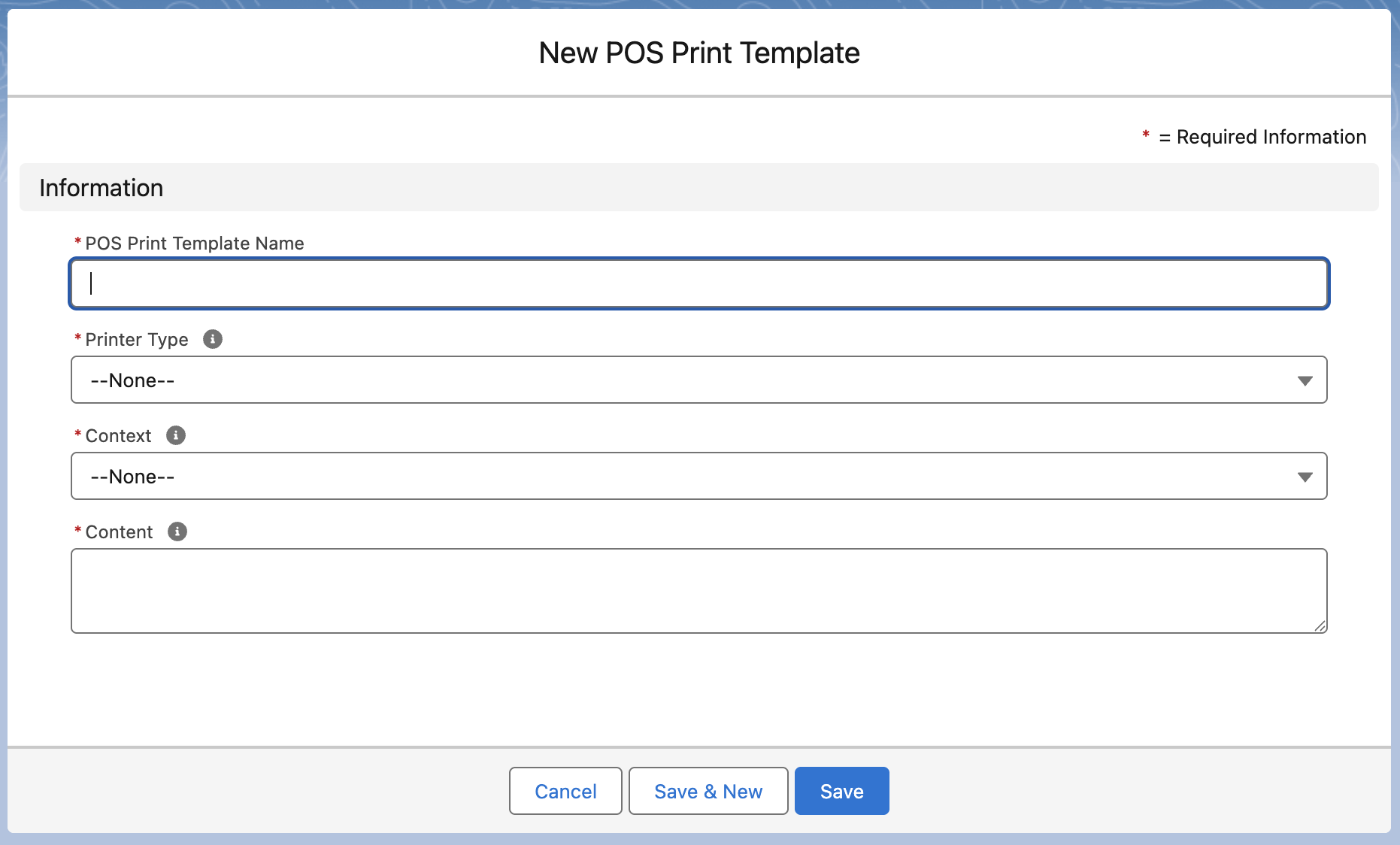
- Give the template a Name. Choose something you will recognize easily later.
- In the Printer Type field, select Receipt.
- In the Type field, select Product.
- Leave the height and width fields blank.
- In the Template field, enter the code for the receipt structure. An example and explanations are provided below.
- Select Save.
- Test and update code until you are happy with the results.
The template is available to select as the receipt template for the outlet, and prints when a sale is completed at the register.
Sample receipt template
```liquid
{%- assign qr_code_url = ‘https://example.com’ -%} {%- assign store = current_store -%} {%- assign logo_url = store.data.logo.thumb_url -%} {%- assign outlet = current_outlet -%} {%- assign outlet_tax_number = outlet.tax_number -%} {%- assign outlet_phone = outlet.phone -%} {%- assign outlet_address_1 = outlet.address1 -%} {%- assign outlet_address_2 = ‘’ -%} {%- if outlet.address2 != blank -%} {%- assign outlet_address_1 = outlet_address_1 | append: ‘, ‘ | append: outlet.address2 -%} {%- endif -%} {%- if outlet.city != blank -%} {%- assign outlet_address_2 = outlet.city -%} {%- endif -%} {%- if outlet.state != blank -%} {%- if outlet_address_2 != blank -%} {%- assign outlet_address_2 = outlet_address_2 | append: ‘, ‘ | append: outlet.state -%} {%- else -%} {%- assign outlet_address_2 = outlet.state -%} {%- endif -%} {%- endif -%} {%- if outlet.zip_code != blank -%} {%- if outlet_address_2 != blank -%} {%- assign outlet_address_2 = outlet_address_2 | append: ‘ ‘ | append: outlet.zip_code -%} {%- else -%} {%- assign outlet_address_2 = outlet.zip_code -%} {%- endif -%} {%- endif -%} {%- assign date_format = ‘%m/%d/%Y’ -%} {document word-wrap=true } {# header } {center} {%- if logo_url != blank %} {image src=”{{ logo_url }}” size=80 dither=atkinson } {%- endif %} {size 1} SALES RECEIPT {%- if outlet_tax_number != blank %} TAX#: {{ outlet_tax_number }} {%- endif %} {left} {rule} {%- if outlet_address_1 != blank or outlet_address_2 != blank or outlet_phone != blank %} {table cols=1 margin=1 align=[left] width=[] {%- if outlet_address_1 != blank %} row=[”{{- outlet_address_1 -}}”] {%- endif %} {%- if outlet_address_2 != blank %} row=[”{{- outlet_address_2 -}}”] {%- endif %} {%- if outlet_phone != blank %} row=[“Phone: {{- outlet_phone -}}”] {%- endif %} } {%- endif %} {rule} {table cols=2 margin=1 align=[left,right] width=[10,] row=[“Receipt #”,”{{- current_order.reference -}}”] row=[“Date”,”{{- current_order.ordered_at | date: date_format -}} {{- current_order.ordered_at | date: “%l:%M:%S%p” -}}”] {%- if current_order.assisted_by_name != blank %} row=[“Cashier”,”{{- current_order.assisted_by_name -}}”] {%- endif %} {%- if current_order.contact != blank %} row=[“Customer”,”{{- current_order.contact.name -}}”] {%- if current_order.contact.phone != blank %} row=[“Phone”,”{{- current_order.contact.phone -}}”] {%- endif %} {%- endif %} } {line} {# items } {bold} {table cols=3 margin=1 align=[left,right,right] width=[,4,8] row=[“Item”,”Qty”,”Total”] } {endBold} {rule} {%- if current_order.items.size > 0 %} {table cols=3 margin=1 align=[left,right,right] width=[,4,8] {%- for item in current_order.items %} {%- assign quantity = item.quantity | default: 1 -%} {%- assign line_total = item.unit_price_excl_tax | times: quantity | round: 2 %} row=[”{{ item.product.name }}”, “{{ quantity }}”, “{{ line_total | money }}”] {%- assign saving = item.pricing.original_price | minus: item.unit_price_excl_tax | round: 2 -%} {%- if saving > 0 %} row=[” was {{ item.pricing.original_price | money }}, saved {{ saving | money }} ea”, “”, “”] {%- else %} row=[” {{ item.unit_price_excl_tax | money }} ea”, “”, “”] {%- endif %} {%- endfor %} } {%- endif %} {# total } {center} {rule} {left} {size 2} {bold} {table cols=2 margin=1 align=[right,right] width=[,17] row=[“Sales Tax:”,”{{ current_order.total_tax | money }}”] } {endBold} {bold} {size 2} {table cols=2 margin=1 align=[right,right] width=[,17] row=[“SALE TOTAL:”,”{{ current_order.total | money }}”] } {endBold} {size 1} {line} {%- if current_order.payments.size > 0 %} {table cols=2 margin=1 align=[right,right] width=[*,17] {%- for payment in current_order.payments %} {%- assign payment_desc = payment.description -%} {%- if payment.payment_method == “LINKLY” or payment.payment_method == “TYRO” or payment.payment_method == “CARD_INTEGRATED” or payment.payment_method == “CARD_SQUARE_INTEGRATED” -%} {%- assign payment_desc = “Card” -%} {%- endif -%} {%- assign payment_desc = “Paid by “ | append: payment_desc %} row=[”{{ payment_desc }}”,”{{ payment.amount | money }}”] {%- if payment.payment_method == “CHEQUE” and payment.transaction_number != blank %} row=[“Cheque #:”,”{{ payment.transaction_number }}”] {%- endif %} {%- if payment.payment_method == “PAY_ON_ACCOUNT” and payment.invoice_reference != blank %} row=[“Reference:”,”{{ payment.invoice_reference }}”] {%- endif %} {%- if payment.payment_method == “CASH” and payment.change_given > 0 %} row=[“Change”,”{{ payment.change_given | money }}”] {%- endif %} {%- endfor %} } {%- endif %} {size 1} {%- if current_order.customer_notes != blank %} {line} Note: {{- current_order.customer_notes -}} {%- endif %} {center} {line} Find us online {qrcode data=’{{ qr_code_url }}’ level=’m’ model=’2’ size=6} ```
Explanation of receipt template code by section
The way the receipt code works is to display data already defined in StoreConnect, e.g. your store and outlet information, and combine this with transaction information.
Variable setup
The template opens with a qr_code_url parameter. Replace https://example.com with your store’s URL before using the template. Everything after that reads store and outlet data into named variables, keeping the rest of the template readable and avoiding repeated long field paths.
The address fields are built up conditionally, so address line 2, city, state, and postcode are only appended if they are not blank. This keeps the layout clean for outlets that don’t use every field. Phone is included in the same address table, so no blank lines appear between the address and phone number.
Where to put assign statements
Placement comes down to scope, not preference:
- Values that do not change per line go at the top — the QR URL, store and outlet records, the address lines, and the date format are computed once and reused throughout. Placing them at the top of the template means they are calculated once, not on every loop pass, and the rest of the template is easier to read.
- Values that depend on the current item or payment stay inside the loop —
quantity,line_total,saving, andpayment_descall reference the loop variable, which only exists inside the{% for %}block, so they must be assigned there. Declare them at the start of the loop body, before therow=that uses them.
:::warning
Inside a loop, group all of an iteration’s assign statements before the {%- if -%} and row= lines they feed. The print markup parser needs each row= to begin on its own line, and the tag immediately before a row= must keep its trailing newline. An assign wedged between an {%- if -%} and its row= strips that newline and the row prints on the wrong line. Always assign your variables before the row= or {%- if -%} lines that use them.
:::
Header
```liquid
{image src=”{{ logo_url }}” size=80 dither=atkinson} SALES RECEIPT TAX#: {{ outlet_tax_number }} ```
Displays:
- Store logo (only if set on the store record)
- “SALES RECEIPT” heading
- Tax number (only printed if set on the outlet)
Followed by the outlet address and phone in a single table, only printed if at least one of those fields is populated.
Logo recommendations
The logo is sourced from the store record and printed at 80% of the paper width. Because thermal printers only print in black and white, dither=atkinson automatically converts the image, so you do not need to prepare a black and white version yourself.
For the best result:
- Format: PNG or JPG
- Background: White or transparent — avoid dark or busy backgrounds, as they print as solid black and obscure the logo
- Contrast: Use a high-contrast design. Low-contrast logos (light gray on white, for example) can become indistinguishable after dithering
- Simplicity: Simple shapes and bold lines reproduce more clearly than fine detail or gradients on thermal paper
- Source size: The template uses the store logo’s thumbnail crop (240×240 px). Upload a clean, square version of your logo to the store record for the best output
Order info
```liquid
row=[“Receipt #”,”{{- current_order.reference -}}”] row=[“Date”,”…”] row=[“Cashier”,”{{- current_order.assisted_by_name -}}”] ```
Shows transaction metadata. Receipt number and date are always printed. The cashier row is only printed if a staff member is linked to the order.
Customer name and phone are shown conditionally if a contact is linked to the order.
Items table
```liquid
row=[”{{ item.product.name }}”, “{{ quantity }}”, “{{ line_total | money }}”] row=[” was {{ item.pricing.original_price | money }}, saved {{ saving | money }} ea”, “”, “”] ```
Loops through current_order.items and prints each product with quantity and tax-exclusive line total. A second row shows the tax-exclusive unit price, or a “was / saved” row when the item was discounted.
The “was” price is the pricebook list price (item.pricing.original_price). The per-unit saving is that list price minus the tax-exclusive unit price charged (item.unit_price_excl_tax), which captures both product-level and order-level discounts in a single value.
:::warning
Keep the list price and the price charged on the same tax basis, or the saving will be wrong. In a tax-exclusive store, the list price excludes tax, so the saving is calculated against unit_price_excl_tax, consistent with the line total above and the separate Sales Tax line. In a tax-inclusive store, the list price includes tax, so compare against unit_price_incl_tax instead.
:::
Line totals are calculated by multiplying item.unit_price_excl_tax by quantity. Totals are read from the order directly, so no loop accumulation is needed.
Totals and payments
```liquid
row=[“Sales Tax:”,”{{ current_order.total_tax | money }}”] row=[“SALE TOTAL:”,”{{ current_order.total | money }}”] ```
Shows the order tax and the tax-inclusive total, both printed at a larger size for visibility.
The payments section loops through current_order.payments and prints each payment. Integrated card payment methods (Linkly, Tyro, Square, and other card-integrated providers) are labeled “Card” for clarity. CHEQUE payments show the reference entered at the till (the “Cheque details” field), which is stored on payment.transaction_number. PAY_ON_ACCOUNT payments show their invoice reference. CASH payments show change via payment.change_given if applicable.
:::tip
For stores that use US spelling, relabel cheque payments to “Check”. Add an override alongside the card override, {%- if payment.payment_method == "CHEQUE" -%}{%- assign payment_desc = "Check" -%}{%- endif -%}, and change the reference row label to Check #:. The underlying payment method value stays CHEQUE; only the printed text changes.
:::
Notes
```liquid
{%- if current_order.customer_notes != blank %} Note: {{- current_order.customer_notes -}} {%- endif %} ```
Prints any customer notes entered at checkout, only if present.
QR code
```liquid
{%- assign qr_code_url = ‘https://example.com’ -%} ```
```liquid
{qrcode data=’{{ qr_code_url }}’ level=’m’ model=’2’ size=6} ```
The QR code URL is set as a parameter at the top of the template. Replace https://example.com with your store’s URL before deploying.
To avoid hardcoding the URL, you can store it in a custom data field on the outlet record and read it dynamically:
```liquid
{%- assign qr_code_url = outlet.data.sc_website_url__c -%} ```
Was this article helpful?
Thanks for your feedback! It helps us improve our docs.