

Version 21 release notes
On this page
Latest releases - Package version 21.12 and Website version 21.0.15
Version 21 is a major release spanning advanced promotions, a significantly expanded Point of Sale, broader payment capabilities, and stronger developer tools. It introduces Advanced Promotions as a second parallel promotions engine, a rebuilt POS experience with saved carts, grid layouts, keyword search, and a completely redesigned hardware and printing system. On the payments side, multi-capture of pre-authorized payments, substantially expanded web refunds, account credit refunds, and 3DS for Pay By Link are among the highlights. The release also adds first-party Google Tag Manager, new Shippit and custom shipping providers, account security controls, stealth mode, and significant Liquid developer improvements including encrypt/decrypt filters and request header access.
These release notes cover all v20.x point releases delivered from October 2025 through May 2026, plus all changes in the full v21 development cycle. For detailed per-release breakdowns of earlier v20.x website and package releases, see v20 Release notes.
See also the V20 to V21 upgrade guides.
Release types and versioning
StoreConnect ships two independent release tracks within each major version:
Package releases (e.g. v21.0, v21.1) update the Salesforce package — including new objects, fields, Apex logic, and the StoreConnect Console. These are installed into your Salesforce org via a package upgrade.
Website releases (e.g. v21.0.0, v21.0.4) update the StoreConnect website application — including storefront behavior, payment gateways, Liquid templates, POS, and checkout flows. These deploy independently of the package.
Highlights
If you have skipped a few updates, you’ll see a lot has changed since v20. The five biggest changes are:
- Advanced Promotions — A fully independent second promotions engine with rich scheduling, stacking rules, coupon codes, and customer scoping, running alongside your existing promotions with no migration needed. See Advanced Promotions.
- POS hardware and printing — A completely redesigned hardware management experience with a guided setup wizard and fully customizable Liquid printer templates for receipts, labels, and cart printouts. See POS hardware and printing.
- Product Bundles 2.0 — A new native bundle product type lets you sell grouped products with component groups, quantities, and optional overrides — purchasable on the web storefront. See Product Bundles 2.0.
- New payment gateways — Three new web payment gateways (Westpac Online Pay, Flywire, NMI), a major eWAY rewrite with 3DS2 and wallet support, and three new POS payment integrations (Linkly, Quest Airpay TAP, Latitude Finance). See Payments.
- POS grid layout and keyword search — A new card-based grid view and fast full-text keyword search transform how staff browse and find products, orders, and contacts at the POS. See POS layouts and search.
Breaking changes and cautions
As part of the version upgrade, you may need to prepare your current organization for changes. See the notes below as well as the v20 to v21 upgrade guide
POS layout identifier migration to snake_case
All POS layout and action group identifiers have been standardized to snake_case. Existing dash-case identifiers continue to work via automatic backward-compatibility fallback, but a deprecation warning is logged to the browser console when a fallback is used. Update your POS layout identifiers to snake_case at your next opportunity — the fallback is not permanent.
Key identifier changes:
| Old identifier | New identifier |
|---|---|
sidebar |
main_menu |
cart-contact |
cart_contact |
modal-view |
modal_view |
See POS layouts for the full migration reference table.
What to do:
- After upgrading, open the POS in your browser and check the developer console (F12 → Console tab) for deprecation warnings. Any layout using a dash-case identifier will log a warning.
- In Salesforce, go to StoreConnect Console → POS Layouts and open each
Pos_Layout__crecord that has an affected identifier. - Update the Identifier field value to its snake_case equivalent (e.g.
cart-contact-list→cart_contact_list). The full mapping table is in POS layouts. - Repeat for POS Action Group records (
Pos_Action_Group__c).
Stock level fields now read-only
Count On Hand and Available To Sell are now displayed as read-only formula fields on the Stock Level record page. The underlying fields are updated programmatically — use Change Qty or Set Qty to adjust stock.
What to do:
- Audit your automations — search Salesforce Flows, Process Builder rules, Apex triggers, and any third-party integrations for references to
Count_On_Hand__corAvailable_To_Sell__cas writable fields. These will now fail or be silently ignored. - Replace with the correct fields:
- Use
Change_Quantity__cto add or subtract stock (e.g. set to5to add five units,-3to remove three). - Use
Set_Quantity__cto reset stock to a specific absolute count.
- Use
- Manual stock adjustments in Salesforce should be made via the Stock Level record’s Change Qty field, not by editing Count On Hand directly.
POS layout filter “Hidden” type renamed to “Hidden (Legacy)”
The original Hidden POS layout filter type has been renamed to Hidden (Legacy) to distinguish it from the new Hidden type introduced alongside the Range filter types. Existing filters using the old Hidden type continue to work and are automatically shown as Hidden (Legacy) in the console — no changes are required. However, if your setup documentation or automated provisioning scripts reference “Hidden” by name, update them to “Hidden (Legacy)”.
Voucher Log field changes
Two fields on Voucher_Log__c have been renamed or replaced:
Event_Result__cis deprecated and replaced bySuccess__c(a boolean). Update any Salesforce reports, flows, or automations that referenceEvent_Result__c.Reason_Code__chas been renamed toReason__c(a picklist). Update any references to the old field name.
Both old fields remain temporarily but should be migrated at your earliest opportunity. See Voucher log object reference.
What to do:
- Salesforce reports and list views — search for any reports filtered or grouped on
Voucher Log: Event ResultorVoucher Log: Reason Codeand update them to useSuccessandReasonrespectively. - Flows and Process Builder — search for any automations that read or write
Event_Result__corReason_Code__conVoucher_Log__crecords and update the field references. - Apex or API integrations — update any code querying or updating these fields by API name.
- Liquid templates — if your theme or POS layouts reference voucher log fields, update to
successandreason.
Product JSON-LD template rename
The product structured data snippet has been renamed from snippets/products/product/json-ld.liquid to snippets/products/product/rich_data_json.liquid. A backward-compatibility shim ensures the old path continues to work, but custom themes referencing the old filename should be updated. See Product rich data snippet for the new template reference.
What to do:
- In Site Builder, search your theme files for
json-ld.liquid. If found, update the reference torich_data_json.liquid. - If you have not customized this template, no action is needed — StoreConnect manages the structured data output automatically.
- The backward-compatibility shim is temporary. Update the reference before your next theme deployment to avoid future breakage.
Account security: customized account templates need updating
v21’s account security hardening changes two account flows. Stores on the standard templates are unaffected, but customized account snippets must be updated or the affected form fails silently:
- Password change now requires the current password. If you have customized
snippets/account/profile, add the current-password field to the Password tab. See Password change now requires the current password. - New-account checkout now requires email confirmation. If you have customized
snippets/account/checkout/set_password, show a “check your email to confirm your account” message after submit. See New-account checkout now requires email confirmation.
Point of Sale
Version 21 substantially expands the POS with a new grid layout, full-text keyword search, and a completely redesigned hardware and printing system — alongside dozens of enhancements to cart management, payments, layouts, and developer tools.
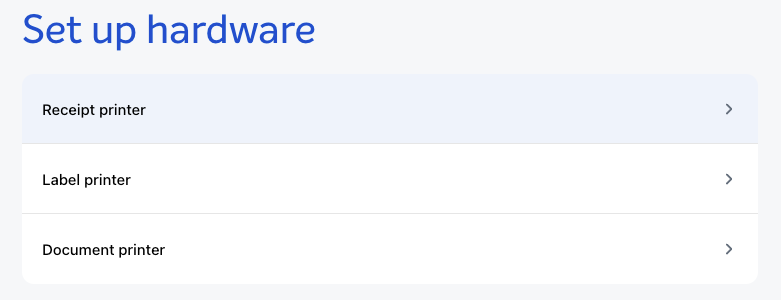
Hardware and printing
A complete redesign of POS hardware management:
- Hardware setup wizard — guides staff through printer connection, template selection, test printing, and cash drawer configuration step by step
- Printer templates — fully customizable using Liquid, supporting receipt, label, and the new cart template type (for quote-style printouts before an order is placed)
- print:cart POS action — triggers cart printing from any layout using the configured cart template; accepts optional
cart_sc_idandprint_template_sfidparams - Direct PDF printing — print without a modal dialog on supported devices
- Printers can be set up as physical (USB) or document (PDF) type
See POS hardware setup and POS print templates.
Layouts and search
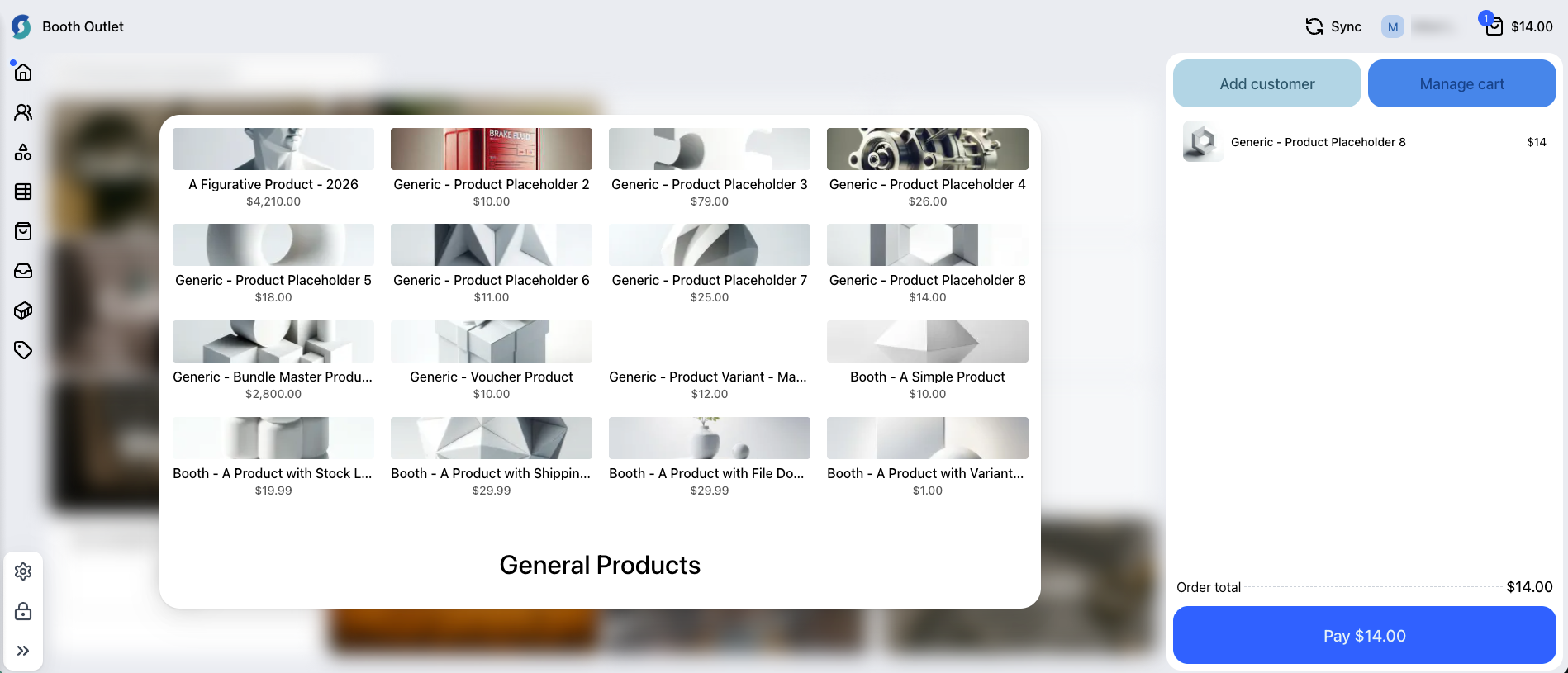
POS grid layout — POS layouts now support a grid type that renders records as visual cards rather than rows — ideal for product catalogs, voucher selection, and any scenario where visual browsing is preferred over a list. Grid fields are indexed for search and can be combined with keyword search and layout filters.
See POS layouts.
POS keyword search — A new keyword search capability enables fast full-text search across products, orders, contacts, and custom objects on any layout where it is enabled. Existing records are indexed automatically on first use.
Additional layout enhancements:
- POS layout filters — Filter panels can be configured on list and grid layouts with Hidden and Range field types. See POS layout filters.
- POS layout view override — New
Pos_View_Id__clookup onPos_Layout__crenders a specific view instead of the default. - POS layout overrides for all built-in screens — All major POS screens can now be replaced with custom layouts: cart list and cart record, order list and order record, product list and product record, customer list, customer record, and customer form. Configure overrides using the appropriate layout identifier on a
Pos_Layout__crecord. - POS layout custom filters — Layout filter panels support fully custom filter configurations in addition to the built-in Hidden and Range types, and filter options are auto-populated based on the values present in the local dataset.
- POS Liquid drops — A comprehensive set of Liquid drops is available in POS layout field views and action params, enabling rich data-driven layout customization without custom JavaScript. Available drops include
pricebook,pricebook_entry,product,contact,account,order,order_item,cart,cart_item,media,staff,payment, andpayment_provider. Custom object records can be queried using the{% liquid_query %}tag. - Outlet and Register Liquid drops — First-class
OutletDropandRegisterDropavailable in POS Liquid contexts ascurrent_outletandcurrent_register. Expose address, name, custom data fields, and registers collection. - POS receipt template override — A POS layout’s action items can specify a receipt template override via print_template_sfid, allowing different layouts to print using different templates.
- Stock visibility in POS — Product list and grid cards show stock level indicators (available, low, out of stock). Bundle component cards show individual component stock.
- Per-product tax-inclusive pricing in POS — POS now respects the
tax_inclusiveflag on individualPricebookEntryrecords rather than only the store-level setting, so stores with mixed tax-inclusive and tax-exclusive products display and calculate taxes correctly at item level. - Configurable fulfillment type labels — Fulfillment type names (Delivery, Click & Collect, etc.) can be overridden via store variables so they match your business terminology.
Cart and orders
- POS saved carts — Cart state is persisted to the server so in-progress carts survive browser refreshes, device switches, and app restarts. Saved carts can be resumed from any register in the same outlet. See Saved carts.
- POS cart and fulfillment UX — Dedicated cart screen with improved product display (product code shown below name). New admin Fulfillment Configuration screen consolidates fulfillment type and payment option setup. See POS cart and Configure POS fulfillment types and payment methods.
- Shipping price override — Staff can manually edit the shipping price on a delivery fulfillment after a rate has been selected.
- Alternate shipping recipient — A separate recipient name field on POS delivery fulfillments for the name the package is addressed to, independent of the cart contact.
- Destination-based delivery taxes — POS delivery fulfillments calculate tax against the shipping destination address rather than the outlet address. Automatic, no configuration needed.
- Per-item salesperson — New
Assisted_By_User_Id__conCart_Item__candOrderItemtracks which staff member added each line item. Auto-populated in POS when a user is signed in. - Pay on Account as POS refund method — When the original transaction included a Pay on Account payment, staff can issue the refund back to the customer’s account, capped to the original payment amount. Supports mixed refunds. See Item returns - refund and exchange at POS and Pay on account.
- POS order discount display on items — Applied discounts are shown against individual cart line items in the POS cart so staff can see per-item savings at a glance.
- POS refund item tax breakdown — Tax breakdown is visible at the item level during POS refund flows, matching the tax detail shown on the original receipt.
- Rental bookings connected to POS cart — Asset booking holds are scoped to the cart so rental timers survive park/resume cycles. Expired booking banners are shown and checkout is blocked for expired rental items.
- Returns on deposit orders — Orders placed with a deposit payment can now be returned and refunded at POS.
- Cart product swapping — A product in an existing POS cart item can be swapped for a different product while preserving quantity, discounts, and fulfillment data.
- Custom shipment statuses — POS renders custom order and shipment status values in readable sentence case rather than raw API strings, so stores using custom fulfillment workflows see clean status labels throughout the POS interface.
Payments at POS
- Square terminal tipping — Square EFTPOS terminals now support tip prompts at POS checkout. See Square payment provider.
- Vii gift card payments at POS — Vii gift cards are now accepted as a payment method at POS, enabling gift card redemption at point of sale for stores integrated with the Vii platform.
- Customizable payment method labels — The display name for each POS payment method can be overridden via store variables. See POS payment methods.
Actions and developer tools
- cart:add_product action params — The
cart:add_productPOS action now accepts additional Liquid-templatable params:serial_numbers,unit_price,unit_discount,quantity,name. See POS layouts. - checkout:start scAction — New POS action fires at the start of the checkout flow, enabling custom pre-checkout logic. See POS checkout start action.
order:returnPOS action — Programmatic returns from Liquid or actions, with pre-selected items, amounts as dollar or percentage, and an optionalnew_cartparameter. Askip_fulfillment_checkparameter allows refunding items that have not yet been fulfilled. See POS actions reference.scActiononSuccess/onErrorcallbacks — POS actions now support callback parameters so custom scripts can respond to the outcome of an action in real time. See POS sc action.print:labelsaction — Prints product labels from a configured Liquid template. Acceptsproduct_sfids(required),print_template_sfid(optional override), andquantity. See POS print templates.print:templateaction — Executes any named Liquid print template directly by SFID, with additional params passed as Liquid context. See POS print templates.modal:open:email_receiptaction — Opens the email receipt modal programmatically from any POS action or layout.modal:open:returnaction — Opens the returns modal for a given order from any POS action or layout.- Additional POS scActions — New programmatic actions available in POS layouts and custom scripts. See POS actions reference:
print:receipt— prints the configured receipt template for the current orderorder:update— updates fields on the current order recordrecord:save/record:delete— save or delete a record from a layoutcart:item:remove— removes a line item from the cartcart:item:update— updates a cart item’s fields (quantity, price, etc.)cash_drawer:open— triggers the configured cash drawer to opennav:view/open:view— navigate to a named layout viewcart:add_contact/cart:remove_contact— set or clear the cart contact
scLocalStoragewrapper — A safe, store-scopedscLocalStorageAPI is available in POS custom layouts and scripts as a replacement for directlocalStorageaccess, ensuring data is isolated per store and survives POS data migrations.- POS developer mode — Append
?dev_mode=trueto the POS URL to enable development mode in production-like environments for debugging layouts and actions.
Register and settings
- Outlet pricebook — POS outlets can now have a default pricebook assigned. See Create a store outlet.
- Register Code uniqueness — Outlet register codes are now enforced as unique.
- Order Notes relabeling — The “Order Notes” field label in POS can be renamed via a store variable.
- Register inactivity lock — The POS register can be configured to lock automatically after a period of no user interaction. A second setting locks the register whenever the device screen locks. Both are controlled via store variables (
pos.settings.lock.inactivity_timeout_minutesandpos.settings.lock.lock_on_device_lock). See POS register lock. - Discount outlet scoping in POS — Discounts can be scoped to a specific outlet so they only apply at that POS location. See Discounts.
- POS storage usage — A Storage Usage panel in POS Settings shows data usage by record type.
- POS navigation renamed — “Outlets” renamed to “POS Outlets” and “Action groups” renamed to “POS Action groups” throughout the Salesforce console navigation.
Live sync
- Real-time record updates — POS registers now receive live record updates via ActionCable when data changes in Salesforce or from another register in the same outlet, keeping layout data current without a manual resync.
Payments
New payment gateways
New web payment gateways — Three new gateways are available on web checkout:
- Westpac Online Pay — Westpac’s hosted online payment solution with Apple Pay, Google Pay, and subscription support. 3DS2 card authentication is also supported.
- Flywire — Cross-border tuition and fee payment gateway with multi-currency support, student-ID validation, and conditional required-field rules. Suitable for education institutions. See Flywire payment provider.
- NMI — Full NMI payment gateway integration including ACH, and subscriptions. The gateway endpoint URL is also configurable to support regional deployments. See NMI payment provider.
eWAY major update — The eWAY integration has been fully rewritten with 3DS2 authentication, subscription renewal payments via eWAY, wallet payments (Apple Pay and Google Pay), and express checkout. eWAY also gains the ability to update subscription payment methods using wallet and express checkout. See eWAY payment provider.
New POS payment providers — Three new payment integrations are available at POS: Linkly (formerly PC-EFTPOS) for card terminals, Quest Airpay TAP for mobile card readers (with split refunds, lane tag support, and transaction recovery), and Latitude Finance for buy-now-pay-later at POS with per-outlet credentials, preauth, and promotions eligibility. Latitude is also available on web checkout. Contact StoreConnect support to enable these providers.
Pre-authorization and capture
- Multi-capture of pre-authorized payments — Pre-authorized payments can now be captured in multiple partial installments rather than a single full capture. Each capture creates a
Payment_Installment__crecord linked to the original payment. Payment status updates automatically as each installment is captured. Supported gateways: Adyen, ZipPay AU, and Latitude. A newPreauth_Amount_To_Capture__cfield onPayment__ccontrols the capture amount. - Preauthorization expanded to additional gateways — Preauthorize-then-capture payment flow is now supported for Braintree, Square, Adyen, Authorize.Net, CyberSource, eWAY, Tyro, and Stripe. Stores using the new per-product
Payment_Capture_Type__cfield can designate products as preauthorize-only so funds are held and captured only after fulfillment. See Payments. - Per-product payment capture type — New
Payment_Capture_Type__cpicklist onProduct2with valuescharge_immediately,preauthorize_only, andsave_payment_method_only, allowing products to control how payment is captured.
Refunds
- Refund approvals workflow — Refunds can be configured to require approval before processing. The refund is held as pending until an authorized user approves it, giving stores control over who can process refunds. See Processing refunds for web orders.
- Web refunds via additional payment providers — Online refunds now supported for: Adyen, Zip Pay AU, Windcave, Tyro, PayWay, CyberSource (including order item-level), Authorize.Net (order item-level), cash, cheque, and bank transfer. See Processing refunds for web orders.
- Refund records on voided pre-authorizations — When a pre-authorized payment is released or voided, a refund record is now created correctly so the transaction history accurately reflects the outcome.
- Account credit and loyalty points web refunds — Refunds can now be issued back to a customer’s account credit balance or loyalty points on web checkout, giving customers immediate value rather than waiting for a card reversal. See Account credit and Loyalty points.
- Adyen ACH refunds — Web refunds are now supported for Adyen ACH transactions. See Adyen payment provider.
Security and compliance
- 3DS for Pay By Link and additional payments — 3D Secure authentication is now supported for Stripe and Adyen on Pay By Link and other additional payment flows, providing the same authentication protection as regular checkout.
- CyberSource MLE support — Support for CyberSource Message Level Encryption for enhanced payment data security. See CyberSource payment provider.
Configuration and reporting
- Windcave: api_key/api_secret credential pair — Windcave now accepts an
api_key/api_secretpair as an alternative to the legacy username/password credentials. Both formats remain supported; stores on the newer Windcave account type can configure without needing a workaround. See Windcave payment provider. - GL code support for payment gateways — Payment transactions can carry a General Ledger (GL) code resolved from the product or cart configuration, enabling accounting system integration at the line-item level. TouchNet is the first gateway with full GL code integration. See TouchNet payment provider.
- Pay By Link enhancements — Billing address collection added for additional payments. Custom amount entry supported for deposit orders (including overpayment). Custom amount persists across page reloads and eWAY 3DS redirects.
- NMI configurable gateway endpoint — The NMI gateway endpoint URL is now configurable, supporting custom or regional NMI deployments. See NMI payment provider.
- Payment Origin field — New
Payment_Origin__cfield onPayment__crecords the channel through which a payment was made (e.g. web checkout, POS, Pay By Link), providing better visibility for reconciliation and reporting. See Payment origin codes. - Register Shift ID on payments —
Register_Shift_Id__conPayment__c; POS sends the current shift ID on every payment for end-of-shift reconciliation. - Payment Method object — New
Payment_Method__cSalesforce object stores saved card details (token, brand, last four digits, expiry, contact and provider lookups). Linked fromPayment__candSubscription__c. See Payment methods. - Subscription payment method lookup —
Subscription__c.Payment_Method_Id__clookup toPayment_Method__cgives admins a direct path from a subscription to the saved card charged at renewal. - Afterpay: product line items and discounts — The Afterpay checkout popup now displays a recognizable product summary with individual line items and discounts. Click & Collect orders send the pickup outlet’s address to Afterpay instead of the customer’s home address.
Promotions
Advanced Promotions
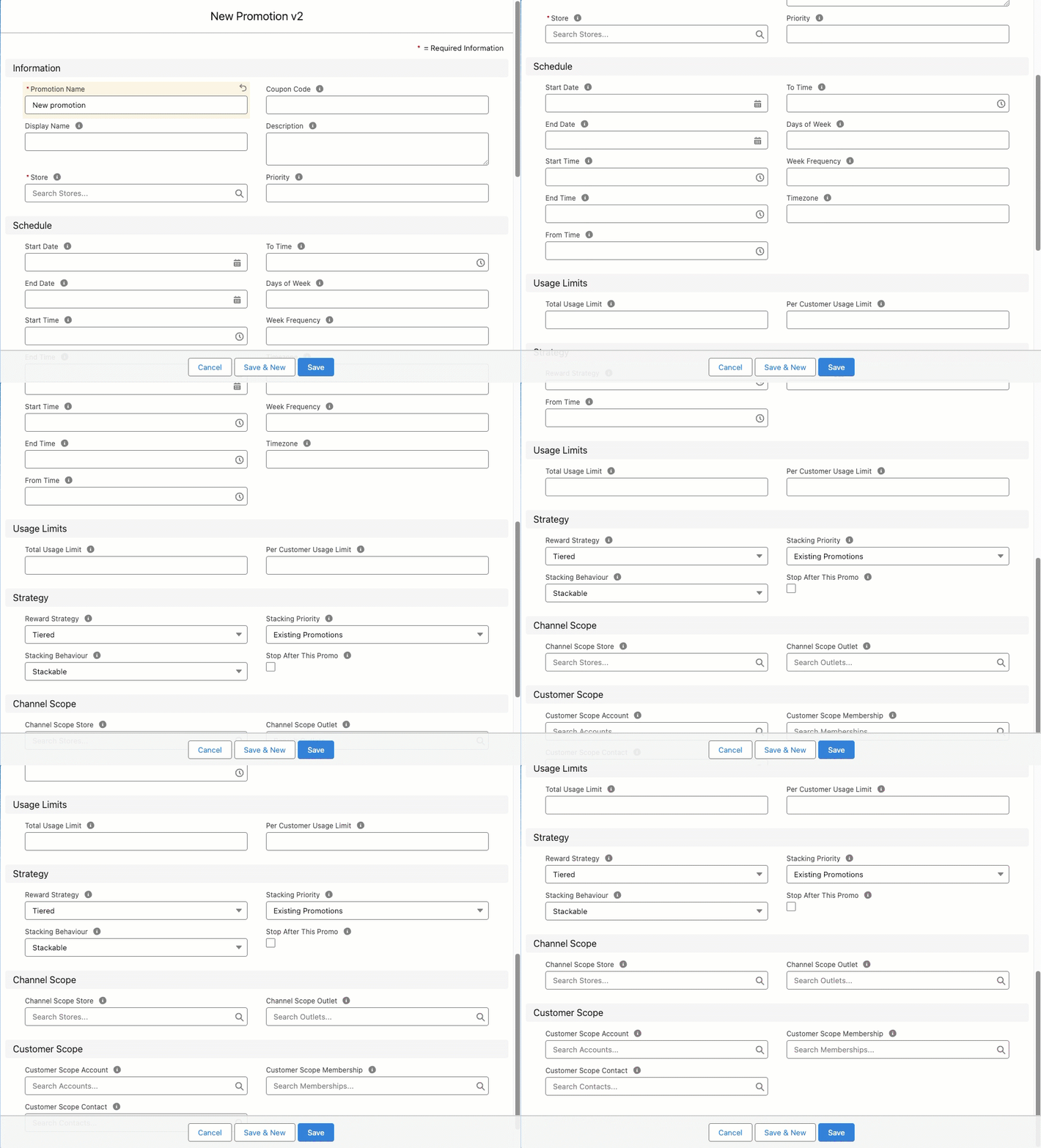
A fully independent second promotions engine runs in parallel with current promotions functions — no migration required and both engines coexist on the same store simultaneously. Advanced Promotions introduces rich scheduling (start/end dates, time-of-day windows, day-of-week, week frequency, timezone), stacking rules (stackable vs non-stackable with priority ordering), customer scoping (Contact, Account, or Membership), channel scoping (Store or Outlet), per-promotion coupon codes, usage limits (total and per-customer), auto-applied promotions, and free-product rewards.
Promotion settings and eligibility rules are configurable via store variables. See Advanced promotions and Store variables.
Other enhancements
- Outlet-scoped discounts — Discounts can be restricted to a specific outlet so they apply only at that POS location. See Discounts.
- Exclude products from price reductions —
Exclude_From_Price_Reductions__cfield onProduct2andPricebookEntryprevents those items from being discounted by promotions or bulk price reductions. See Exclude products from price reductions.
Products and pricing
Product Bundles 2.0
A native bundle product type, independent from the legacy Salesforce CPQ bundle path. Bundles can contain component groups with individual products, quantities, and optional overrides. Bundles are purchasable on the web storefront and at POS. Bundle-only products are blocked from being added to the cart as standalone items. Both CPQ bundles and Bundles 2.0 can coexist in the same store.
See Product bundles.
Enhancements
- Tax-exempt accounts — Accounts (and guest customers using an email tied to a tax-exempt account) are exempt from tax at checkout. See Configure tax exempt customers.
- Variable pricing min/max —
Variable_Pricing_Min_Amount__candVariable_Pricing_Max_Amount__cfields onPricebookEntrybound the acceptable range for variable pricing inputs. - Stock management UX overhaul (Salesforce) — Rebuilt stock management component with improved stock level display, bulk transfer distribution, and draft record handling.
Vouchers
- PIN-protected vouchers — Vouchers can require a PIN at redemption on both web checkout and POS. See Create voucher products and Managing and spending vouchers.
- Voucher redemption logging —
Voucher_Log__crecords are created for every voucher redemption on web and POS, with Event and Reason picklist values. See Managing and spending vouchers. - Voucher sales mechanism — When a voucher product is sold, StoreConnect automatically creates and activates a
Voucher__crecord. New fields onProduct2—Voucher_Requires__c(picklist: what the voucher requires at creation) andVoucher_Uses_Assets__c(checkbox: whether the voucher is asset-backed) — control the creation behavior. A newActivated_At__cfield onVoucher__crecords the activation timestamp. See Create voucher products. - Asset-backed vouchers — A new
voucherUsesAssetsproduct flag enables asset-linked voucher creation and redemption on both POS and web checkout. See Create voucher products. - Voucher activate before date — A new
Activate_Before_Date__cdate field onVoucher__cprevents redemption before the specified date.
Storefront and site builder
Express checkout for logged-in customers
Customers already signed in now experience a streamlined wallet sheet for Apple Pay, Google Pay, Link, and Amazon Pay (Stripe). Contact details (email and phone) are pre-filled from their account and not re-collected. Shipping address and rate selection are still presented in the wallet sheet for physical goods orders, so customers can confirm or adjust their delivery details before completing payment.
See Express checkout.
Liquid Components
The {% component %} tag renders a named Liquid partial via an async request, so sections of a page can load or refresh independently without a full page reload. This enables richer, more interactive storefront experiences — a product recommendation block, a live stock indicator, or a personalized content section — without custom JavaScript or a headless architecture.
See Components for how to create and use components.
Stealth mode
A stealth_mode store variable hides the store from search engines and external services — blocking crawlers, disabling the sitemap, and suppressing the Google Merchant Feed — without disabling the store for customers. Distinct from Test Mode (which still processes real orders) and Store Disabled.
See Stealth mode and Store variables.
Shipping providers
Two new shipping provider types:
- Shippit — connects to the Shippit platform for live rate calculation and label generation. See Shippit shipping provider.
- Custom provider — integrates any HTTP-based shipping rate API via a configurable endpoint, request format, and response mapping. See Custom shipping provider.
Both provider types gain a new Channel field (Web, POS, or blank = both) to restrict them to a specific sales channel.
Account security
Four new security controls, all configurable via store variables:
- Account lockout — locks a customer account after 5 failed login attempts; unlocks automatically after 15 minutes
- Session timeouts — configurable inactivity timeout (default 30 min) and absolute session limit (default 60 min); applies to web sessions only
- Content Security Policy (CSP) — report-only by default; can be switched to enforce mode via
content_security_policy_type - Email confirmation grace period — configurable window during which unconfirmed accounts can still access the store (default 0 minutes)
See Account security settings and Store variables.
Google Tag Manager
A built-in GTM proxy routes script requests and measurement hits through the store’s own domain instead of Google’s servers, bypassing ad blockers and browser tracking restrictions such as Intelligent Tracking Prevention (ITP). Configured via store variables. Built-in ecommerce events (purchase, cart.add) fire automatically. Requires a Google server-side tagging account with a *.fps.goog host.
See Google Tag Manager first-party gateway and Store variables.
Site Builder enhancements
- Store and theme selectors — Store and theme selectors in the builder header allow switching between stores and themes without leaving the builder. Preview mode toggle disables inline editing for an accurate reader view. Template key uniqueness validation prevents duplicate keys. See Website builder.
- Google Merchant Feed enhancements —
g:additional_image_linknow included (up to 10 additional images at original quality). Brand display name used. Graceful error handling skips invalid products rather than failing the entire feed. See View the Google Merchant feed. - Channel scoping on scripts, styles, and shipping — A new
Channels__cmultiselect picklist on Script Block, Style Block, and Shipping Provider restricts each to one or more sales channels (Web, POS, or both). Leaving the field empty is fully backward-compatible. - Contents sidebar — A Contents panel in the Site Builder sidebar lists all content blocks in the current page template, expandable to show nested components. The list refreshes automatically when navigating to a different page.
- Create and rename themes — Themes can now be created and renamed directly from within Site Builder. A New Theme option in the theme selector creates a theme without leaving the builder; an inline rename action updates the theme name in place.
- Base template browser — The template list in Site Builder now shows built-in base templates alongside custom templates, with unified search across both. Base templates can be used as a starting point for creating new custom templates.
- Site Builder error pages — Site Builder and the Salesforce console now display a descriptive error page when authentication fails — for example, if the connected Salesforce user record has not yet synced — replacing the previous silent redirect.
- Theme controllers in theme importer — The
/templates/controllers/directory is now recognized by the Salesforce theme importer, so controller templates are included when importing or exporting themes via the console.
Web store enhancements
- Deposit payment mode on web checkout — Web checkout now respects the deposit mode configured on cart items (
Deposit_Payment_Mode__c). Customers see a clear “Deposit / Total due” breakdown at checkout and on the additional payments page. See Deposits. - Cart items preserved on session expiry — When a logged-in customer’s session expires, their cart is now restored when they sign back in, rather than being replaced by a new guest cart.
- Multiple active delivery windows — The storefront can now query and render multiple concurrent delivery windows, supporting stores with overlapping or time-slot-based delivery schedules.
- Entra ID (Azure AD) login post-checkout — The Entra ID sign-in option now appears after checkout completes, allowing customers to connect their Microsoft account after placing an order.
- SAML login auto-creates Contact — When a customer signs in via a generic SAML provider for the first time, a Salesforce Contact is created automatically if one does not already exist.
- Subscriptions purchasable via express checkout and wallets — Subscription products can now be purchased using Apple Pay, Google Pay, and other wallet providers, removing the need for customers to enter card details for recurring purchases. See Subscription products.
- Require current password to change password — When a signed-in customer changes their password in their account profile, they must first enter their current password, reducing the risk of account takeover via an unattended session.
- User enumeration protection — Login and password reset forms now return identical messages whether or not an email address exists in the system, preventing attackers from discovering valid customer accounts.
- Subscription Pay Owing page — Customers with a failed or past-due subscription renewal can now pay the outstanding amount directly from their account area via a dedicated Pay Owing page, without contacting support. Improved renewal flow also provides clearer status messages. See Manage delinquent subscription payments.
- Reorder Now copies custom form answers — When a customer uses Reorder Now, custom product form answers from the original order are copied to the new cart, reducing re-entry for products with required custom fields.
- Featured products on category pages — Product categories can have a set of featured products that display prominently on the category page. Enables merchandising highlights without manual theme customization.
- Multiple saved carts — web cart selector — Logged-in customers can choose which of their saved carts to resume from a list, rather than having only the most recent cart automatically loaded. See Manage multiple carts per customer.
- Abandoned carts no longer create stub orders — Checkout sessions that are started but not completed no longer generate empty
Orderrecords in Salesforce. Orders are created only when a payment is initiated, reducing noise in order reporting and Salesforce automation. See Abandoned carts. - POS cart discounts applied in web checkout — When a POS cart is paid via web (Pay By Link), cart-level discounts applied in POS are correctly carried through to web checkout totals and displayed on the order summary page.
Liquid and developer
Liquid request headers
current_request.headers now exposes a Headers drop giving Liquid templates read access to HTTP request headers. Access by name using bracket notation (headers["Accept-Language"]) or dot notation (headers.accept_language); header names are case-insensitive and underscores convert to hyphens. Sensitive headers (authorization, cookie, proxy-authorization) are always denied. Multi-value headers are parsed correctly per RFC 7230.
See Request - Liquid Object Reference.
Filters
- Liquid encrypt and decrypt filters — New symmetrical
encryptanddecryptfilters supporting String, Integer, Float, Array, and Hash types with an optionalsaltparameter. See encrypt - Liquid Filter Reference and decrypt - Liquid Filter Reference. - Liquid enhancements — Four additions:
markdownfilter (GFM with sanitization); geolocation fields oncurrent_request(country, region, city — IP-derived); distance calculations in Liquid queries via{% struct %}syntax; alternate MIME types for page templates (e.g.text/plainforrobots.txt). See Liquid filters and Liquid query.
Liquid queries
{% liquid_query %}enhancements — Now supports querying subscriber-defined custom objects, result ordering via anorder:parameter, and extended filter operators including pattern matching and comparison. See Liquid query.- Liquid in POS action params — All POS layout action parameter fields now support Liquid templating, with
record,cart,outlet, andcurrent_contactavailable as context variables.
Cart and checkout Liquid
cart.createLiquid action — Creates a new empty cart and sets it ascurrent_cart. Works for guests and logged-in users.cart.selectnow also acceptssc_idin addition tosfid.cart.cloneLiquid action — Clones the current cart to a new cart. Useful for re-order flows and quote duplication.- Custom data on Cart and Cart Item drops —
cart.custom_dataandcart_item.custom_dataare now accessible in Liquid templates, enabling custom field values from Salesforce to be rendered on cart and checkout pages. - Order Item Drop additional fields —
order_item.unit_price,order_item.price_excl_tax, andorder.sub_total_excl_taxare now available in Liquid, giving templates access to pre-tax pricing data without manual calculation.
Developer tools
- Product JSON-LD / rich data snippet — Major overhaul: product images included, price range display,
hasVariants/isVariantOf/variesByarrays,productGroupIDvia SFID. Pricing always displayed; stock only shows Out of Stock when Track Inventory is on and item is unavailable. See Product rich data snippet. - Alternate MIME types for content pages — Page templates can serve non-HTML content (e.g.
text/plain,application/xml) by including the MIME type in the template key. See Content pages. - Alternate MIME types for articles — Articles now support the same alternate MIME type behavior as pages, resolved via URL extension or Accept header (e.g.
article.xml.liquid,article.md.liquid). Article previews in Salesforce now render in the correct format rather than always as HTML. - Chunked theme resources — Theme template files larger than 131,072 characters are now stored and served as sequential chunks, removing the previous size limit on large Liquid files.
Salesforce and admin
Salesforce Console redesign
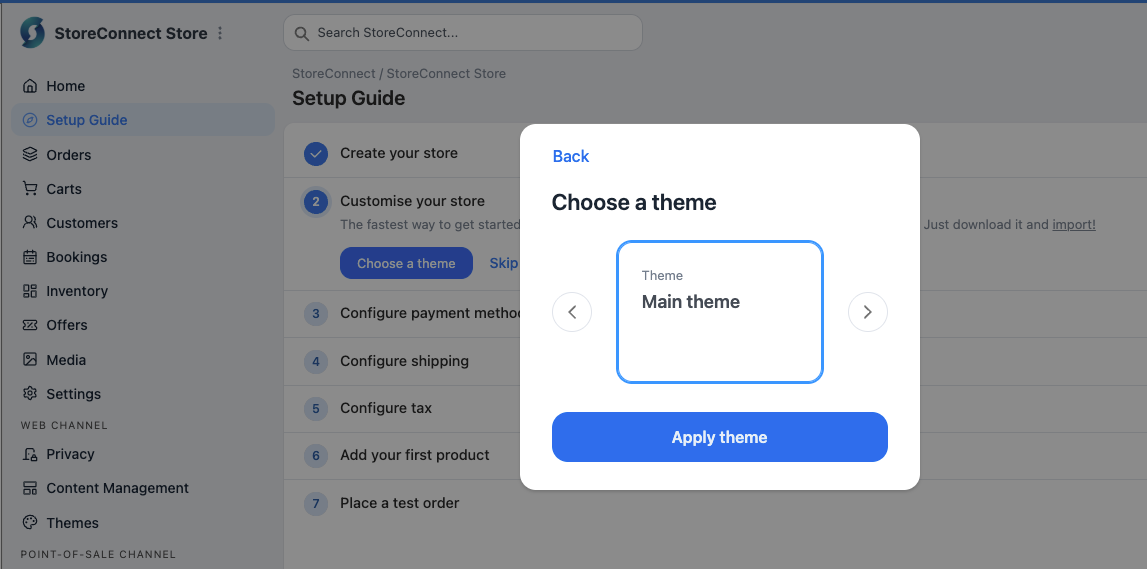
A full redesign of the StoreConnect setup experience. Each setup step (store creation, theme selection, payments, shipping, tax, product, test order) now opens a focused modal dialog. Steps can be skipped and completed later. Progress is tracked visually and credentials are masked after entry.
See About the StoreConnect console.
Custom object sync via flows
A new Salesforce invocable action — StoreConnect: Sync Record Changes — enables Flow-triggered sync of custom objects to the web store and POS. Set up Flow triggers on create, update, and delete events for any custom object to keep it in sync. Custom objects used in POS layouts are also kept in sync automatically.
See Sync custom objects using flows and Add custom data fields to your store.
New fields and objects
- Cart Fulfillment sync to Salesforce —
CartFulfillment__candCartFulfillmentItem__crecords now sync from POS to Salesforce, enabling reporting and automation on fulfillment method, payment mode, quantities, and linked assets. - Register Shift additional fields —
Bank_Deposit_Reference__c,Counted__c(sum of shift totals), andEnded_By_User_Id__cadded toRegister_Shift__c.Amount__c(counted) andExpected__c(expected from orders) added toRegister_Shift_Total__c. - Contact audit timestamps —
Invitation_Accepted_At__candPassword_Reset_At__cDateTime fields added to Contact for auditing account activity. - Discount fields on Cart and Cart Item — New fields on
Cart__candCart_Item__c—Discount_Mode__c,Discount_Amount__c, andDiscount_Percentage__c— record how discounts were applied at both cart and line-item level, enabling discount reporting and automation from Salesforce. - Cart Customer Notes field — A new
Customer_Notes_Long__clong text field (up to 10,000 characters) onCart__cstores customer notes. Notes entered in web checkout and in POS are persisted to this field and visible on the Cart record page in Salesforce. - Cart Item deposit fields — Two new fields on
Cart_Item__csupport deposit-based payments:Deposit_Payment_Mode__c(picklist: All, None, Specify amount, or Specify percentage) andDeposit_Percentage__c(numeric). These align Cart Item deposit configuration with how the web storefront manages deposits. See Deposits. - Minimum deposit on Pricebook and Pricebook Entry — A
Minimum_Deposit__cfield on Pricebook2 and PricebookEntry enforces a minimum deposit amount before a record can be saved, ensuring consistent downstream deposit and installment flows. - Subscriptions table on Order record page — The Order record page in Salesforce now shows a related Subscriptions list, giving administrators a direct view of subscriptions associated with the order without navigating away. See Subscription products.
- Wallet type on Payment records — Payment records for wallet-based transactions now display the wallet type (Apple Pay or Google Pay) so administrators can identify the payment instrument used at a glance.
- PricebookEntry
tax_method: Inherit — A newInheritvalue on thetax_methodpicklist onPricebookEntrycauses individual entries to fall back to the store-level tax method, reducing the need to set explicit tax methods on every entry when the store default is correct.
Console tools and admin
- Media Manager — Folder organization, grid/list view switching, favorites, search, tags, and role-based access in the Salesforce console. See About the media manager.
- Schema Explorer — New admin tool in the Salesforce console to explore StoreConnect object schemas, field types, and relationships. See Schema explorer.
- Register tab — A dedicated Register tab added to the StoreConnect console menu.
- Post-upgrade picklist updater — A new in-console utility updates picklist values after a package upgrade in subscriber orgs, removing the need for manual field edits following an upgrade.
- Open in Website Builder from Salesforce — Content Change records in Salesforce now include an “Open in Website Builder” button, providing a direct link from the record to the relevant page in Site Builder.
- Media Manager import progress indicator — Media items currently being imported show a placeholder icon in the Media Manager list view so admins can see import progress without refreshing.
Automation and sync
- Per-record sync opt-in — Change event filtering can now be applied at the record level across batch and poll sync paths.
- Route mapping auto-generation — Route mappings are now automatically created whenever the path or slug of a product, page, article, article category, or product category changes in Salesforce, keeping redirects current without manual intervention. Uniqueness validation prevents conflicting or circular redirect paths.
- Delinquent subscription retry — Recurring subscription retries now resume correctly after failed payments. Previously, customers could become stuck in a delinquent status with retries not continuing as expected; they now proceed correctly.
Bug fixes
These are a selection of the most requested fixes.
- Fixed outlet pricebook not being applied to POS orders when configured.
- Fixed Pay By Link email validation in POS.
- Fixed phantom cart item appearing on POS cart in certain conditions.
- Fixed free text search for hyphenated values in POS.
- Fixed country code resolution for POS delivery rate fetching.
- Fixed Apple Pay eWAY express checkout flow.
- Fixed
paid_attimestamp for web and ecommerce payments. - Fixed Avalara ping route for stores with a base path.
- Fixed bulk product option endpoint for form-encoded params.
- Fixed custom object mapping poll import.
- Fixed tax recalculation for POS orders with free-text country names.
- Fixed theme importer failure when outbound email is unavailable.
- Fixed duplicate-resolution indexes on Account, Contact, and Lead.
- Fixed custom form file upload URLs not being saved to form submissions at checkout.
- Fixed Avalara incorrectly including promotional, cash rounding, and tipping line items as taxable, causing double tax calculation for Avalara-integrated stores.
- Fixed nil unit price on orders when loyalty points were applied to shipping costs.
Infrastructure and dependencies
- POS data sync is faster and more reliable, with improved data prioritization, configurable filtering, and better handling of large datasets.
- POS customer and record search now combines locally cached data with live results for faster, more complete lookups.
- Gateway request logs are redacted for PCI compliance.
- Checkout performance improvements.
In this section
Was this article helpful?
Thanks for your feedback! It helps us improve our docs.