

Pay on account at checkout
On this page
Allow any pre-authorized Account and Contact to complete a checkout using a purchase order number. No immediate payment is required to complete the checkout. Depending on whether you have offered a line of credit, you can then fulfill the order or wait for payment before fulfilling.
This suits customers who buy for a business. They are spending someone else’s money, against a budget code, at terms their company negotiated, and often cannot pay by card at all.
To authorize a customer to use this feature, all three of these must be true:
- Pay By Account is selected on the Account record (
s_c__Pay_By_Account__c). - Authorised to purchase for Account is selected on the Contact record (
s_c__Can_Purchase_For_Account__c). - Account is on credit hold is clear on the Account record (
s_c__Credit_Hold__c).
You can automate the first two as part of your onboarding process in Salesforce.
The option appears at checkout for any signed-in contact whose Account has Pay By Account selected. The other two conditions are checked when the payment is submitted, not when the option is shown, so a contact who is not authorized still sees the option and the purchase order form, and the payment fails when they submit it.
:::note Account is on credit hold is how you suspend an account without withdrawing its approval. While it is selected, the contact still reaches the pay on account option at checkout, but the purchase order form is replaced by a message telling them the account is on hold. Clear the checkbox and the option works again, with no other change needed. See Customers and accounts. :::
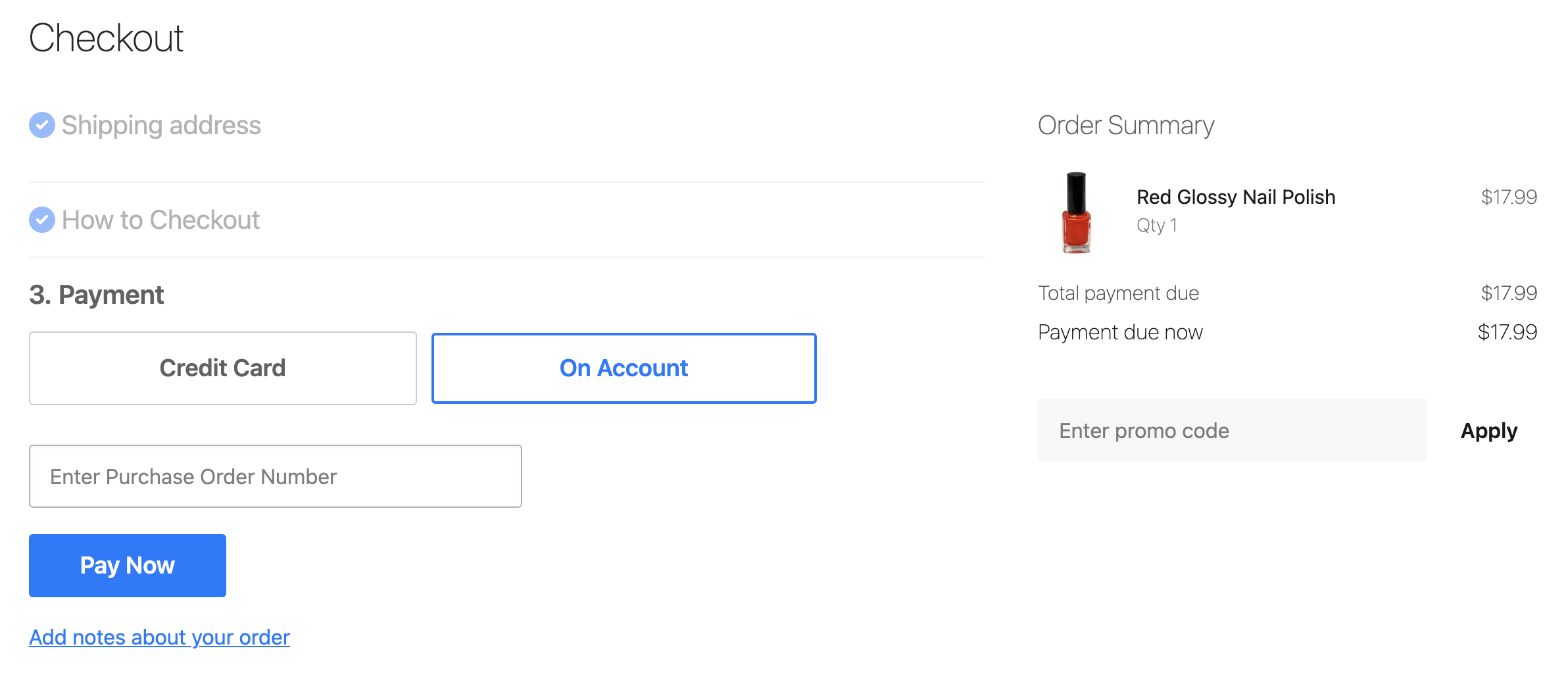
Purchase order number
When a customer chooses to pay on account, they are asked to enter a purchase order number. The value they enter is stored in the Transaction Number field on the order’s payment record.
A buyer whose finance team matches invoices to purchase orders needs the number captured at the point of ordering, rather than emailed afterwards, which is why the field is required by default through the HTML attribute required="true". To make it optional, add a theme variable with the key checkout.pay_by_account.require_po_number and a value of false.
Supported features
| Feature | Supported |
|---|---|
| Standard Checkout | 🟢 |
| Subscriptions | 🟢 |
| Update Subscription | |
| Additional Payment | |
| Salesforce Payment | 🟢 |
| GooglePay | |
| ApplePay | |
| Express Checkout | |
| Preauthorization |
Payment provider configuration options
| StoreConnect Field | Usage | Input |
|---|---|---|
| Provider | Picklist Value API Name = PayByAccount | Picklist |
| Display Name | Purchase Order or Charge to My Account, etc. | Plain Text |
| Description | Terms are Strictly 30 days, etc. | Plain Text, Markdown, HTML |
| Payment Information | e.g: Statements are sent at the end of each month and payment is due by the end of the following month. | Plain Text, Markdown, HTML |
| API Mode | Live / Testing, etc. | Plain Text |
| API Key | ||
| API Secret | x | Plain Text |
| API Options |
Pay on Account does not use an API Secret, but since it is a required field you need to give it a value. For simplicity you can mark it with an x.
Other ways to let a customer defer payment
Trade customers often ask for these by the wrong name, and they behave differently:
- Account credit is a stored balance the customer has already paid in or been credited, spent down as they order. See Account credit.
- A deposit takes part of the value at checkout and leaves the balance to be collected later. See Accept deposits for purchases.
What this does not decide
The checkout builds its list of payment methods from the providers that are active on the store for that sales channel, from whether the order is a recurring or a Salesforce payment, and, for pay on account, from the Pay By Account setting on the customer’s Account. Pay on account is also excluded when the customer is making an additional payment against an existing order.
Nothing in that list depends on what is in the cart. A rule such as offering account terms only above a certain order value, or only for a particular product range, is not something this setting can express, because approval is held against the customer rather than the order. An approved buyer sees the option on every cart. To vary it by cart, hide the option in the checkout template instead. See Theme templates and Liquid controllers.
Approval inside the buyer’s own organization, where one person builds the order and another authorizes the spend, is not part of the checkout either. A quote request is the closest thing to it, because it produces a priced document the buyer can take to whoever signs it off. See Enable customers to request product quotes.
Confirm it is working
Sign in as an approved contact and open the checkout. The pay on account option appears alongside your other payment methods, and selecting it asks for a purchase order number. Complete the order and confirm the resulting Order carries the account, the contact, and the purchase order number in Transaction Number, so finance can invoice it without going back to anyone.
Was this article helpful?
Thanks for your feedback! It helps us improve our docs.