

Custom shipping rates
On this page
Shipping Rates rely on Configure zones for tax and shipping areas to determine what rates are available for each order. If the shipping address is within any of the zones for an applicable Shipping Rate, that rate will be available to the customer. It is often easier to set up your zones prior to setting up Shipping Rates. If an order shipping address does not fall within a zone used by any applicable shipping method, shipping will not be available to that customer at the checkout.
Example shipping rate configuration
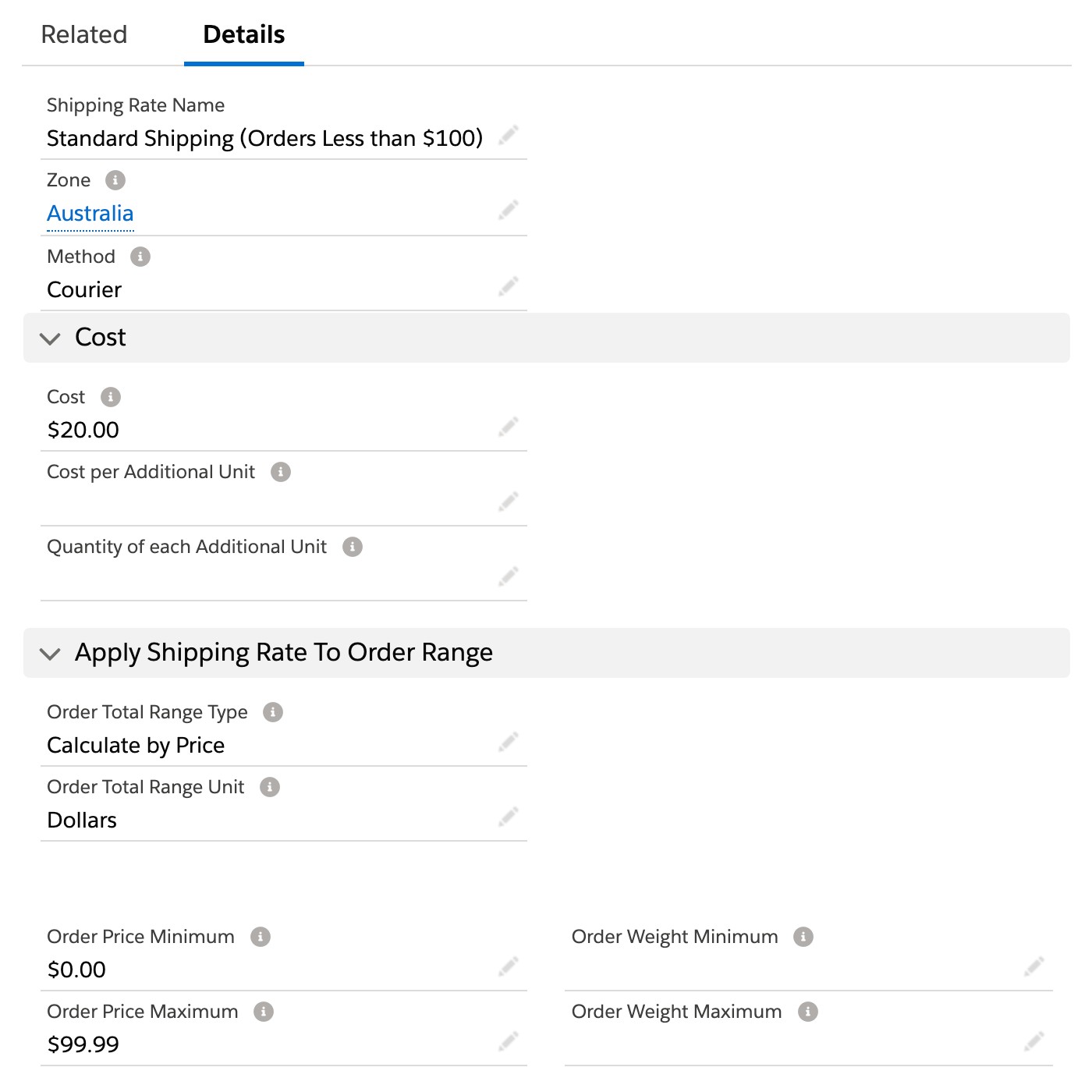
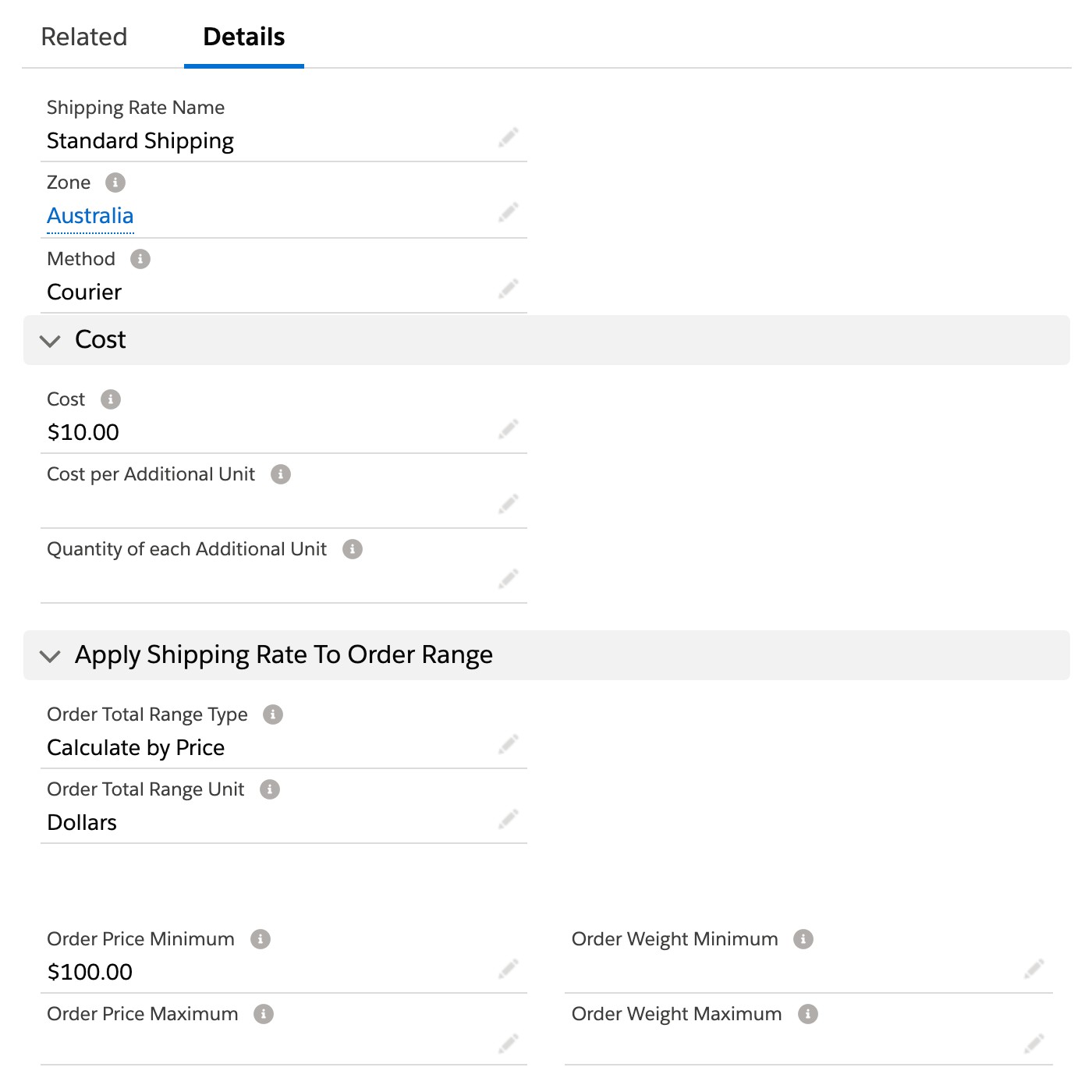
For all products add Courier to the Shipping Method multi-select picklist field on the product record. Any order less than $100 will pay $20 for shipping, all others will pay $10.
The above example uses total order price to determine what ‘Courier’ method rate to apply to the order. You can also determine the rate based on the cart weight. To make this work, all products that are assigned that shipping method must have a weight and weight unit entered into the product record.
If free shipping is offered for a selection of products, you could add the following Shipping Rate:
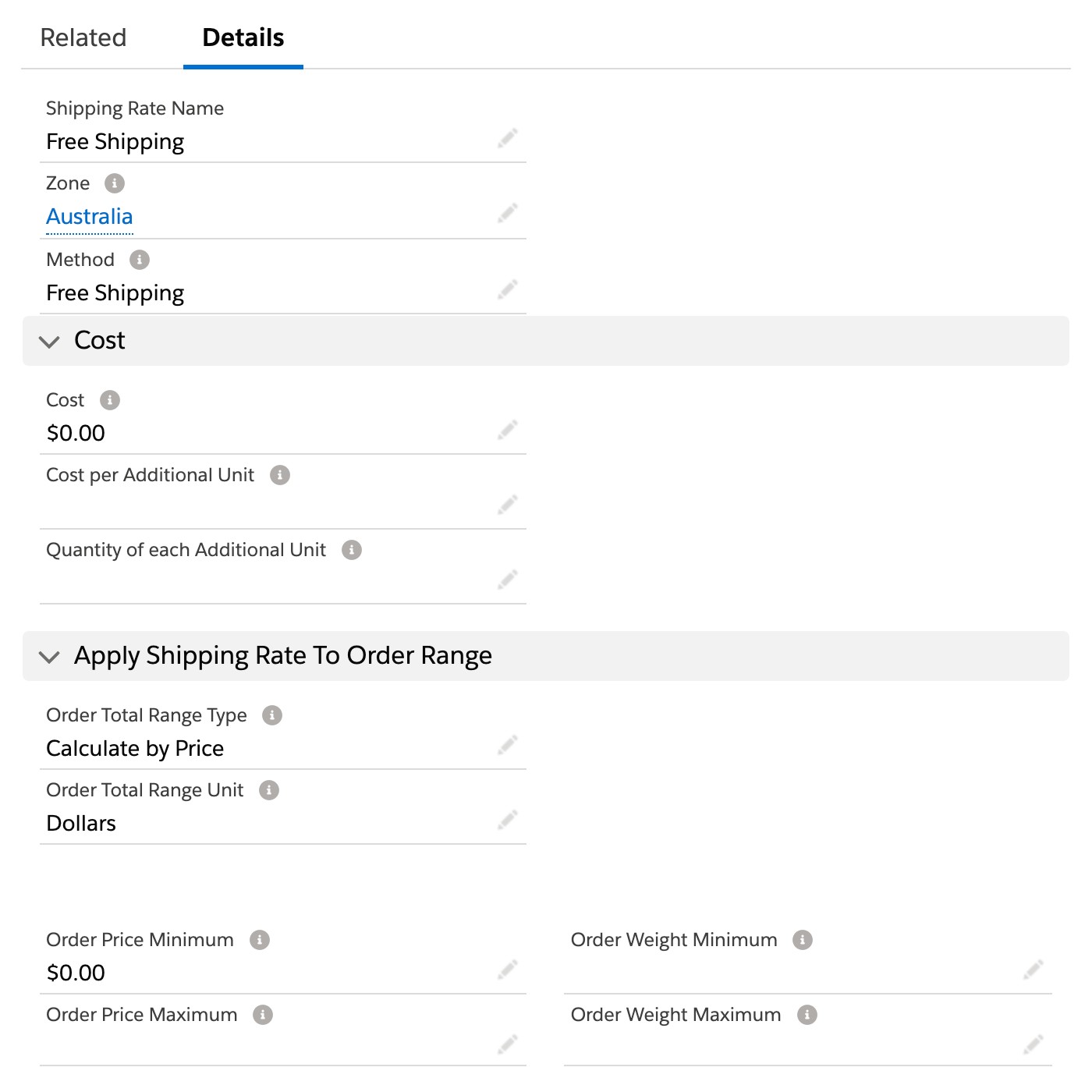
For all products that qualify for Free Shipping, add Free Shipping to the Shipping Method multi-select picklist field on the product record. If free shipping doesn’t apply to all products, add Courier to the Shipping Method multi-select picklist for all products including the ones that get free shipping. This will ensure a common Shipping Method exists for all products. In this example, orders that only contain products with free shipping will ship for free, for all other orders, those less than $100 will pay $20 for shipping, the rest will pay $10.
You can provide multiple options to your customers, applying to different zones and order subtotals. When a customer goes through the checkout process, they will be able to select their preferred option. Once they have paid for their order, you can then view and edit the Shipment record in Salesforce and manage the remainder of the shipping process. See Split shipments and manual shipping.
Scope shipping rates to channels
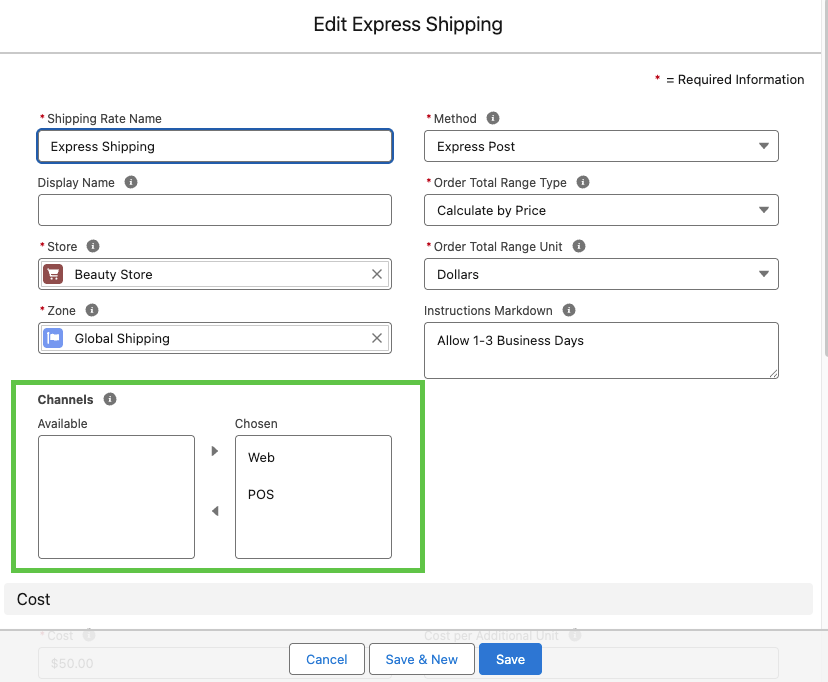
The Channels field on a Shipping Rates record controls which sales channel the shipping rate applies in. To see the Channels field you may need to add it via the Object Manager.
Use channel scoping when you need different shipping rates for in-store versus online — for example, a flat “Local pickup” rate that only appears on POS.
| Channel | Effect |
|---|---|
| Web | Rate appears at web checkout only; not available in POS |
| POS | Rate appears in POS only; not available at web checkout |
| Web + POS | Rate is available on both channels |
Carrier pricing rules
When using an external shipping carrier that quotes rates dynamically, you can adjust the carrier-quoted price before it is shown to the customer. Pricing rules are configured on the Shipping Carrier Product record in Salesforce.
The rules apply in this order:
- Fixed Price — if set, overrides the carrier-quoted price entirely. All other rules are ignored.
- Markup Percentage — adds a percentage on top of the carrier-quoted base price (for example,
10adds 10%). - Markup Amount — adds a flat amount on top of the marked-up price.
- Min Price — raises the result to this floor if it falls below it.
- Max Price — clamps the result to this ceiling if it exceeds it.
Leave any rule blank to skip it. Validation prevents negative values and ensures Max Price is not set below Min Price.
| Field | API Name | Effect |
|---|---|---|
| Fixed Price | s_c__Fixed_Price__c |
Hard override — ignores all other rules |
| Markup Percentage | s_c__Markup_Percentage__c |
Adds a percentage to the carrier-quoted price |
| Markup Amount | s_c__Markup_Amount__c |
Adds a flat amount after the percentage markup |
| Min Price | s_c__Min_Price__c |
Sets a minimum floor after markup |
| Max Price | s_c__Max_Price__c |
Sets a maximum ceiling after markup |
Incremental cost shipping rates
Some shipping companies may charge a flat rate plus an extra amount per weight unit (i.e. 40c per kg or $1.20 per 3kg).
You can allow for this using the Cost Per Additional Unit field and the Quantity of each Additional Unit field.
- Name: Express Courier (Sydney Metropolitan Area)
- Zone: Sydney Metropolitan Area
- Order Total Range Type: Calculate by Weight
- Order Total Range Unit: kg
- Cost: $25.00
- Unit Quantity: 1
- Unit Cost Amount: $0.40
- Order Weight Minimum: 0
- Order Weight Maximum: None
This would then charge $25 as a base rate and $0.40 per kg after that. Note, the minimum price a customer would be charged in this case would be $25.40 for the first kg.
Was this article helpful?
Thanks for your feedback! It helps us improve our docs.