

SEO and site data
On this page
Search engine optimization (SEO) is the process of improving a website’s visibility on search engines. Search engines read your pages and decide how to classify and rank them. Part of what they read is metadata: the Meta Title, Meta Description, and related fields you set on each record in StoreConnect to say what a page is about.
Use this article to populate that metadata correctly across your store, understand what StoreConnect falls back to when a field is blank, and see what else affects how your store ranks.
SEO and AEO
This article covers traditional search: helping engines such as Google rank and display your store in results pages.
Its companion, Answer engine and generative engine optimization (AEO/GEO), covers AI answer engines such as ChatGPT, Perplexity, Claude, and Google’s AI Overviews, which answer a shopper’s question directly and cite their sources.
The two are not separate projects. The metadata described on this page is the foundation
AEO builds on: accurate, specific titles and descriptions on your products, categories,
articles, and pages are what both a search engine and an answer engine read. Google’s own
guidance is that AI visibility is largely a byproduct of standard SEO and content
quality. Do the work on this page first, then see the AEO article for the additional
levers (structured data feeds, llms.txt, and AI crawler access).
What affects your ranking
Meta fields are the part of SEO you set on each record, and most of this article covers them. They are not the whole of it. Search engines now weigh the experience and structure of the page at least as heavily as its metadata:
| Area | Where it is handled |
|---|---|
| Accurate titles and descriptions | This article |
| Structured data for products, so results can show price, availability, and reviews | Structured data for product SEO |
| A current sitemap, so new and changed pages are found quickly | Manage the sitemap for your store |
| Crawler access rules | Edit robots.txt to prevent search engine indexing |
| Keeping thin or duplicate pages out of the index | Implement ‘noindex’ tags on specific pages using Liquid |
| Page speed, mobile layout, and stable rendering | Your theme |
| Being cited by AI answer engines | Answer engine and generative engine optimization (AEO/GEO) |
Two things carry more weight than any tag. Content quality means pages that genuinely answer what the shopper asked. Page experience means fast loading, a layout that works on a phone, and content that doesn’t shift as it renders. A perfectly populated Meta Description will not rescue a slow page with thin content.
SEO fields
Two fields do the work on every record.
Meta title
The title of the page, shown in the browser tab and as the headline in search results. On the Store record it acts as the site-wide default.
Meta description
A short summary of the page. This is the copy a shopper reads underneath your link in a search results page, so it is doing sales work, not just classification. Write it for that reader: a specific, accurate sentence describing what the page offers will earn more clicks than a list of terms.
Answer engines use it the same way, as a concise statement of what the page is about.
Google documents the description tag, along with the other meta tags it supports, in Meta tags and HTML attributes that Google supports. Its own description of the tag is deliberately cautious:
Use this tag to provide a short description of the page. In some situations, this description is used in the snippet shown in search results.
:::note
“In some situations” matters. Google may replace your description with text taken from the page when that looks like a better answer to the shopper’s query. A good description makes it more likely yours is used, but nothing guarantees it. This is another reason page content matters as much as the metadata describing it.
:::
| Metadata field | Usage |
|---|---|
| Meta Title | 50 - 60 characters describing the page |
| Meta Description | The description that shows up on search results. Usually less than 300 characters |
A note on meta keywords
The meta keywords tag is deprecated. Google stopped using it as a ranking signal in 2009 and the other major search engines followed, so it is not covered on this page, and populating it will not improve your search position.
The s_c__Meta_Keywords__c field still exists on your records, and StoreConnect still
renders it as a <meta name="keywords"> tag on the page, so nothing breaks if you already
populate it. Just do not treat it as SEO work. The Google and Facebook merchant feeds do
not read this field; their description comes from Meta Description and the search
description, not from keywords.
How to make SEO fields available
In some cases, such as the product object, the meta fields are not displayed by default. You will need to change the assigned page layout or add the field to your config page layout. Refer to Change page layouts for Salesforce objects for instructions.
Bulk importing metadata
Meta Title and Meta Description fields can be bulk imported or updated using any
standard Salesforce data tool (Data Loader, Data Import Wizard, Workbench, or similar) by
mapping to the relevant fields on the record (for example, s_c__Meta_Title__c and
s_c__Meta_Description__c on Product2).
You can also use the StoreConnect product importer CSV by adding the meta title and meta description columns and mapping them to the correct fields during the import.
What metadata is inserted
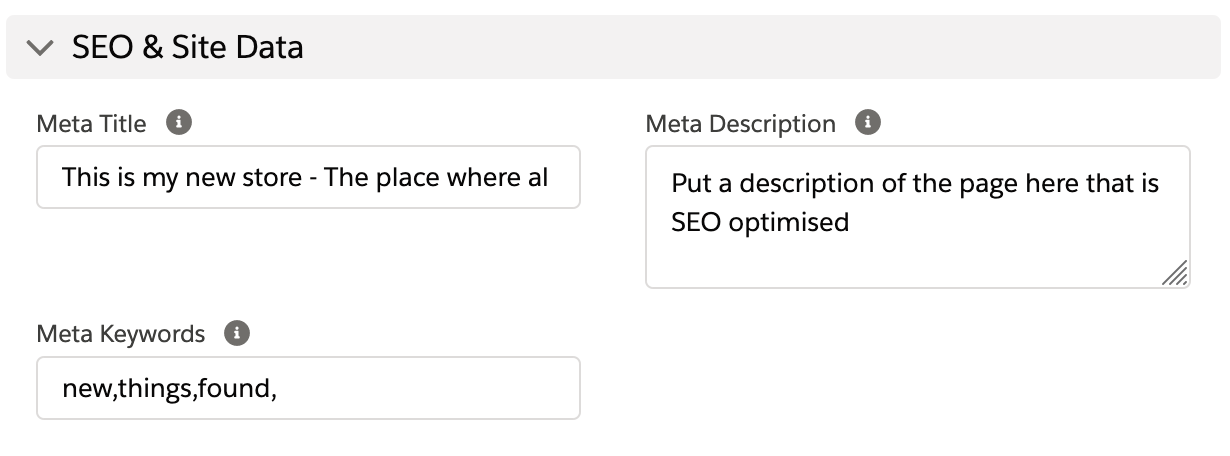
What your customer is looking at on the store will determine which set of metadata is inserted into the page currently being viewed.
A full description of each type is detailed in our Dynamic page information and metadata help article.
Site data details for the store
These fields exist for several objects, and the SEO fields on the Store object act as a default for any page in that store that doesn’t have its own SEO metadata.
You can provide these records with SEO metadata:
- Stores
- Location Group
- Locations
- Pages
- Article Categories
- Articles
- Product Categories
- Products
Other content on your pages and articles can also assist SEO, including content block text and text within fields like Introduction and Information on the product category pages.
Default values
Each record with metadata fields will try and return an intelligent default value if the metadata fields are blank. These default values are used for the page metadata as well as the description within the merchant feeds for products.
Where an entry says “Store” it means the content is taken from the Store record as a
fallback. For example, the product Meta Title returns Product2.s_c__Meta_Title__c
first, then Product2.s_c__Display_Name__c, then Product2.Name, and finally the store
meta title if all three are blank.
The full list of default values for each record type follows.
Products
- Meta Title:
s_c__Meta_Title__c->s_c__Display_Name__c->Name-> Store - Meta Description:
s_c__Meta_Description__c->s_c__Search_Description_Markdown__c->s_c__Summary_Markdown__c-> Brand Names plus Product Name
Product categories
- Meta Title:
s_c__Meta_Title__c->s_c__Display_Name__c->s_c__Title__c-> Store - Meta Description:
s_c__Meta_Description__c->s_c__Introduction_Markdown__c->s_c__Information_Markdown__c-> Store
Articles
- Meta Title:
s_c__Meta_Title__c->s_c__Title__c->Name-> Store - Meta Description:
s_c__Meta_Description__c->s_c__Intro_Markdown__c->s_c__Summary_Markdown__c-> Store
Article categories
- Meta Title:
s_c__Meta_Title__c->s_c__Display_Name__c->Name-> Store - Meta Description:
s_c__Meta_Description__c->s_c__Introduction_Markdown__c->s_c__Information_Markdown__c-> Store
Pages
- Meta Title:
s_c__Meta_Title__c->s_c__Title__c->Name-> Store - Meta Description:
s_c__Meta_Description__c-> Store
Locations
Locations are Account records, and their meta fields carry a Location_ prefix rather
than the plain names used on other objects.
- Meta Title:
s_c__Location_Meta_Title__c->s_c__Location_Display_Name__cplus Location Group Title, or Store - Meta Description:
s_c__Location_Meta_Description__c-> Store
Location group
- Meta Title:
s_c__Meta_Title__c->s_c__Display_Name__c->Name-> Store - Meta Description:
s_c__Meta_Description__c-> Store
Stores
- Meta Title:
s_c__Meta_Title__c->Name - Meta Description:
s_c__Meta_Description__c
Order of priority
Given that you can be viewing an article, which is within an article category, that is within a store, there are multiple meta title and meta description fields that could be returned.
The metadata is returned in the following order of priority:
- Products
- Product Categories
- Articles
- Article Categories
- Pages
- Locations
- Location Group
- Stores
So if you are showing a product, its metadata will be returned instead of the store’s (or any other metadata).
Beyond metadata
Populating the fields above is necessary, and it is not sufficient. The sections below cover the rest of what determines whether a shopper finds your store.
URLs and redirects
A page’s URL is part of its identity in search. Rankings and inbound links attach to the URL, not to the record behind it.
- Set a readable, stable slug when you create a record.
s_c__Slug__con a product ands_c__Slug__c/s_c__Path__con a page control the URL. - Keep slugs short and descriptive. Prefer
merino-hiking-socksoverproduct-00123-v2-final. - Treat a published slug as permanent. Changing it changes the URL, and the old one stops working. Any ranking and any link pointing at it is lost.
- When a URL genuinely must change, redirect the old one to the new one. See Route mapping and 301 redirects.
- When migrating from an existing website, map the old URLs to the new ones before launch. See Redirect to StoreConnect from existing web pages.
:::warning
Losing a redirect map at cutover is the most damaging and least reversible SEO mistake in a migration. Search engines drop the old URLs, and the new pages start from nothing.
:::
Canonical URLs and social previews
StoreConnect generates these for you, so there is nothing to populate.
- Canonical URL — tells search engines which address is authoritative when the same content is reachable by more than one path, such as a product listed in several categories. This prevents the duplicate-content problem that otherwise affects most online stores.
- Open Graph tags — control the title, description, and image shown when a page is shared on social platforms or in messaging apps.
Both are built from the same metadata described on this page, which is another reason accurate titles and descriptions matter. See Dynamic page information and metadata for exactly what is generated.
Keyword and competitor research
Metadata describes content you already have. Research decides what content to create, and it is the step most stores skip.
- Start with the words your customers use, not your own. Trade terms rarely match what a shopper types. The cheapest source of real customer queries is the Performance report in Google Search Console, which lists the terms people searched before your store appeared. See Analyze search performance.
- Read your support inbox and reviews. Recurring questions are search queries written out in full, and each one is an article waiting to be written.
- Group queries by intent, not by volume. “Best hiking socks for winter” and “buy merino socks” want different pages. Map each group to the page type that answers it using the table below.
- Look at who currently ranks for the terms you want. Search them and read the pages that come back. What questions do they answer that you do not? Which page type is winning, a product page, a category, or a guide? That tells you what the engine thinks the query means.
- Check what competitors do not cover. A specific question nobody has answered well is easier to win than a broad term everyone targets, and it usually attracts shoppers closer to buying.
- Write the page, then record the terms in the Meta Title and Meta Description naturally. Do not stuff keywords into the metadata fields, which does not help ranking and reads badly to the customer who sees it in the results.
:::tip
Terms you find this way are also worth adding to the Search Keywords field on the matching product, article, or page, so shoppers using your own store search find the right result. See How storefront search works.
:::
Content mapping
Different page types answer different kinds of question. Mapping them deliberately is more effective than optimizing every record the same way.
| Page type | The question it should answer | Example |
|---|---|---|
| Product | “I want to buy this specific thing” | Merino hiking socks |
| Product category | “I want to compare options in a group” | Hiking socks |
| Article | “How do I decide, or how does this work?” | How to choose hiking socks |
| Page | “Who are you, and can I trust you?” | About us, shipping, returns |
Shoppers early in a decision search in questions and land on articles; shoppers ready to buy search for the thing itself. A store with only product pages competes solely on the final query and is invisible for everything leading up to it.
This also matters for AI answer engines, which draw heavily on explanatory content when composing an answer. See Answer engine and generative engine optimization (AEO/GEO).
Internal and deep links
Search engines discover pages by following links, and links pass authority between pages. Within a StoreConnect store you control this through:
- Menus — the primary path to your main categories and pages.
- Content blocks — link from articles and landing pages to the products and categories they discuss.
- Related and featured products — connect products to each other.
- Deep links — link straight to a category, a filtered listing, or a specific product rather than to the home page. A link to the exact page is worth far more than one to the front door.
A page reachable only by search box, with nothing linking to it, is effectively invisible to a crawler.
Also worth doing
- Image alt text — describes an image to search engines and to screen readers. See Uploading media.
- Breadcrumbs — show shoppers and crawlers where a page sits in your structure.
- Pagination — long category listings should page cleanly so every product remains reachable.
Measure what happens
Everything above is an input. To see the output, verify your store with Google Search Console and submit your sitemap. It reports which queries brought shoppers to your store, which pages are indexed, and which pages a search engine tried to read and could not. It is also where you diagnose a store that is not appearing in results at all.
See Analyze search performance.
Next: answer engines
Once your titles and descriptions are accurate and specific, the same content is what AI
answer engines read when deciding whether to cite your store. See
Answer engine and generative engine optimization (AEO/GEO)
for what to do beyond this page: structured data feeds, llms.txt, AI crawler access, and
how to check whether your store is being cited.
Was this article helpful?
Thanks for your feedback! It helps us improve our docs.