

Store variables
On this page
Store Variables are used to set parameters that dictate how your store works. They are always optional (because they have default values) and can be changed to affect your store or to provide custom values that apply for your Store, eg. API keys for third-party services.
When adding a store variable, you should know what variable are already available to use, what values the variables can contain, and what effect each will have on your store. You are not limited to these as you can create any variables you want and update your theme to make use of them.
Themes have Theme Variables and these work in much the same way. The key difference is that a Theme Variable’s value is used for all stores that use that theme, whereas Store Variables only impact that store.
If you want to override a Theme Variable for a single store, create a Store Variable for that store using the same key used by the theme.
Adding a store variable
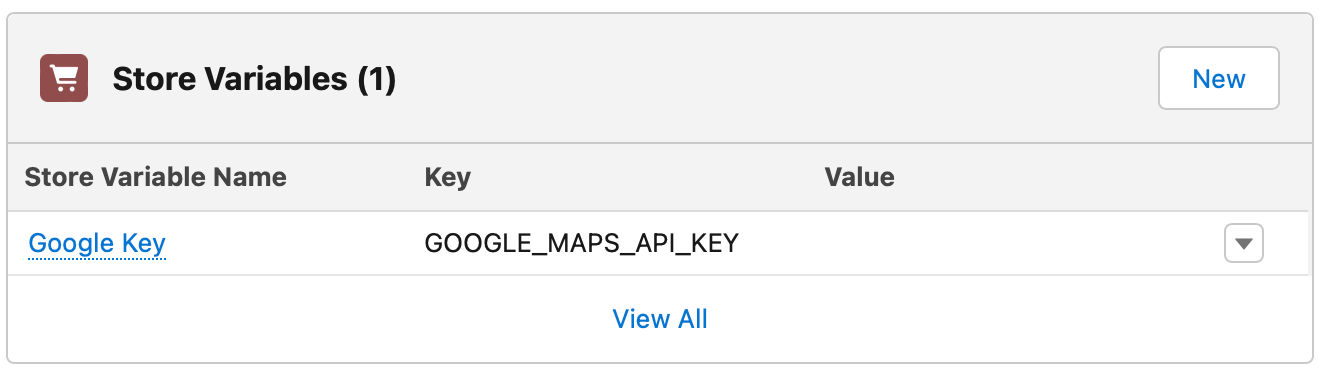
- Open the Store record and go to the Store Variables related list.
- Click New.
- Enter a Name that makes sense to your organization. This is a label for you, not the key the store reads.
- Enter the Key exactly as listed in the table below, or your own key if you are adding a custom variable. Keys are case sensitive.
- Enter the Value.
-
Select Available in Liquid if your theme needs to read the key. Some variables listed below require this.
- Save the record.
- Load the affected part of your store and confirm the new behavior. POS variables only take effect after the next store sync.
:::tip An AI agent connected to your store can read the current store variables and set new ones for you, so you can describe the behavior you want rather than looking up the key. See build on StoreConnect using AI agents. :::
Variables already available
| Key | Value | Effect |
|---|---|---|
| addressify_api_key | A valid API Key for the Addressify service | Enables address autocomplete on the checkout shipping address field (Australia only). See Addressfinder integration for setup. <hr>For multi-region support, see Google address autocomplete |
| api.auth_key | A long random secret, 80 characters or more | The store’s system key for the website API, for system-to-system integration such as a checkout or billing service. It grants the commerce scopes: carts, checkout, contacts, accounts, payment methods, subscriptions, orders and payments, plus read access to the catalog and store settings. It does not grant content, theme or publishing scopes, so it cannot be used to drive an AI agent; give people agent access through their own token instead. See Manage who can use an AI agent. Treat it as a secret and never select Available in Liquid for it. |
| api.disable_path_access | Any value (for example true) |
Refuses authenticated website API requests made on the store’s own domain (https://<your-store-domain>/api/v1/...), leaving only the api. subdomain. Setting it also refuses requests to the store’s /mcp endpoint, which is on the store domain, so do not set it on a store where people connect AI agents. Any value turns it on; remove the variable to turn it off. |
| auth.as_customer_saml_metadata_url | String (URL) | The Metadata Discovery Endpoint of the External Client App you created for this store, used by the “log in as customer” feature. Take it from that app’s SAML Login Info. The identity provider’s shared metadata URL is not specific to your app, and sign-in can then land on a different store. When set, it takes precedence over the legacy idp_sso_target_url and idp_certificate_fingerprint variables. See Log in as a customer in Salesforce |
| captcha_type | String (e.g., “recaptcha”) | The type of captcha service to use. See Adding captcha to your checkout flow |
| captcha_site_key | Google reCAPTCHA site key | Site key from the Google reCAPTCHA console. See Adding captcha to your checkout flow |
| captcha_secret_key | Google reCAPTCHA secret key | Secret key from the Google reCAPTCHA console. See Adding captcha to your checkout flow |
| captcha_passing_score | Decimal (0.0 to 1.0, default: 0.5) | The minimum reCAPTCHA v3 score required to pass. See Adding captcha to your checkout flow |
| cart_abandoned_hours | Integer (Min: 1, Max: 1080, default: 10) | How many hours after the customer creates a cart before it is marked as abandoned (between 1 hour and 45 days). See Process empty and abandoned carts |
| checkout_uses_email_confirmation | true or false | Adds a confirm email field to the checkout form requiring customers to enter their email address twice |
| checkout_uses_first_and_last_name | true or false | Separates the First and Last name on checkout |
| content_security_policy | CSP policy string | Set to a CSP policy string to enable CSP. When blank, no CSP header is sent. See Store security settings |
| content_security_policy_type | enforce or blank |
Set to enforce to block violating resources. Leave blank to use report-only mode (when CSP is enabled). See Store security settings |
| delivery_windows.allow_on_backorder | true or false | Allows delivery windows to be selected for backordered items. See Delivery windows |
| enable_company_name | true or false | Adds an extra field for Company Name to the checkout form and the profile page |
| autocomplete_countries | Comma-separated 2-character ISO country codes (e.g. AU,US) | Countries supported by Google address autocomplete at checkout. Google supports up to five at a time. Must have Available in Liquid enabled. See Google address autocomplete |
| default_autocomplete_country | 2-character ISO country code (e.g. AU) | The default country pre-selected for Google address autocomplete at checkout. Must have Available in Liquid enabled. See Google address autocomplete |
| google_autocomplete_api_key | A valid Google Maps API key | Enables Google address autocomplete on the checkout shipping address field. Must have Available in Liquid enabled. See Google address autocomplete |
| google_maps_api_key | A valid API Key for the Google Maps service | Enables maps for the Location Finder feature and anywhere else maps can be used on the site |
| google_reviews.delivery_days | Integer (1 to 365) | Number of days expected for delivery of orders |
| google_reviews.merchant_id | Google Merchant ID | Used when you add Google Reviews to your store |
| google_reviews.opt_in_style | Various options (e.g., CENTER_DIALOG, BOTTOM_RIGHT_DIALOG) | Position of the Opt In form |
| gtm_gateway.host | First-party GTM hostname (e.g. gtm-abcdef.fps.goog) |
The fps.goog hostname for your first-party GTM configuration. Must end in .fps.goog. See Google Tag Manager first-party gateway |
| gtm_gateway.path | URL path prefix without slashes (e.g. metrics) |
Path under which GTM requests are served on your store domain. See Google Tag Manager first-party gateway |
| guest_subscriptions_enabled | true or false | Allows guest users (not signed in) to view and manage an existing subscription, including updating the saved payment details, without logging in. Also available as the newer subscriptions.guest_subscriptions_enabled alias; setting either key to true enables the behavior. See Manage customer subscriptions |
| idp_certificate_fingerprint | String | Legacy setting: the fingerprint of your identity provider’s signing certificate for the “log in as customer” feature. Used only when auth.as_customer_saml_metadata_url is not set. See Log in from Salesforce |
| idp_sso_target_url | String (URL) | Legacy setting: your identity provider’s SSO target URL for the “log in as customer” feature. Used only when auth.as_customer_saml_metadata_url is not set. See Log in from Salesforce |
| logins.unconfirmed_access_minutes | Integer (Min: 0, default: 0) | Grace period in minutes that allows a new user to be signed in before confirming their email. When set to 0, the user must confirm their email before they can sign in. See Store security settings |
| order_reference_prefix | String (Max: 10 characters, default: “SC”) | Set a prefix to order reference numbers instead of using the default of SC. Values longer than 10 characters are truncated |
| passwords.minimum.alpha_numeric_characters | Integer (default: 8) | Minimum number of alphanumeric characters required in a password. See Enforce password complexity |
| passwords.minimum.lower_case_characters | Integer (default: 1) | Minimum number of lowercase characters required in a password. See Enforce password complexity |
| passwords.minimum.upper_case_characters | Integer (default: 1) | Minimum number of uppercase characters required in a password. See Enforce password complexity |
| passwords.minimum.special_characters | Integer (default: 1) | Minimum number of special characters required in a password. See Enforce password complexity |
| passwords.lockout.failed_attempts_threshold | Integer (default: 5) | Number of failed login attempts before the account is locked. See Store security settings |
| passwords.lockout.max_duration_minutes | Integer (default: 15) | How long in minutes an account stays locked after exceeding the failed attempts threshold. See Store security settings |
| passwords.reset.within_minutes | Integer (default: 360) | How long in minutes a password reset link stays valid after it is sent. The default of 360 minutes is 6 hours. See Store security settings |
| pos.delivery.requested_delivery_date.enabled | true or false | Shows a date picker on the POS Arrange Delivery page, allowing staff to record the customer’s preferred delivery date. Changes take effect after the next store sync. |
| pos.delivery.requested_delivery_date.required | true or false | When true, the requested delivery date field must be filled before staff can confirm delivery. Requires pos.delivery.requested_delivery_date.enabled to be set to true. |
| pos.enable_pay_by_link_custom_amount | true or false | Enables a custom amount field on the Pay by Link payment page, allowing customers to pay a partial amount of the balance due instead of the full amount |
| pos.fulfillment_types.{type}.enabled | true or false | Enables or disables a POS fulfillment type (takeaway, delivery, pickup, hold, transfer, reserved, special_order). See Configure POS fulfillment types and payment methods. |
| pos.fulfillment_types.{type}.label | Text string | Custom label for a POS fulfillment type. Also supports pluralized_label and action_label variants. See Configure POS fulfillment types and payment methods. |
| pos.memo.label | Text string (default: Memo) |
Custom label for the open-order memo field throughout POS (new order modal, convert-to-open-order screen, and cart header). Changes take effect after the next store sync. |
| pos.notes.label | Text string (default: Order notes) |
Renames the “Order notes” label throughout POS (cart, checkout, and order detail). Action buttons automatically use “Add [label]” and “Edit [label]”. Changes take effect after the next store sync. See POS cart. |
| pos.open_orders.enabled | true or false (default: false) | Enables open orders in POS. When true, the “Convert to open order” action appears in the cart, and the fulfillment and advance-line actions appear on the order detail. POS layout fields set to the open_orders_enabled condition are also shown. Changes take effect after the next store sync. |
| pos.payment_options.{type}.enabled | true or false | Enables or disables a POS payment method (cash, card, cheque, bank, voucher, on_account, account_credit, etc.). See Configure POS fulfillment types and payment methods. |
| pos.payment_options.{type}.label | Text string | Custom display label for a POS payment method. See Configure POS fulfillment types and payment methods. |
| pos.payment_options.{type}.require_purchase_order | true or false | Requires the POS operator to enter a purchase order number when using this payment method. Valid types: on_account, card, cash, card_integrated, transfer, cheque, voucher, card_square_integrated, account_credit, pay_by_link, linkly, latitude, vii. See Configure POS fulfillment types and payment methods. |
| pos.settings.lock.inactivity_timeout_minutes | Integer (default: 0, disabled) | Minutes of POS inactivity before the session automatically locks and requires re-authentication. Set to 0 to disable auto-lock. |
| pos.settings.lock.on_device_lock | true or false | When true, the POS session locks automatically when the device is locked (e.g. a tablet lock screen). |
| pos.stock.display | indicative, exact, or off (default: indicative) |
Controls how product stock levels appear on POS product lists and cards. indicative shows qualitative tags (In stock, or Low stock when the item is out of stock at the current outlet); exact shows numeric counts (for example, 5 available in store, or Sold out); off hides the stock indicator entirely. Products that do not track inventory show a Not tracked tag instead. Any unrecognized value falls back to indicative. Changes take effect after the next store sync. |
| promotions.calculation_strategy | independent or cumulative (default: independent) |
How the discount is calculated when multiple stackable promotions apply to a cart. independent calculates each promotion against the original item prices; cumulative calculates each promotion against the running subtotal after previous discounts. This setting only affects promotions that are configured as stackable; promotions marked as not stackable are excluded from combined calculations regardless of this setting. |
| promotions.eligibility.free_products | true or false | When true, free products added to the cart by a promotion count toward promotion conditions and can trigger additional promotions. |
| promotions.eligibility.price_overrides | true or false | When true, items with manually overridden prices are eligible for promotions. When false (default), custom-priced items are excluded from promotion calculations. |
| promotions.max_coupon_codes_per_cart | Integer (default: no limit) | Maximum number of coupon codes a customer can apply to a single cart. When not set, there is no limit. |
| session.inactivity_timeout_minutes | Integer (default: 30) | How many minutes of inactivity before a customer’s session expires and they are signed out. See Store security settings |
| session.absolute_timeout_minutes | Integer (default: 60) | Maximum session duration in minutes regardless of activity. After this time the customer is signed out. See Store security settings |
| show_new_recipient_form | true or false | Enables a button/link on the checkout which gives the customer the chance to ship it to someone else |
| stealth_mode | true or false | When true, prevents search engines from indexing the store and disables public access to the store’s sitemap and merchant feeds. Useful for stores under development or stores that should not appear in search results. |
| subscriptions.guest_renewal_payment_enabled | true or false (default: false) | Allows guest (not signed in) customers to pay a pending subscription renewal order through the order payment link without logging in. Signed-in customers can always pay their renewal orders regardless of this setting. See Salesforce order payment link |
| subscriptions.guest_subscriptions_enabled | true or false | Newer alias for guest_subscriptions_enabled. Allows guest users (not signed in) to view and manage an existing subscription, including updating the saved payment details, without logging in. Setting either key to true enables the behavior. See Manage customer subscriptions |
| test_checkout_emails | Comma-separated list of email addresses (Max: 4) | Register email addresses that when used at checkout, orders come through marked as Test Order. See Use test mode for transaction testing |
| use_shipping_notes | true or false | Adds an extra field for use on the shipment section of the checkout |
| visible_address_lines | Integer (Min: 1, default: 1) | How many Street Address lines to provide on forms |
Was this article helpful?
Thanks for your feedback! It helps us improve our docs.