

Version 22 release notes
On this page
Latest releases - Package version 22.0 and Website version 22.0.10
Version 22 brings a host of changes, including four major features. At the Point of Sale, open orders let staff save a sale, keep adding items over time, and take payment when the customer is ready. Fulfillment stations automatically send each item sold at the POS to the area that prepares it, based on the product’s fulfillment category. Promotions v2 now applies at the register as well as on the web. And every store now has its own MCP server, so you can connect an AI agent and build or update your store by describing what you want, with every change staged for approval.
The web store also gets an address book, multi-shipping, saved cards, and checkout deposits. Payments are hardened throughout, so an interrupted terminal or gateway payment is found and resolved quickly, to avoid duplicate charges.
These notes cover website versions v22.0.0 (20 October 2026) to v22.0.10 (5 November 2026) and package version 22.0 (20 October 2026). They list what is new since Website version 21.0.15 and Package version 21.14.
Before you upgrade, read Breaking changes and cautions and the v21 to v22 upgrade guide.
Release types and versioning
StoreConnect ships two independent release tracks within each major version:
Package releases (for example v22.0, v22.1) update the Salesforce package, including new objects, fields, Apex logic, and the StoreConnect Console. These are installed into your Salesforce org through a package upgrade.
Website releases (for example v22.0.0, v22.0.5) update the StoreConnect website application, including storefront behavior, payment gateways, Liquid templates, POS, and checkout flows. These deploy independently of the package.
Highlights
- Open orders — Save a sale at the register with a short memo, keep adding items over time, and take payment when the customer is ready. See Orders and fulfillment.
- Fulfillment stations — Automatically send each item sold at the POS to the area that prepares it, based on the product’s fulfillment category, with live tickets and automatic dockets. See Orders and fulfillment.
- Promotions v2 at the register — Advanced promotions apply at the register as well as on the web, are itemized on each order line, and can be limited to the web or the POS. See Promotions and loyalty.
- AI agents for every store — Connect an AI agent to your store and ask for a new page, a design change, or a product update; every change is staged for approval. See AI agents.
Also in this release:
- A faster register — Fast checkout, tipping, item notes, and a view of changes still waiting to sync while a device is offline.
- A richer web checkout — Address book, multi-shipping, outlets on the web, checkout deposits, saved cards, and PayPal Fastlane.
Breaking changes and cautions
Each item names who it affects. The v21 to v22 upgrade guide has the steps for each one.
If you have a custom theme
Liquid tag option values from a variable are no longer run as templates
A tag option value that comes from a variable is now printed as written, so stored text containing Liquid no longer runs as code. Build the value with {% capture %} instead. See tag option values that come from a variable.
Base-theme templates changed
About twenty base templates changed. Merge the changes into any template your theme overrides, and always merge the store locator templates, because the previous version exposed your Google Maps API key. See changed base-theme templates.
shipping.set is deprecated
The shipping.set controller action still works but logs a warning. Use shipping.update instead. See Liquid controller actions.
Translation keys removed
order_summary.voucher, products.add_to_cart.quantity_label, and the checkout.gateways.vii.* keys were removed. See removed translation keys.
If you sell subscriptions
Automatic renewals charge only the balance owing
A renewal now subtracts payments already recorded on the renewal order before charging. If you lower Term Price by hand after a part payment, set it back to the full price before upgrading. See subscription payments and renewals.
Fixed-term subscriptions paid upfront are charged their term once
These lines were overcharged and are now charged their full term only. See fixed-term subscriptions paid upfront.
If you use Advanced promotions or loyalty points
Choose standard or Advanced promotions for each store
In v21, a web store could use standard and Advanced promotions together. In v22, you choose one per store with the store variable promotions.version: v1 for standard promotions (the default) or v2 for Advanced promotions. See choose the promotions engine for each store.
Promotions v2 now apply at the register
Every active Advanced promotion applies at the POS as well as the web after you upgrade. Set the new Channels field to keep one online-only or in-store-only. See promotions limited to a channel.
Percentage rewards with no frequency limit apply once
A percentage reward no longer repeats for every qualifying group in the cart. See Advanced promotion examples.
Exclusions and sale prices are honored
Products excluded from price reductions, and lines already on sale, no longer take Advanced promotion rewards. Some carts get a smaller discount. See promotions respect price reduction exclusions.
Promotion dates use the promotion’s time zone
Start and end dates are judged in the promotion’s time zone, not UTC, so they move by the UTC offset. See Advanced promotions.
Loyalty points are earned on the overridden price
A line whose price was overridden earns points on the amount charged. See Loyalty points.
If you use the POS
Custom layouts are no longer chosen in POS Settings
A custom layout now replaces a built-in view when the layout’s Identifier matches the built-in name. Set the identifiers before upgrading. See custom layouts are no longer chosen in POS Settings.
Store variables with a pos. prefix sync to every device
Move secrets such as API keys out of the pos. namespace. See store variables with a pos prefix.
Add the new Shipment status values
Add preparing, on_loan, and returned to the Shipment Status picklist, or those updates fail to sync. See Shipment status values.
Layout page titles are hidden by default
Set pos.layouts.always_show_title to true to keep them. See layout page titles.
Account pricing at the register requires the contact’s flag
Set Can use Account pricing to true on every contact who should get account prices at the POS. Other contacts now get the membership, outlet, or store price. See Account pricing.
POS orders no longer send a follow-up update to Salesforce
A flow or trigger on Order or Order Item that runs only on update no longer fires when a POS sale is submitted. Change it to run on create.
Registers still on v20 must update through v21
Update registers to v21 before v22. See before you upgrade.
If you use eWay
The eWay preauthorization setting now takes effect
use_preauth: true in API Options was ignored and is now honored. Remove it if you do not want preauthorized payments. See the eWay preauthorization setting.
If you use Windcave
Production mode uses the live Windcave host
Providers in production or live mode now send requests to sec.windcave.com, so test credentials fail at checkout. Enter live credentials, or set API Mode to sandbox. See Windcave payment provider.
If you ship to US territories
US territories are states of the United States
Zones set at the United States level now apply US rates and tax to territory addresses, and zones built on a territory country record no longer match. Add the territory as a state under United States.
If you use Bambora North America
Upgrade to v22.0.5 before 31 December 2026
Shift4 retires the na.bambora.com domains after 31 December 2026, and only v22.0.5 and later use the new endpoints. See Bambora payment provider.
If you grant Console access through custom permission sets
Add ConsoleSearchController for Console record search
Add the Apex class to any cloned or custom permission set that grants Console access, or record search shows an error. See record search in the Console header.
If you offer Pay by Account or guest checkout
Pay by Account requires the contact’s flag
Set Can Purchase For Account to true on every contact who should pay by account. See Pay by Account requires the contact’s flag.
Password reset links expire
Links expire after 360 minutes. Change the window with passwords.reset.within_minutes. See Store security settings.
Guests can set a password only from the session that placed the order
A returning guest is asked to register or reset their password instead. See guests setting a password.
Field and object changes
These fields were added in package v22.0. The v21 to v22 upgrade guide summarizes all package changes across v21 and v22.
The following new fields, values, and objects were added to this version of StoreConnect. Not all of them automatically appear in your org when you upgrade, and they never appear on page layouts or record pages your org has customized. Refer to the relevant procedure to add them.
- Add a new field to your custom layout or record pages, see add new fields to your record pages.
- Add new picklist values, see update picklist values.
- Display a field on a page layout, see page layouts and profiles.
New fields on existing objects
| Object | Field | API name | Type | What it records | Where it appears after upgrading |
|---|---|---|---|---|---|
| Product | Canonical Path Override | s_c__Canonical_Path_Override__c |
Text (255) | A store-relative path, such as /old-page.html, used as the product’s canonical URL instead of its own |
StoreConnect Product record page |
| Product Category | Canonical Path Override | s_c__Canonical_Path_Override__c |
Text (255) | A store-relative path used as the category’s canonical URL instead of its own | Nowhere. Add it to your Product Category layout |
| Promotion | Channels | s_c__Channels__c |
Multi-select picklist (Web, POS) |
The channels an Advanced promotion applies in. Blank applies it everywhere | Nowhere. Add it to your Promotion layout |
Both Canonical Path Override fields have a validation rule: the value must start with / and contain no domain, ?, or #. Existing records are unaffected because the fields start blank.
Point of Sale
Orders and fulfillment
-
Open orders — Save a sale at the register and keep adding to it over time, for example a restaurant table, a bar tab, or a customer who is still shopping. Staff save the cart as an open order with a short memo, such as a table number or customer name, keep adding items as the customer orders, and take payment when the customer is ready. New items can be sent to their fulfillment station as they are added, items can be canceled with a reason, and returns on an open order are settled by a refund. Turn it on with
pos.open_orders.enabled. See Start an open order and the open orders reference.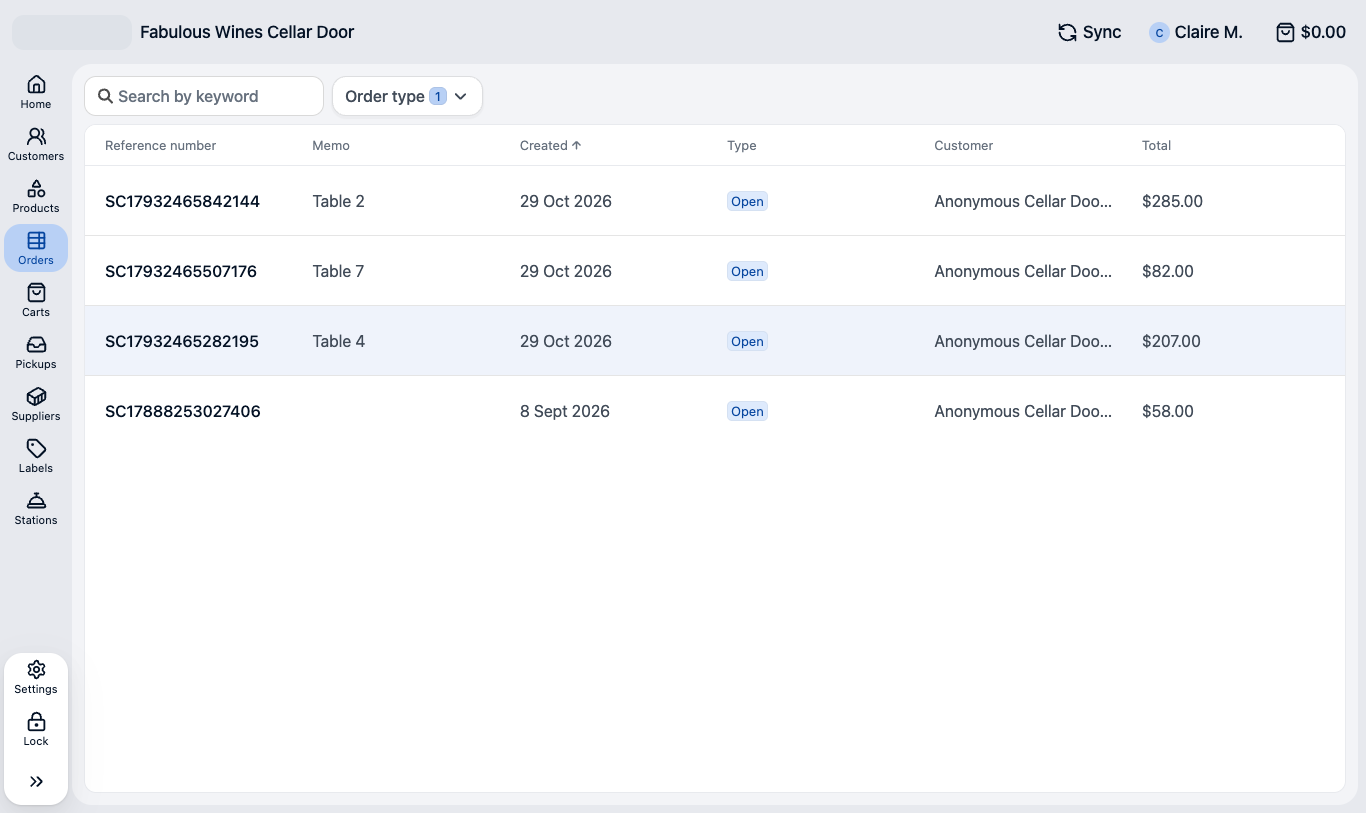
-
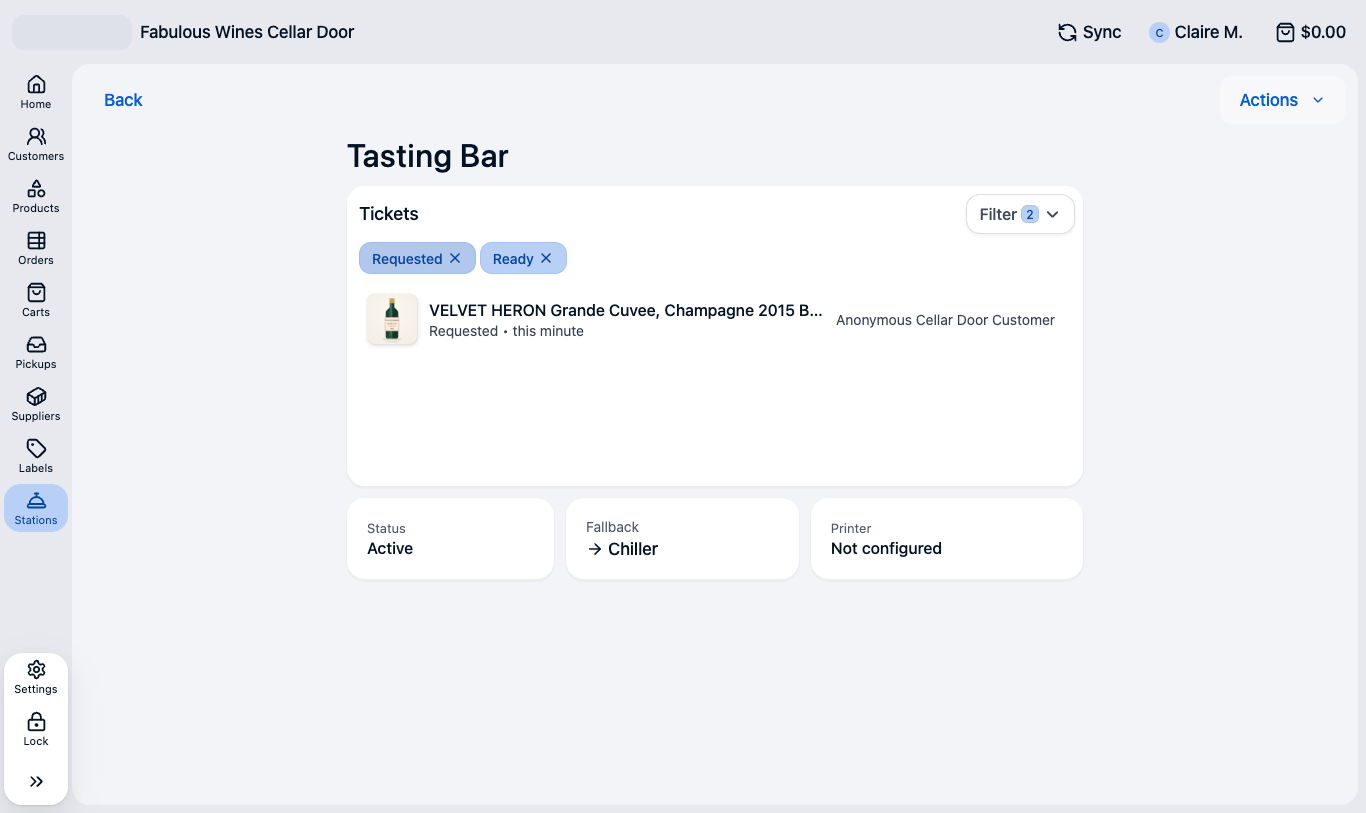
Fulfillment stations — Automatically send each item sold at the POS to the area that prepares it, such as a kitchen, bar, or other preparation area. Products are routed by their fulfillment category, and you can override the station for individual registers and set fallback stations. Each station shows live tickets that staff move from requested to ready, and staff can reprint a docket or move a ticket to another station. Dockets print automatically, so orders reach the right team without anyone relaying them. If no stations are set up, the POS works as before. See POS fulfillment stations and Work station tickets.
- Save and exit — Staff can leave checkout with the sale kept as an unpaid order, carrying any payment already taken, so a customer can pay a deposit now and the balance later. The saved order is a real order: station tickets, tax, and promotion usage all happen when it is saved. Turn it on with
pos.checkout.save_incomplete_order. See Save a POS cart as an unpaid order. - Bundles at the register — Product Bundles 2.0 can now be sold in store as well as online. Staff choose the components in a guided window, and bundle lines stay grouped on the cart, receipts, and dockets, even after a cart is parked and resumed. See Set up bundles for POS and Sell a bundle at POS.
- Delivery details — When staff arrange a delivery, they can record the date the customer wants it and any delivery notes. Both sync to Salesforce with the shipment and pass to custom shipping providers, so the warehouse or carrier has what it needs. See Arrange delivery fulfillment at POS.
- Address lookup for deliveries — On the delivery form, staff type part of an address and pick a Google Places suggestion, which fills the address and fetches shipping rates straight away. Turn it on with
pos.address_lookup.enabledand agoogle_places_server_api_keystore variable, and limit suggestions to your countries withpos.address_lookup.countries. The lookup is hidden while the register is offline.
Checkout at the register
- Fast checkout — A single Charge button takes payment straight away for cash and integrated card terminals, and the cash screen suggests likely amounts tendered. Busy counters get through each sale with fewer taps. See Configure POS fast checkout.
-
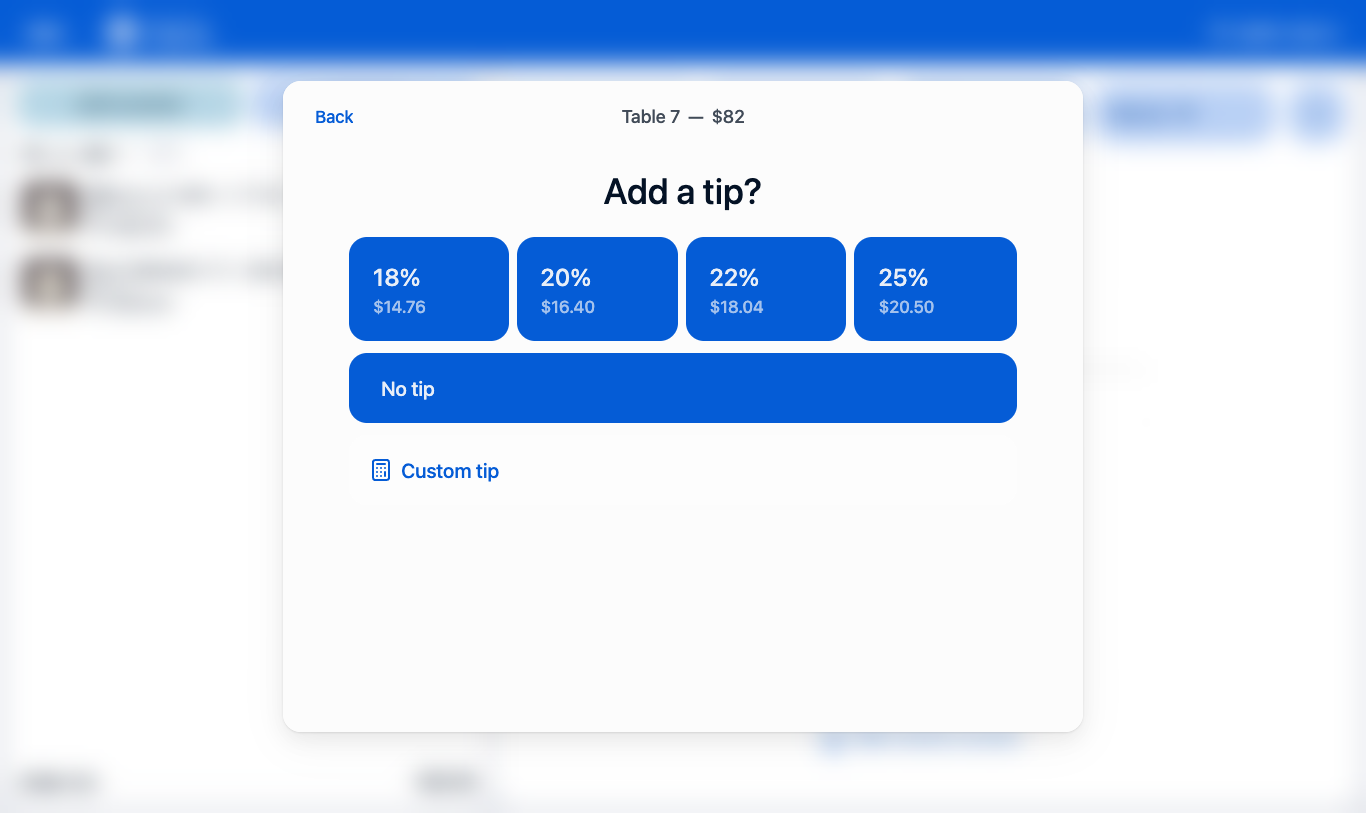
Tipping — Offer tip presets by percentage or fixed amount at checkout, calculated before or after tax. Square and Tyro terminals ask for the tip on the device, and the tip is recorded with the payment. See Configure POS tipping.
- Staff attribution — Record which staff member helped the customer and which took each payment, for commission and team performance reporting. See Staff attribution at POS.
- Item notes — Add a note to a cart line, such as a gift message or a preparation instruction. The note prints on receipts and station tickets and is saved on the order. See Configure POS item notes.
- Per-register payment settings — A register can turn cash payments on or off for that device, for example on a card-only kiosk, unless the store locks the setting. See POS payment methods.
-
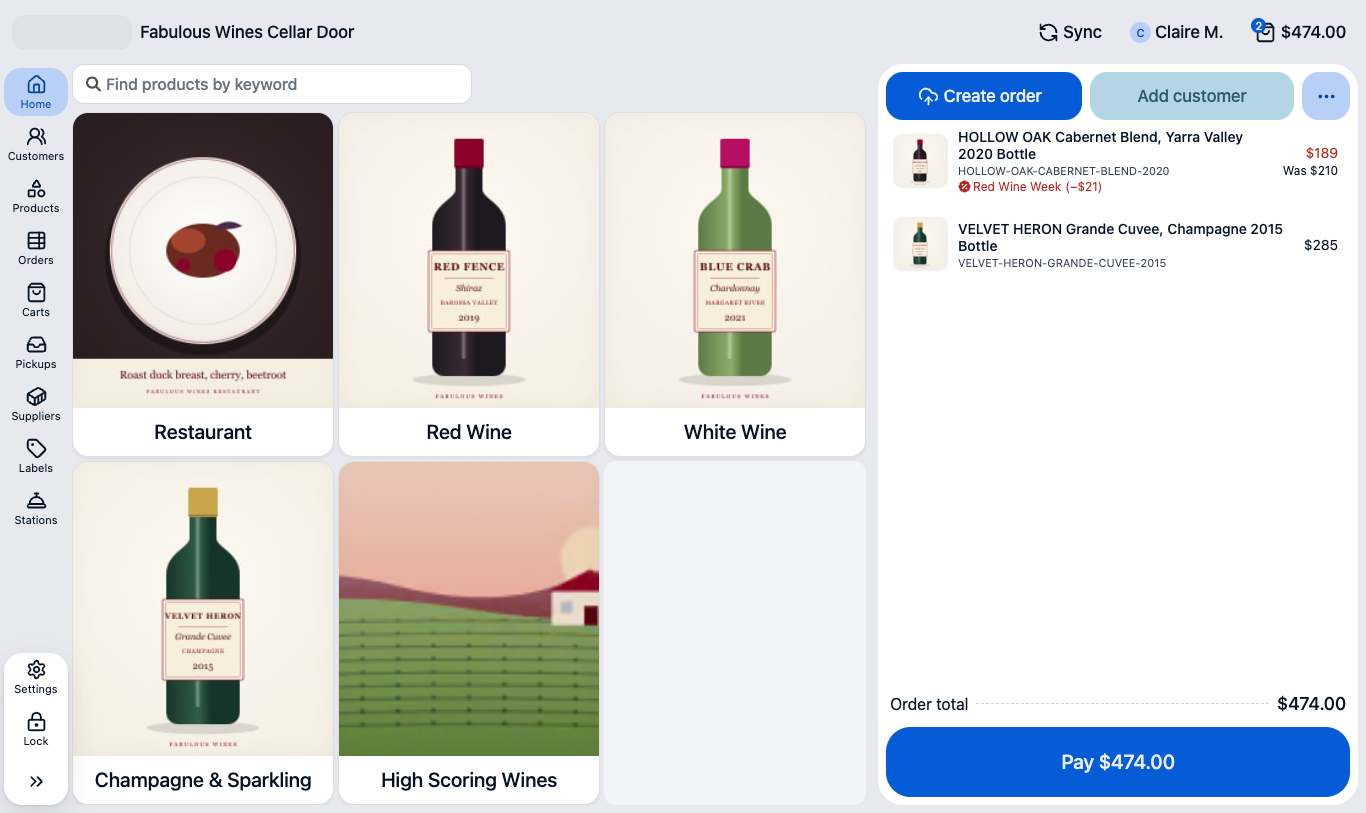
Promotions v2 at the register — Advanced promotions now apply in store as well as online, so one set of offers runs across every channel. Automatic and coupon promotions show in the cart with the full price shown as “Was”, are named in the totals and on the receipt, and are shared correctly across returned items. See Advanced promotions.
- Avalara at the register — Stores that use Avalara AvaTax now get the same tax calculation in store as online, including on open orders, and tax is refunded correctly on full and partial returns. See AvaTax.
- Subscriptions at the register — Subscription products can now be sold in store. The POS requires an identified customer and captures their card for future billing through a paired Square Terminal or a secure web page. Products set to preauthorize only cannot be sold at the POS. See subscriptions sold at the POS.
Payments and refunds at the register
- Terminal recovery — If a terminal payment or refund is interrupted, for example by a lost connection or a page reload, the POS finds it the next time the terminal is used and lets staff wait for it or cancel it. This covers Linkly, Quest Airpay TAP, Latitude, and Square, and terminal transactions are now recorded on the server as they happen, so a customer is not charged twice. See Linkly payment provider.
- More refund options — Tyro refunds now run through the terminal, and Linkly and Quest Airpay TAP can refund to a card even when the original payment was cash. An overpaid order offers a refund for the difference. See Returns, refunds, and exchanges at POS.
- Payment statuses — Only paid payments count toward the amount paid and owing, so a declined card attempt no longer settles an order, and shift totals count only money that moved. An unpaid payment shows its status, such as
Failed, beside the method. - Hide the Give refund button — Set
pos.give_refund.enabledtofalseto hide Give refund on overpaid orders, for stores that refund only through a configured action. See Store variables. - Cash drawer on any ESC/POS printer — The cash drawer now opens from ESC/POS receipt printers as well as Star printers, giving you a wider choice of hardware. See Cash drawers.
Sync and offline work
- Unsaved changes — When a register loses its connection, changes queue on the device and retry automatically. The new Unsaved Changes view lists anything still waiting, so staff can retry or discard it instead of wondering whether a sale was saved. A return cannot be started on an order that still has unsaved changes. See Review unsaved changes at POS and Offline sales at POS.
- Manage data — The Manage data page shows the sync status of each type of record, and lets an administrator pause, clear, or resync one object without resetting the whole register. See Manage POS data sync.
- Faster, steadier sync — Records, carts, and fulfillments now sync live, a cart open on one register is locked on the others, and the first sync of a large catalog is faster. Stalled syncs recover on their own. See POS storage, sync, and administration.
Layouts and interface
- Quick search and list layouts — Layouts give you more control over POS lists, including default filters, sorting, field overrides, and what happens when a row is tapped. A list can also open empty until the operator searches, which keeps very large lists fast. See POS layouts.
- Interface refresh — The sidebar and topbar are redesigned, with extra actions gathered in a More menu. On narrow screens the cart collapses to a card that opens with a swipe, and the POS shows the store favicon. Order records use two columns on wide screens, and keyboard focus is easier to see. See POS action groups.
- POS styling API — A published set of styling names lets you restyle POS buttons, badges, cart item cards, and the text in list items and cart prices from a style block. Your styling keeps working through upgrades because it no longer depends on internal class names. See Style the POS.
- New actions and POS Liquid additions — New actions support open orders, cancellations, refunds, and unsaved changes, and POS Liquid gains map and list objects, order custom data, and refund orders. See scAction and the POS Liquid objects reference.
Smaller POS improvements
- Typeable quantity — Staff can type a cart quantity directly or use the on-screen number pad.
- Deposit sales — A deposit sale can charge a keyed card and puts only the amount due now on account.
- Outlet pricing — Prices in POS Liquid and shipping discounts use the outlet price book, so the price shown matches the price charged. Orders record the outlet that created them, and manual prices survive a change of customer.
- Stock display — Choose exact, indicative, or no stock levels on product cards with
pos.stock.display. See Store variables. - Customer email is optional — A customer can be saved at the POS with only a phone number.
- POS on a dedicated host — Set the
pos_domainstore variable before changing the store domain, so POS devices keep working on their installed address. See Configure your POS access URL. - Make payment when an order owes — Make payment shows on any order that still owes money, and a cash part payment confirms on the Charge button before the balance resets.
- Add a customer from a fulfillment — Hold, special order, transfer, and delivery stay available on a cart with no customer, and open the customer picker first.
- Log out from register selection — The register selection screens have Log out, so a device is never stuck on an outlet.
- Empty quick actions explained — An empty home quick actions grid now says why, such as a missing
homeaction group. - Custom fields carry from cart to order — Custom fields on the cart and cart items copy to the order and order items, at the register and on the web. See Copy a custom field from a cart to an order.
Promotions and loyalty
- Promotions v2 — Advanced promotion discounts are now stored on each order line they apply to and itemized in the order summary, so orders, reports, and refunds show exactly where a saving came from. The new Channels field limits a promotion to the web or the POS, and shipping promotions no longer discount tax twice. Signing in at checkout keeps the cart’s account, so member promotions still apply. In Liquid, each discount is available as a DiscountLine. See Advanced promotions.
AI agents
Every store now has its own MCP (Model Context Protocol) server, so you can connect the AI agent you already use and describe what you want in plain language. The agent makes the change in your store, and nothing goes live until someone approves it. See Build on StoreConnect using AI agents.
- Connect the agent you prefer — Connect Claude, ChatGPT, Gemini, GitHub Copilot, Cursor, or another MCP client. In the StoreConnect Console, Agents > Connect an agent gives each person a personal access token, the store address, and setup steps for their agent. See Connect an AI agent to your store.
- Build and change your store by asking — An agent can build a storefront from an existing website, create and update pages, content blocks, menus, articles, media, products, and categories, and change the theme design, from colors and fonts to banners. It can also launch a sale, updating page banners and promoting discount codes. See Update your store design using an AI agent and End-to-end store build sequence.
- Every change is reviewed before it goes live — Everything an agent or integration changes is staged as a draft content change with a preview link, and reaches the storefront only when an approver publishes it. A duplicate identifier or a template that does not parse is rejected when it is staged, not when it is published. See Review and approve a content change.
- You control who uses agents — An agent signs in as a StoreConnect user and can do only what that user is allowed to do, in the one store it is connected to. Administrators turn agent access on or off for each person, set an expiry, reset a token, and assign the store role an agent needs. See Manage who can use an AI agent.
- AI skills that know StoreConnect — The StoreConnect AI skills teach an assistant how themes, Liquid, forms, products, and POS work, with packages for Claude, Codex, Copilot, Cursor, Gemini, Antigravity, Kiro, and Grok. See Install the StoreConnect AI skills.
- Recipes for bigger jobs — Step-by-step sequences guide an agent through multi-stage work, such as building a complete store, in the right order. Agents can also override a single theme template, place content blocks on product pages, and check whether a product can be bought and, if not, why. See Agent recipes.
- POS configuration with an agent — With the AI skills and the Salesforce CLI, an agent can read and explain an existing register setup, and draft layouts, views, actions, and print templates for a developer to review and test in a sandbox. POS configuration is not part of the MCP connection. See Build POS with an AI agent.
If an agent cannot connect, or connects but cannot do what you asked, see Troubleshoot an agent connection.
Payments
- Saved cards — Customers on Stripe, Stripe ACH, Square, or eWAY can save a card in their account and reuse it at checkout, which makes repeat purchases quicker. Products can also be set to save a card only, or to preauthorize only, for deposits and later billing. See Saved payment methods.
- PayPal Fastlane — Returning PayPal customers can check out as guests with their details filled in, which speeds up checkout for shoppers who have not created an account. See PayPal payment provider.
- Vii gift cards on the web — Customers can redeem Vii gift cards at web checkout alongside StoreConnect vouchers. See Vii gift cards.
- Vouchers on the balance payment page — Customers paying an order balance from a payment link can apply vouchers and Vii gift cards before paying the rest. See Salesforce order payment link.
- Forter fraud screening — Forter checks each order before the card is charged. Screening starts in monitor mode, which records decisions without blocking anything, and in enforce mode declined orders wait for review in the Fraud Review Queue. See Forter fraud screening.
- Payment recovery — Every gateway response is now recorded before the order is saved, and uncertain payments are checked against the gateway on a schedule. If a charge cannot be confirmed, the cart is held instead of the customer being asked to pay again. See eWAY payment provider.
Smaller payment improvements
- Apple Pay — Apple Pay always charges the real cart total and shows itemized lines for shipping, discounts, tax, and surcharges. See what the Apple Pay sheet shows.
- Latitude — Web payments settle and authenticate per outlet. See Latitude payment provider.
- NMI ACH — ACH is now available on Salesforce order payments. See NMI ACH payment provider.
- CyberSource — The accepted card networks are configurable. See CyberSource payment provider.
- Afterpay — A retried refund is no longer applied twice, and the product summary is sent to Afterpay express checkout.
- PayPal — Item amounts are sent at the precision of the currency, which avoids rounding rejections. See PayPal payment provider.
- eWAY 3D Secure — After the bank’s check, customers see a processing page while the charge is confirmed, instead of a request that could time out. Resubmitting returns to the open challenge rather than starting a second charge. Themes get a new
pages/payment_processingtemplate. See eWAY payment provider. - Vii refunds at the register — Vii gift card payments taken on the web keep the card number, so they can be refunded to the card at the POS.
- API Mode — Payment and shipping providers match API Mode and API Environment values regardless of capitalization.
Checkout, shipping, and tax
- Customer address book — Signed-in customers can save several addresses, choose a default for shipping and billing, and pick one at checkout instead of typing it again. See Customer address book.
- Multi-shipping — A cart whose items cannot ship together checks out as separate delivery groups, each with its own address and shipping method. Turn it on with
shipping.multi_shipping_enabled. See Split an order into several deliveries. - Outlets on the web — Shoppers can choose a store location online. The prices, stock, promotions, and click and collect options for that outlet then apply, and the order records the outlet. See Outlets on your website.
- Checkout deposit — Customers can pay a deposit at checkout and the balance later, which suits made-to-order and high-value items. See Checkout deposit.
- Shipping providers — Carrier product pricing rules and zone filtering mean only the providers that serve an address are asked for rates. Australia Post labels gain dangerous goods, business name, and delivery note options. See Use a different carrier account per region and Australia Post shipping provider.
- Avalara — Each item is now taxed where the customer receives it, so a click and collect order is taxed at the collection location. Each tax provider record uses its own credentials, and no estimate is requested until the cart has an address. See AvaTax.
- Shipping Liquid actions — New
shipping.addandshipping.removecontroller actions, alongsideshipping.update, manage shipping methods from a Liquid controller. See Liquid controller actions. - Nested bundles — A bundle can now contain one level of sub-bundle with its own quantity, for kits built from smaller kits. See Product bundles.
Accounts and security
- Audit log — Sign-ins, failed logins, password changes, payment attempts, POS register logins and shifts, and fraud decisions are recorded in the Audit Log, giving you a trail for security reviews. Each store sets how much to record and how long to keep it. See Audit log.
- login.gov single sign-on — Customers can sign in with login.gov, for stores that serve US government users. See Set up Login.gov single sign-on.
- Optional address at registration — Set
registration.address_requiredtofalseto make address fields optional when customers register, for a shorter sign-up form. See Make address optional at account registration. - Customer activity on the Contact — Last Login Date, Invitation Accepted At, and Account Confirmed At now sync to the Contact, so service teams can see account activity in Salesforce. See Contact object reference.
- Per-store duplicate resolution — Store variables turn account, contact, and lead duplicate resolution on or off for one store, for orgs where stores need different rules. See turn duplicate resolution on or off for a store.
Subscriptions
- Pay a renewal without signing in — Customers can pay a pending renewal order in full from a link, without logging in, when
subscriptions.guest_renewal_payment_enabledistrue. See Subscription renewal orders. - Renewals and plan changes — Renewal order items are created before the subscription is charged and are not added twice, and plan-change orders now complete like renewal orders, so completion automation and emails run for them. See How subscription plan changes work.
Storefront and SEO
- Custom URL paths — Rename built-in URL segments per store, such as
/cartto/panier, to match your language or brand. You choose whether the former path still works, redirects, or returns not found. See Custom URL paths. - Hierarchical category URLs — Category addresses can follow the category tree, such as
/living-room/lounges/four-seater, which is clearer for shoppers and search engines. Existing flat addresses redirect to the new ones. See Hierarchical category URLs. - Legacy URL extensions — Stores moving from another platform can keep addresses that end in
.htmlworking, so existing links and search rankings carry over. See Legacy URL extensions. - Canonical path override — Set Canonical Path Override on a product or category to keep the canonical URL search engines already index, which protects rankings after a migration. See canonical path override.
- Excluded Channels on products — Hide a product from the web store or from the POS with Excluded Channels, for items you sell in only one place. See Excluded Channels on Product.
- Rich product data — Product pages can publish warranty, ratings, color, size, material, shipping, and return policy details as structured data, which search engines use for richer listings. Fill in the fields on the Product, and set a default return policy once on the Store; the fields sync automatically with nothing to configure. See Structured data for product SEO.
- Store favicon — Set a favicon on the Store record. It shows in browser tabs on the storefront and the POS. See Add a favicon to your website.
Smaller storefront improvements
- Content block links — A Link Target that starts with
mailto:,tel:,sms:,#, or?is passed through as written. - Your own Cloudinary account — A store can use its own Cloudinary account for media.
- Google Tag Manager — An allowlist sets which cookies the first-party gateway forwards. See Google Tag Manager first-party gateway.
Liquid and developer
- Feeds — Publish store data as a feed in JSON, XML, CSV, HTML, Markdown, or plain text, for marketplaces, comparison sites, or partners. Feeds are defined in Salesforce with a query language and paginate automatically. See Set up a feed.
- New Liquid capabilities — A new
image_tagfilter, a newimage_urlfilter for custom image sizes, Cloudinary automatic quality, image width and height, XML support indeserialize, more content types for theapitag, case sensitivity control in queries,external_tax_detailon drops, andnewfor building empty lists and maps. Double-escaping and filter order are also fixed. See image_tag, image_url, and deserialize. - Content API — Agents and integrations read and build a store’s catalog and content through the content API, with scoped access and paging. Every write is staged as a draft, previewed, and pushed to Salesforce for a person to approve. See Content API and Content staging for API changes.
matchfilter time limit — Amatchpattern that runs longer than 0.1 seconds returns an empty list and logs a warning in the web console, so one slow pattern cannot stall a page. Items in a list that are not text are skipped. See match.
Salesforce and admin
- Console record search — Search 76 StoreConnect objects from the Console header, including theme templates, locales, and variables that Salesforce global search cannot find. See record search in the Console header.
- Sync recovery — Failed change events now retry automatically, and a child record that arrives before the parent is completed when the parent syncs, so fewer records need fixing by hand. Deleting an account now checks the account’s child records with Salesforce before the delete cascades. See failed change events.
Bug fixes
These are fixes to behavior that shipped in v21.
Point of Sale
- Fixed tax-inclusive prices double-counting tax, and tax totals that could not be paid exactly. A tax-exempt cart shows no tax, and a resumed delivery cart is taxed at the delivery zone.
- Fixed price reduction exclusions being lost on park and resume, savings and discounts rounding incorrectly, and an order discount leaving one cent owing.
- Fixed Make Payment being offered on canceled orders, the email payment link and email receipt, sales failing when the product had been deactivated in Salesforce, expired account credit being offered, paying an order dropping the customer and notes, Square and Quest amounts losing a cent, and partial refunds over-refunding.
- Fixed End Shift crashing when the local shift record was missing, and shift totals rounding.
- Fixed sync timing out on large catalogs, Latitude refunds counting before Latitude approved them, and POS shipping labels missing the state and country.
- Fixed variant products not loading when a selection completed, a serialized rental line blocking checkout, an empty hold being created for ineligible items, weak email validation on customers, and number-range filters starting with the wrong values.
- Fixed fast confirm dropping the delivery date, a shipment without a stock location failing to save, and checkout continuing when on-screen fulfillments differed from saved ones.
- Fixed the sale discount recorded on POS orders, a terminal custom amount not resetting after a charge, a sidebar tap passing through to the page, checkout swapping the cart’s customer, the native back button leaving order checkout, an order with a blank customer name being rejected, and the cart freezing when many discounts apply.
Web store
- Fixed geolocation redirects on pathless stores, Location Finder directions, date picker layout, category sort order, and a category loop that could exhaust database disk. Visitor IP addresses behind Cloudflare are read correctly.
- Fixed completed carts being resumed, the buyer’s account name being overwritten when shipping to someone else, a custom variable price being lost, the add-to-cart stock check, and refund options offering account credit for gateway payments.
- Fixed taxonomy and price book filter counts needing a restart to refresh, search views not rebuilding for every store, one failed search view refresh blocking the rest, and discounted prices in search results.
- Fixed the Website Builder failing to apply changes on pages with iframes it cannot read, such as Google Tag Manager frames.
- Fixed declined Afterpay and Windcave charges being recorded as paid, the eWAY iframe card, the Apple Pay shipping method detail, three money defects on the payment paths, Paid At not being set on some captured payments, and the checkout total not refreshing after a payment error.
- Fixed subscription checkout failing on newer Stripe accounts. If Stripe cannot save the card, checkout now stops before any charge and shows the reason from Stripe.
- Fixed paying another order switching a Pay Later subscription back to automatic charging.
- Fixed an invalid Avalara entity use code, and large tax provider logs failing to sync.
- Fixed canceled and locked vouchers being accepted at web checkout and the POS.
- Fixed express wallets charging for quote-only carts, which showed the hidden price and skipped the quotation.
- Fixed pending NMI ACH payments never settling.
- Fixed customers being signed out after resetting their password or accepting an invitation.
- Fixed carrier labels using the order’s address instead of the shipment’s, and domestic parcels being lodged as international.
- Fixed slow subscription charge runs and Pay Now timeouts that could charge twice, and slow pages at the shipping step for large carts.
Infrastructure and dependencies
- Product, category, and cart pages load faster.
- Salesforce sync archives faster and recovers from stuck store updates.
- Rails 8.1, Ruby 4.0, and Node 24, with dependency security updates. Ruby 4.0.9 (v22.0.6) closes a set of regular expression vulnerabilities.
Was this article helpful?
Thanks for your feedback! It helps us improve our docs.